ECU Immo & Mileage / Hours/Mileage Scanner (generic)
ECU Hours/Mileage Scanner
Available in ProFullUltimate
What is this?
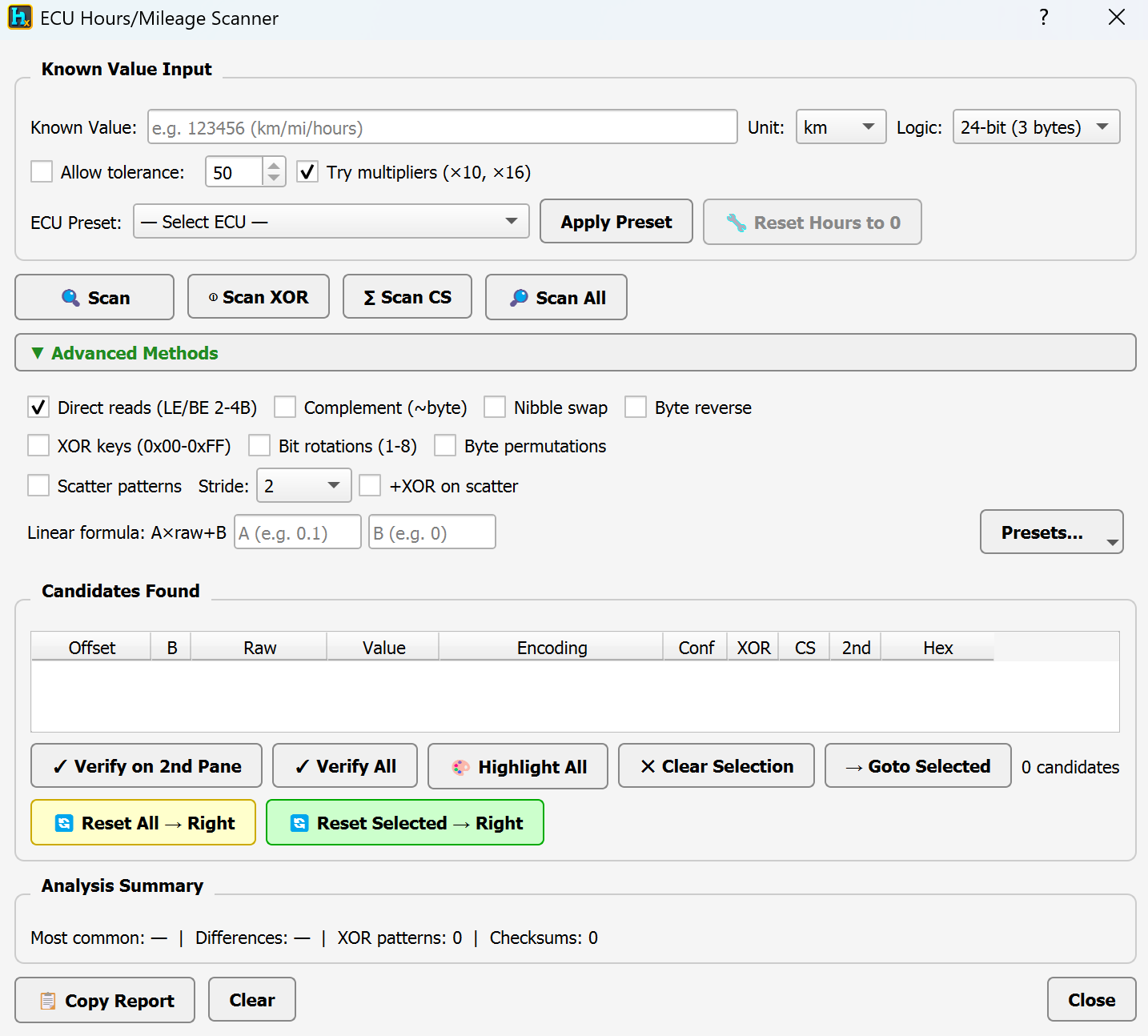
A generic mileage/hours scanner — unlike the profile-based ECU Mileage Editor (which only works for ECUs HexTool already has a preset for), this scanner searches any dump for a value you already know, trying many encodings/transforms at once until it finds where and how that value is stored. Useful for ECUs that don't have a dedicated profile yet.
How to open it
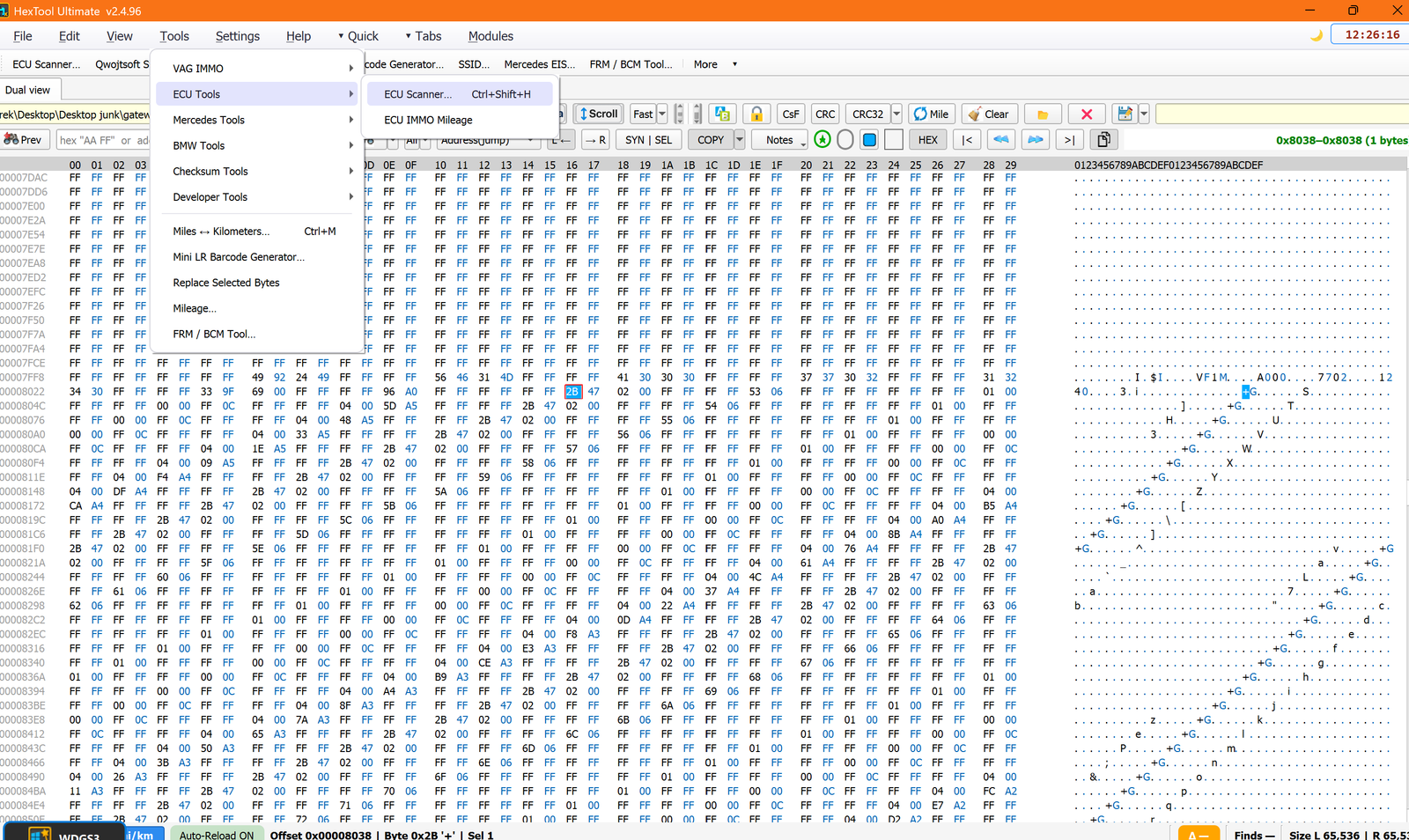
From the main HexTool window: Tools → ECU Tools → ECU Scanner… (shortcut Ctrl+Shift+H).
How to use it
- Known Value Input — type the mileage/hours value you know is correct (e.g. from the dash or a service record), pick the Unit (km/mi/hours) and the Logic (e.g. 24-bit / 3 bytes).
- Allow tolerance — search within ± a range instead of an exact match (useful if the value has drifted slightly since dump time).
- Try multipliers (×10, ×16) — also checks for values stored scaled by common multipliers.
- ECU Preset — if a matching preset exists, Apply Preset fills in the right settings automatically; Reset Hours to 0 is available for supported presets.
- Scan buttons — different search strategies:
- Scan — the main search using your Known Value and settings.
- Scan XOR — searches for the value hidden behind an XOR key.
- Scan CS — searches for the value alongside a matching checksum.
- Scan All — runs every strategy at once.
- Advanced Methods (optional, expand for more control):
- Direct reads (LE/BE 2-4B) — plain little/big-endian reads at multiple byte widths (on by default).
- Complement (~byte), Nibble swap, Byte reverse — common obfuscation transforms some ECUs apply to stored values.
- XOR keys (0x00-0xFF) — brute-forces a single-byte XOR key.
- Bit rotations (1-8) and Byte permutations — further transform variations to try.
- Scatter patterns, with a Stride selector and +XOR on scatter — for values split across non-contiguous bytes at a regular spacing.
- Linear formula: A×raw+B — for values stored under a custom linear scale/offset relationship.
- Presets… — save/load your own advanced-method combinations.
Reading the results
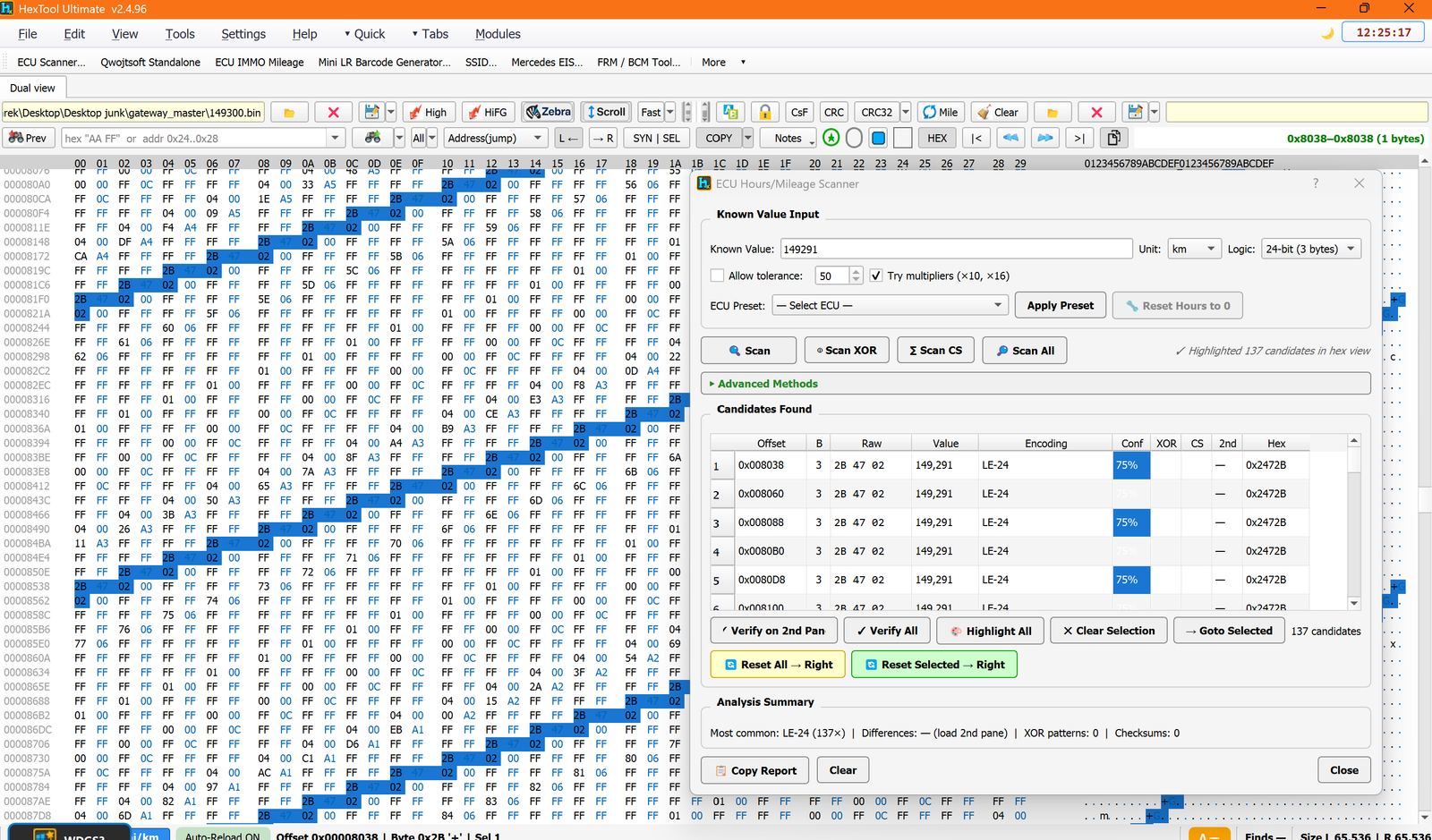
Candidates Found lists every match, with columns for Offset, byte width (B), Raw bytes, decoded Value, Encoding used, a Conf (confidence) percentage, whether an XOR key or CS (checksum) was involved, a 2nd-pane cross-check column, and the raw Hex. In the example scan (known value 149291 km, 24-bit logic), 137 candidates were found sharing the same LE-24 encoding — the tool's Analysis Summary calls out that this is the most common encoding, making it easy to spot the real storage locations among incidental matches.
- Verify on 2nd Pane — checks candidates against a second loaded file (e.g. before/after dumps) to confirm which ones are real.
- Verify All — re-checks every candidate.
- Highlight All — highlights every candidate's location directly in the hex view (shown in the screenshot as blue-highlighted bytes).
- Clear Selection / Goto Selected — manage and jump to selected candidates.
- Reset All → Right / Reset Selected → Right — writes the reset/corrected value for all or just the selected candidates into the right pane.
Analysis Summary shows the most common encoding found, byte differences (when a 2nd pane is loaded), and counts of XOR patterns / checksums detected. Copy Report exports the findings as text; Clear resets the scan.
Typical use cases
- Finding where mileage/hours is stored in an ECU that has no dedicated HexTool profile yet, using a known-correct value as the anchor.
- Confirming a suspected offset really is the mileage field before writing to it.
- Detecting XOR-obfuscated or checksum-paired mileage storage schemes.
Requirements
- A dump loaded in the left pane, and a known-correct mileage/hours value to search for.
ECU Immo & Mileage / BMW MD1 / MG1 (D-Flash Scanner)
ECU Mileage Editor — BMW MD1/MG1 ECU (D-Flash Scanner)
Available in ProFullUltimate
What is this?
The ECU Mileage Editor is a single tool covering several BMW DME/gearbox profiles (MSD80/81/85, MSV70, MS42/43/45, EMS2, MD1/MG1, MEVD17, Bosch ME9…). The MD1/MG1 profile is a D-Flash scanner for BMW's newer F-series and G-series DMEs.
How to open it
From the main HexTool window: Tools → ECU Tools → ECU IMMO Mileage, selecting the BMW MD1/MG1 ECU (D-Flash Scanner) profile. It reads whatever is loaded in the left pane.
MD1/MG1 specifics
- Display values only — this profile is read-only; there's no Apply ISN/VIN or mileage-write action, it's for identifying and reading out what the module contains.
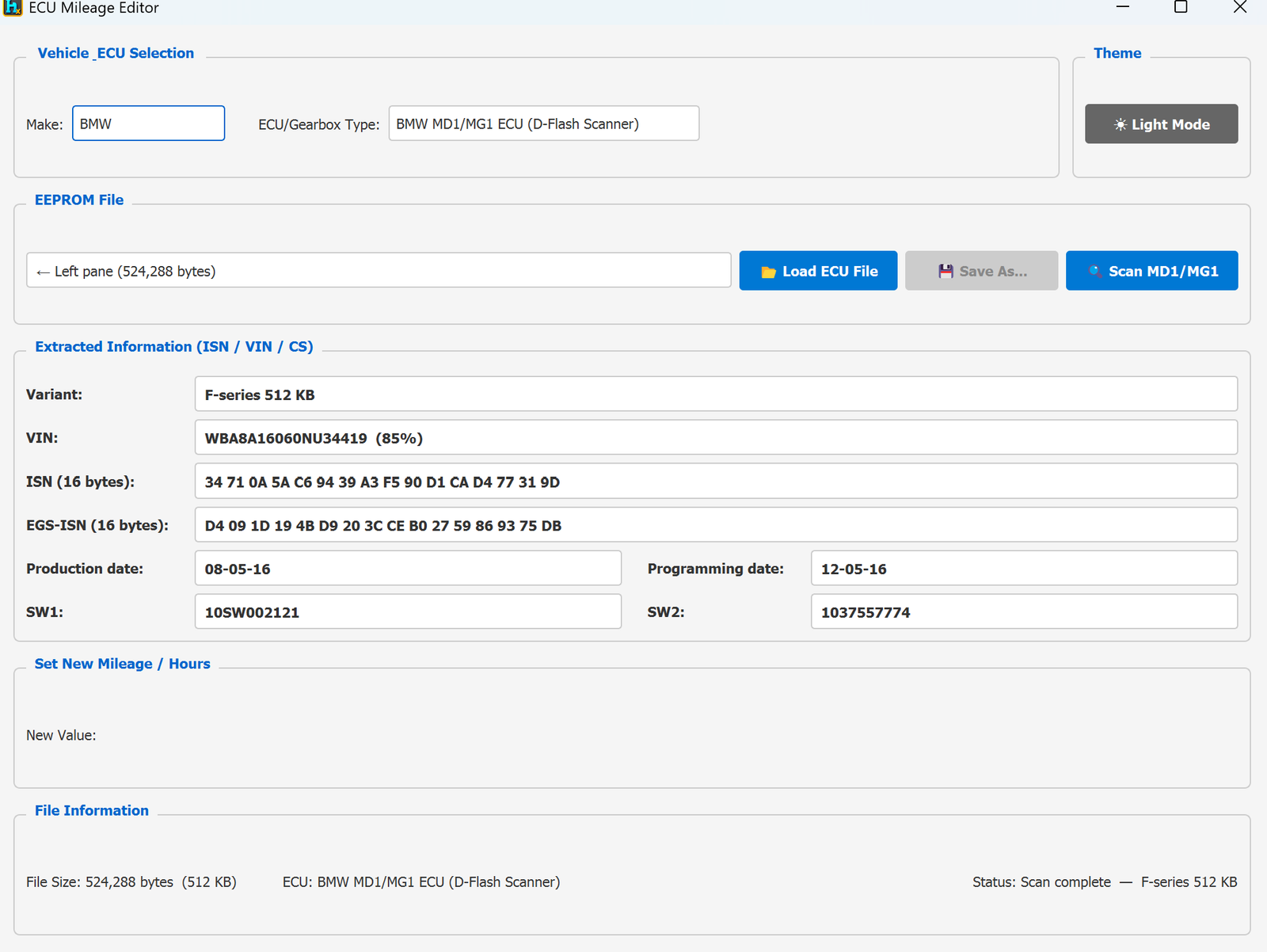
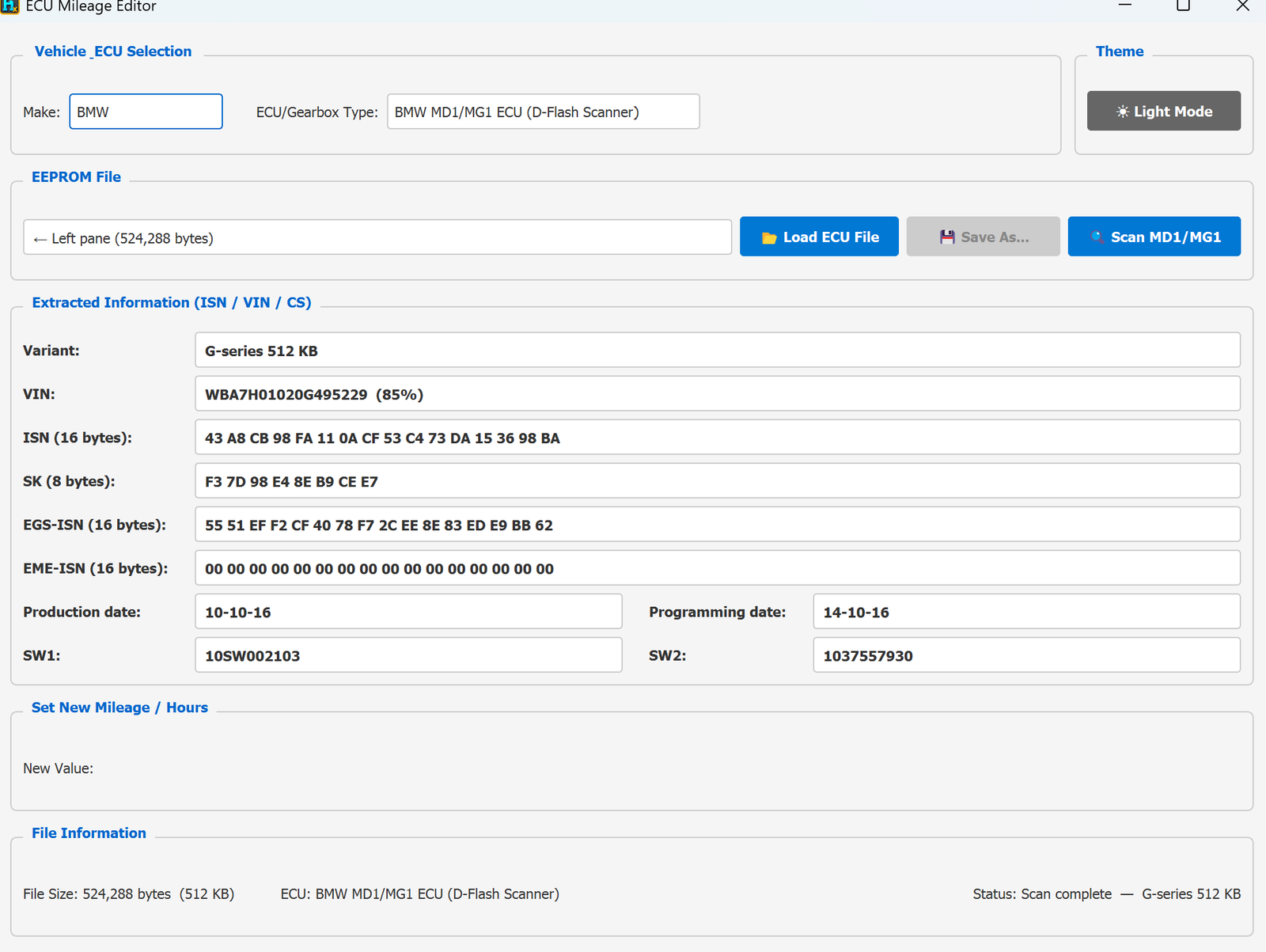
- Supports F-series and G-series, in 512 KB or 768 KB dump sizes — HexTool auto-detects which variant and size you've loaded (shown as Variant, e.g. "F-series 512 KB" or "G-series 512 KB").
- Scan MD1/MG1 locates and decodes everything from the D-Flash.
What gets decoded:
- VIN — shown with a confidence percentage (e.g.
WBA8A16060NU34419 (85%)), since it's read out of flash rather than a clean fixed field.
- ISN (16 bytes) and EGS-ISN (16 bytes).
- G-series adds: SK (8 bytes) and EME-ISN (16 bytes) — not present on F-series.
- Production date and Programming date.
- SW1 / SW2 software identifiers.
Typical use case
- Identifying and reading VIN/ISN/EGS-ISN/software info from a BMW F-series or G-series DME's D-Flash, without needing to write anything back.
Requirements
- An MD1/MG1 D-Flash dump, 512 KB or 768 KB (F-series or G-series).
ECU Immo & Mileage / MEVD17.2.3 Mini 1723 (km + hours)
ECU Mileage Editor — MEVD17.2.3 Mini 1723 DFlash (km + hours)
Available in ProFullUltimate
What is this?
The ECU Mileage Editor is a single tool covering several BMW DME/gearbox profiles (MSD80/81/85, MSV70, MS42/43/45, EMS2, MD1/MG1, MEVD17, Bosch ME9…). This profile targets the Mini 1723 DFlash variant of MEVD17.2.3, and is built specifically around fixing km + hours mismatches.
Why you'd use this
When a used engine computer (DME/ECU) is installed in a BMW/Mini, the car often rejects it — because the "working hours" stored in the used unit don't match the car's actual mileage, causing a persistent "2FA4" invalid data error. This tool lets you align the stored km/hours to the car so the error clears.
How to open it
From the main HexTool window: Tools → ECU Tools → ECU IMMO Mileage, selecting the MEVD17.2.3 Mini 1723 DFlash (km + hours) profile.
What you can do with it
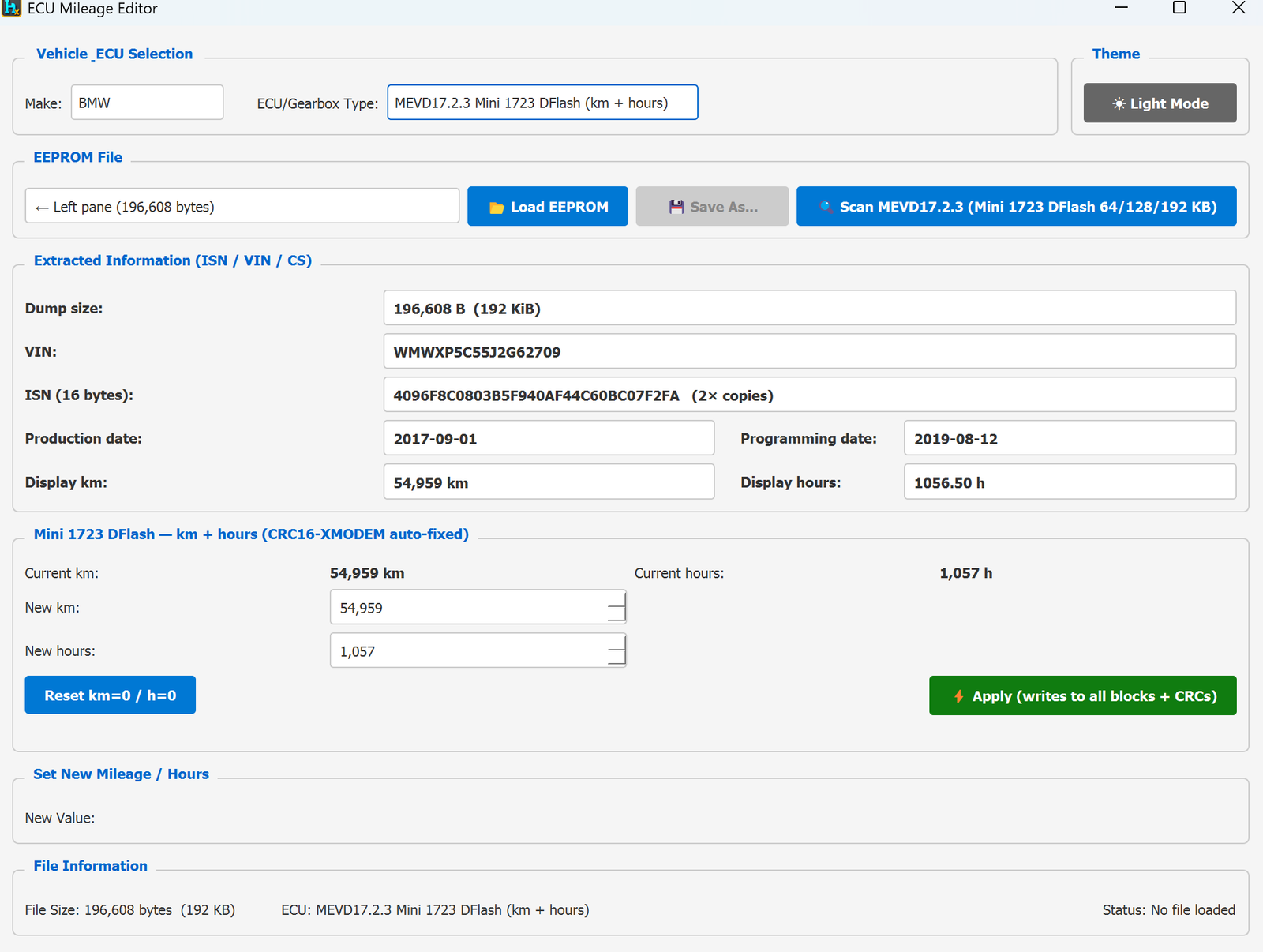
- Scan MEVD17.2.3 (Mini 1723 DFlash 64/128/192 KB) — auto-detects the dump size variant (64/128/192 KB) and decodes it.
- Decoded info: Dump size, VIN, ISN (16 bytes, shown with how many redundant copies were found, e.g. "2× copies"), Production date, Programming date, and the current Display km / Display hours.
- Mini 1723 DFlash — km + hours editor:
- Shows Current km and Current hours read from the module.
- Enter New km / New hours to set specific values (e.g. to match the car's real mileage/hours when installing a used DME).
- Reset km=0 / h=0 — one click to zero both.
- Apply (writes to all blocks + CRCs) — writes the new values to every redundant block and automatically fixes the CRC16-XMODEM checksums so the module accepts the change.
Typical use case
- Installing a used/donor MEVD17.2.3 Mini 1723 DME and clearing the "2FA4" invalid data error by setting its km/hours to match the car (or by resetting to 0 for a genuinely fresh unit).
Requirements
- A Mini 1723 DFlash dump (64, 128, or 192 KB).
ECU Immo & Mileage / BMW MS42 DME
ECU Mileage Editor — BMW MS42 DME
Available in ProFullUltimate
What is this?
The ECU Mileage Editor is a single tool covering several BMW DME/gearbox profiles (MSD80/81/85, MSV70, MS42/43/45, EMS2, MD1/MG1, MEVD17, Bosch ME9…). Pick the profile matching your ECU and it decodes VIN, ISN (where applicable) and mileage from the EEPROM/flash dump, and lets you write a new mileage value.
How to open it
From the main HexTool window: Tools → ECU Tools → ECU IMMO Mileage. It reads whatever is loaded in the left pane, and outputs the edited result to the right pane.
MS42 specifics
- File size: 524,288 bytes (512 KB).
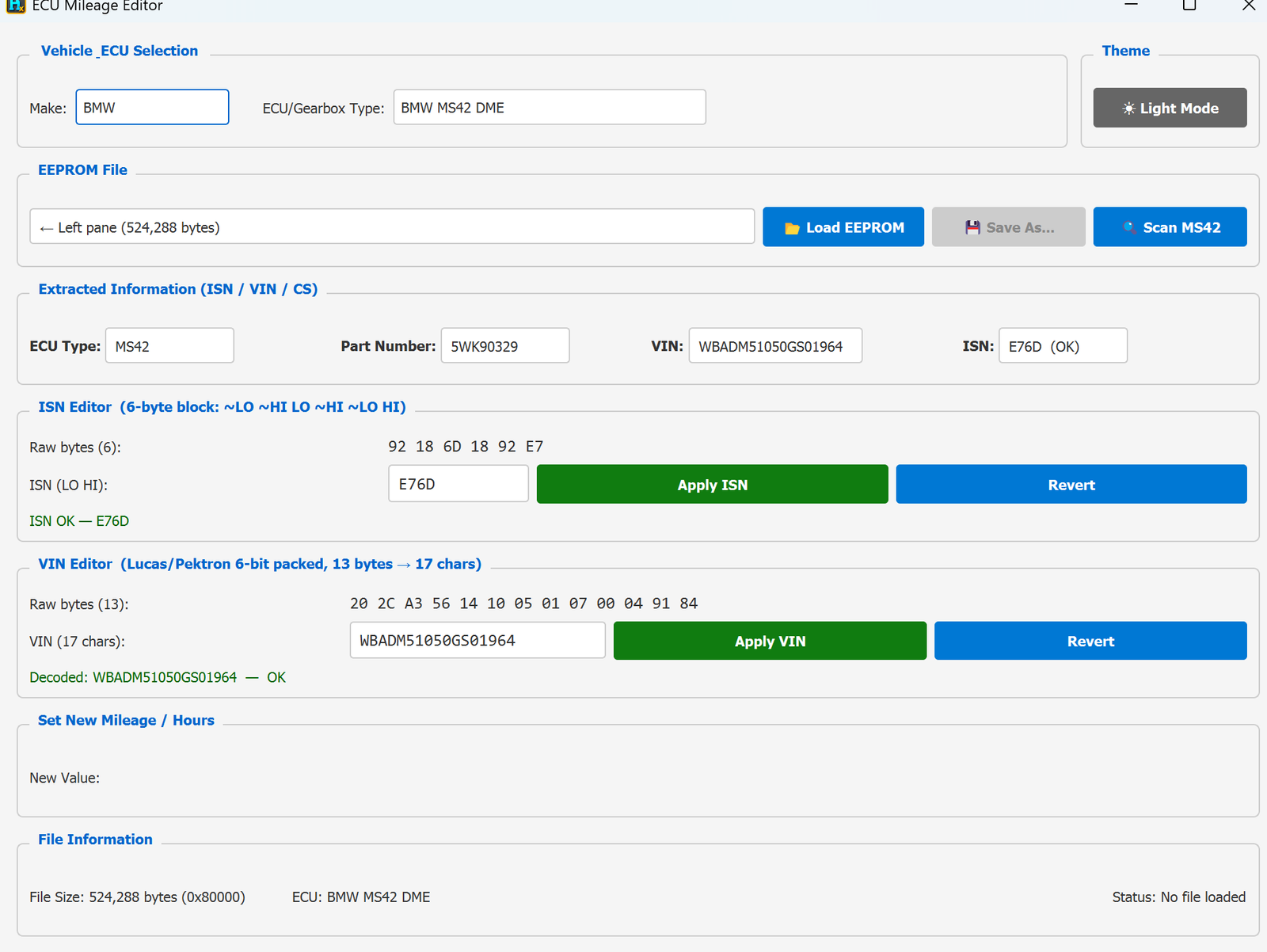
- ECU info shown: ECU Type, Part Number, VIN, ISN — all decoded and displayed together.
- ISN Editor — a 6-byte redundant block (
~LO ~HI LO ~HI ~LO HI). Decoded to a plain ISN value and flagged ISN OK when it checks out. Type a new value and click Apply ISN, or Revert to discard.
- VIN Editor — Lucas/Pektron 6-bit packed format, 13 raw bytes → 17 characters. HexTool decodes it and confirms with Decoded: … — OK. Type a new 17-char VIN and click Apply VIN, or Revert.
- No Mileage Locations table on this profile — like EMS2/ME9, this profile is primarily an ISN/VIN tool; the mileage section is present but empty in the samples seen.
- Scan MS42 — a dedicated scan button to locate/verify the ISN and VIN blocks within the dump.
Typical workflow
- Load the MS42 dump (left pane or Load EEPROM).
- Check ISN Editor — if needed, type a new ISN and click Apply ISN.
- Check VIN Editor — if needed, type a new VIN and click Apply VIN.
- Save As… or send to the right pane.
Requirements
ECU Immo & Mileage / BMW MS43 DME
ECU Mileage Editor — BMW MS43 DME
Available in ProFullUltimate
What is this?
The ECU Mileage Editor is a single tool covering several BMW DME/gearbox profiles (MSD80/81/85, MSV70, MS42/43/45, EMS2, MD1/MG1, MEVD17, Bosch ME9…). Pick the profile matching your ECU and it decodes VIN, ISN (where applicable) and mileage from the EEPROM/flash dump, and lets you write a new mileage value.
How to open it
From the main HexTool window: Tools → ECU Tools → ECU IMMO Mileage. It reads whatever is loaded in the left pane, and outputs the edited result to the right pane.
MS43 specifics
- File size: 524,288 bytes (512 KB) — same as MS42.
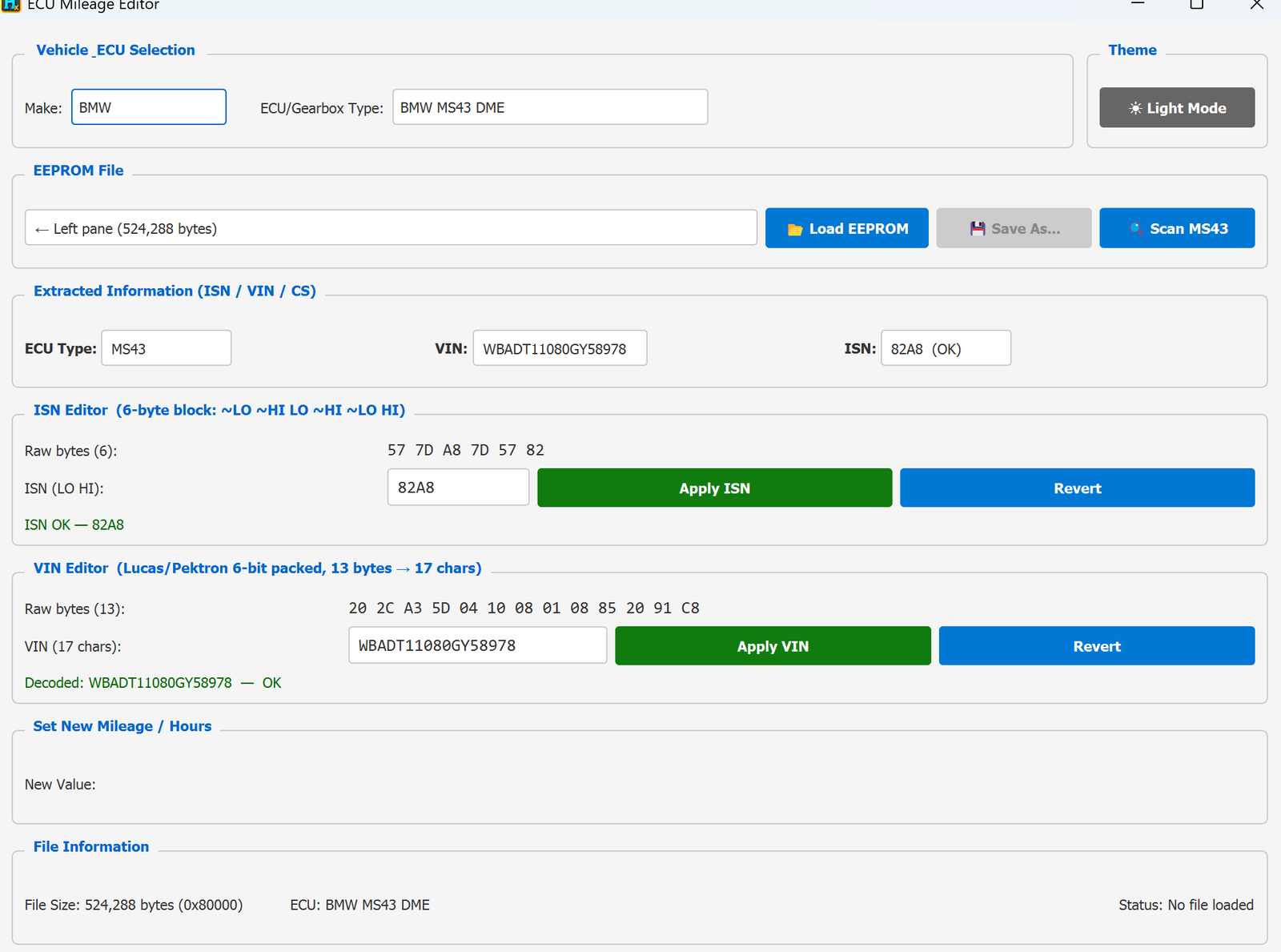
- ECU info shown: ECU Type, VIN, ISN.
- ISN Editor — a 6-byte redundant block (
~LO ~HI LO ~HI ~LO HI), same scheme as MS42. Decoded to a plain ISN value and flagged ISN OK. Type a new value and click Apply ISN, or Revert.
- VIN Editor — Lucas/Pektron 6-bit packed format, 13 raw bytes → 17 characters, same as MS42. Decoded and confirmed with — OK. Type a new VIN and click Apply VIN, or Revert.
- No Mileage Locations table on this profile — same as MS42, this profile is primarily an ISN/VIN tool.
- Scan MS43 — a dedicated scan button to locate/verify the ISN and VIN blocks within the dump.
Typical workflow
- Load the MS43 dump (left pane or Load EEPROM).
- Check ISN Editor — if needed, type a new ISN and click Apply ISN.
- Check VIN Editor — if needed, type a new VIN and click Apply VIN.
- Save As… or send to the right pane.
Requirements
ECU Immo & Mileage / BMW MS45 DME
ECU Mileage Editor — BMW MS45 DME
Available in ProFullUltimate
What is this?
The ECU Mileage Editor is a single tool covering several BMW DME/gearbox profiles (MSD80/81/85, MSV70, MS42/43/45, EMS2, MD1/MG1, MEVD17, Bosch ME9…). Pick the profile matching your ECU and it decodes VIN, ISN (where applicable) and mileage from the EEPROM/flash dump, and lets you write a new mileage value.
How to open it
From the main HexTool window: Tools → ECU Tools → ECU IMMO Mileage. It reads whatever is loaded in the left pane, and outputs the edited result to the right pane.
MS45 specifics
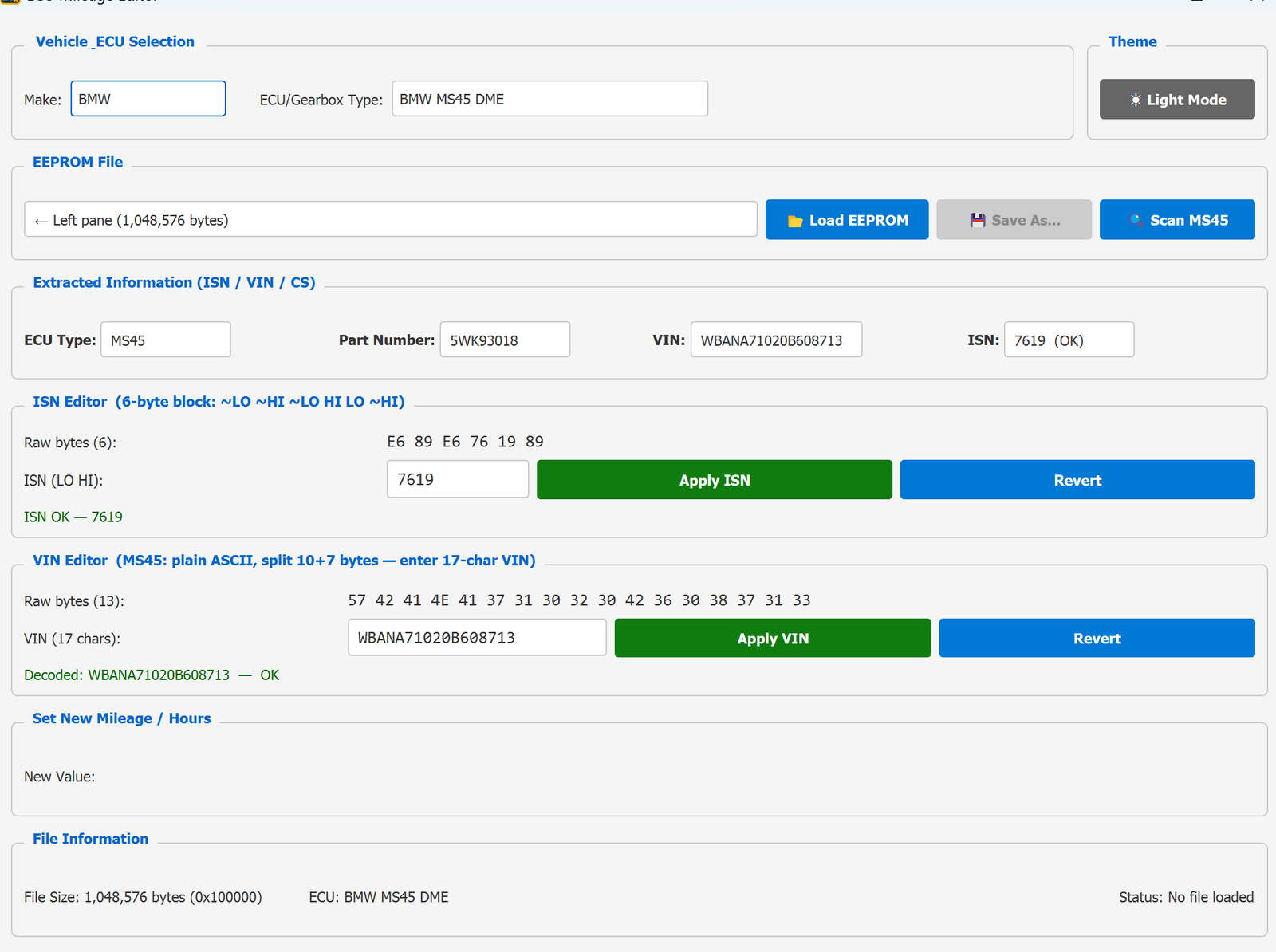
- File size: 1,048,576 bytes (1 MB) — a full flash dump, larger than MS42/43's 512 KB.
- ECU info shown: ECU Type, Part Number, VIN, ISN.
- ISN Editor — a 6-byte redundant block (
~LO ~HI ~LO HI LO ~HI). Decoded to a plain ISN value and flagged ISN OK. Type a new value and click Apply ISN, or Revert.
- VIN Editor — plain ASCII this time (unlike MS42/43's Lucas/Pektron packed format), split 10+7 bytes; type a 17-char VIN and click Apply VIN, or Revert.
- No Mileage Locations table on this profile — same as MS42/43, this profile is primarily an ISN/VIN tool.
- Scan MS45 — a dedicated scan button to locate/verify the ISN and VIN blocks within the dump.
Typical workflow
- Load the MS45 dump (left pane or Load EEPROM).
- Check ISN Editor — if needed, type a new ISN and click Apply ISN.
- Check VIN Editor — if needed, type a new VIN and click Apply VIN.
- Save As… or send to the right pane.
Requirements
ECU Immo & Mileage / BMW MSV70 DME
ECU Mileage Editor — BMW MSV70 DME
Available in ProFullUltimate
What is this?
The ECU Mileage Editor is a single tool covering several BMW DME/gearbox profiles (MSD80/81/85, MSV70, MS42/43/45, EMS2, MD1/MG1, MEVD17…). Pick the profile matching your ECU and it decodes VIN, ISN (where applicable) and mileage from the EEPROM dump, and lets you write a new mileage value.
How to open it
From the main HexTool window: Tools → ECU Tools → ECU IMMO Mileage. It reads whatever is loaded in the left pane, and outputs the edited result to the right pane.
MSV70 specifics
- EEPROM size: 4,096 bytes (4 KB) — much smaller than the MSD8x family.
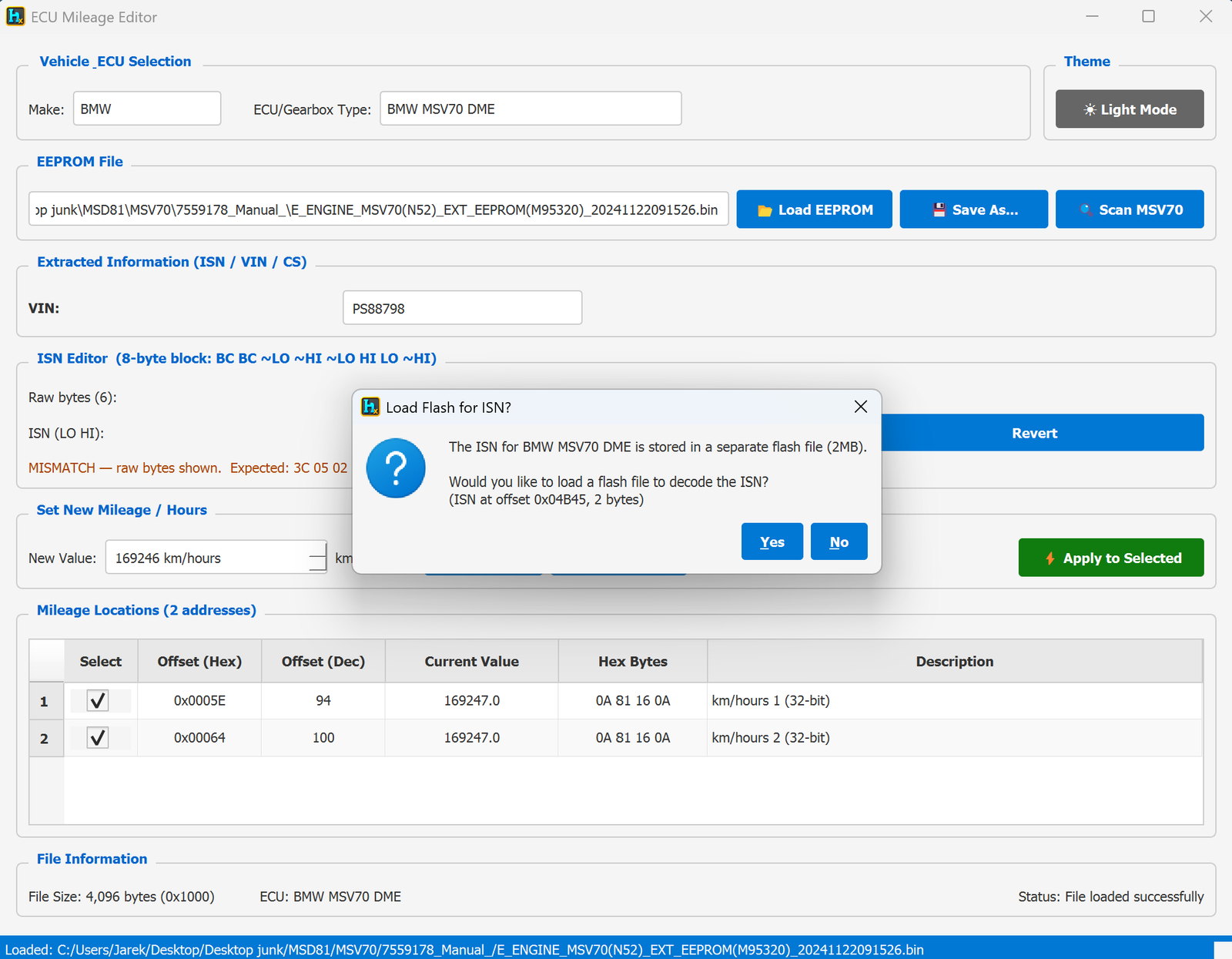
- The ISN lives directly in the EEPROM this time (unlike MSD80/81/85, which need a separate 2 MB flash file). HexTool still offers to load a flash file (ISN at offset
0x04B45, 2 bytes) if you want to cross-check it, but the EEPROM copy can be read and edited on its own.
- ISN Editor — an 8-byte redundant block (
BC BC ~LO ~HI ~LO HI LO ~HI). HexTool decodes it to a plain ISN (LO HI) value, flags ISN OK when the redundant bytes check out, or MISMATCH with the expected value shown if they don't. You can type a new ISN and click Apply ISN, or Revert to discard the change.
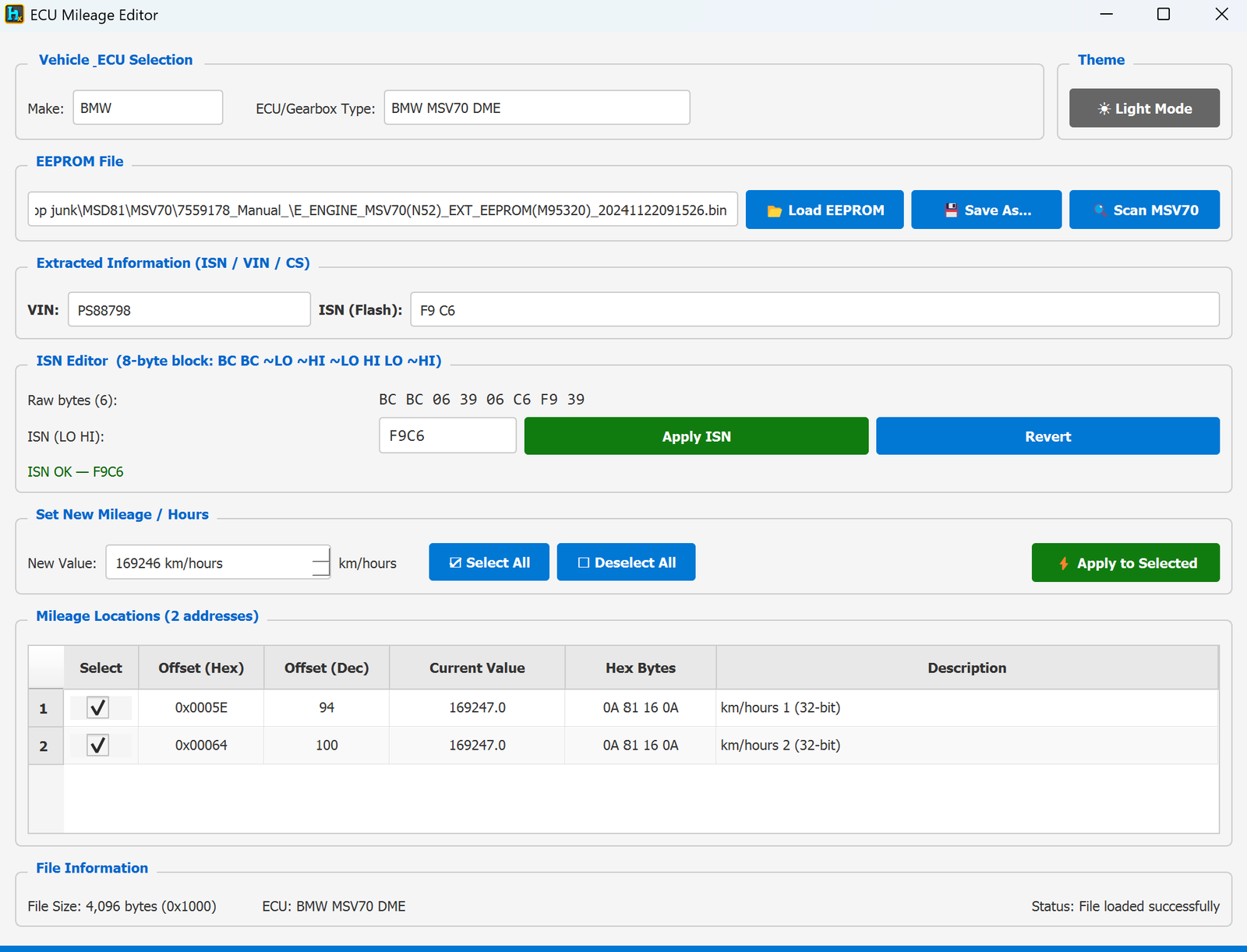
- Mileage Locations: 2 addresses (32-bit) — fewer than the MSD8x family, reflecting MSV70's different EEPROM layout.
Typical workflow
- Load the MSV70 EEPROM dump (left pane or Load EEPROM).
- Check the ISN Editor — if it shows MISMATCH, type the correct ISN and click Apply ISN (or Revert if you don't want to change it).
- Type the New Value (km/hours).
- Leave both mileage locations selected (or adjust with Select All / Deselect All).
- Click Apply to Selected, then Save As… or send to the right pane.
Requirements
- An MSV70 EEPROM dump (4 KB).
- Optionally, the matching 2 MB flash dump if you want to cross-check the ISN against it.
ECU Immo & Mileage / BMW MSD80 DME
ECU Mileage Editor — BMW MSD80 DME
Available in ProFullUltimate
What is this?
The ECU Mileage Editor is a single tool covering several BMW DME/gearbox profiles (MSD80/81/85, MSV70, MS42/43/45, EMS2, MD1/MG1, MEVD17…). Pick the profile matching your ECU and it decodes VIN, ISN (where applicable) and mileage from the EEPROM dump, and lets you write a new mileage value.
How to open it
From the main HexTool window: Tools → ECU Tools → ECU IMMO Mileage. It reads whatever is loaded in the left pane, and outputs the edited result to the right pane.
MSD80 specifics
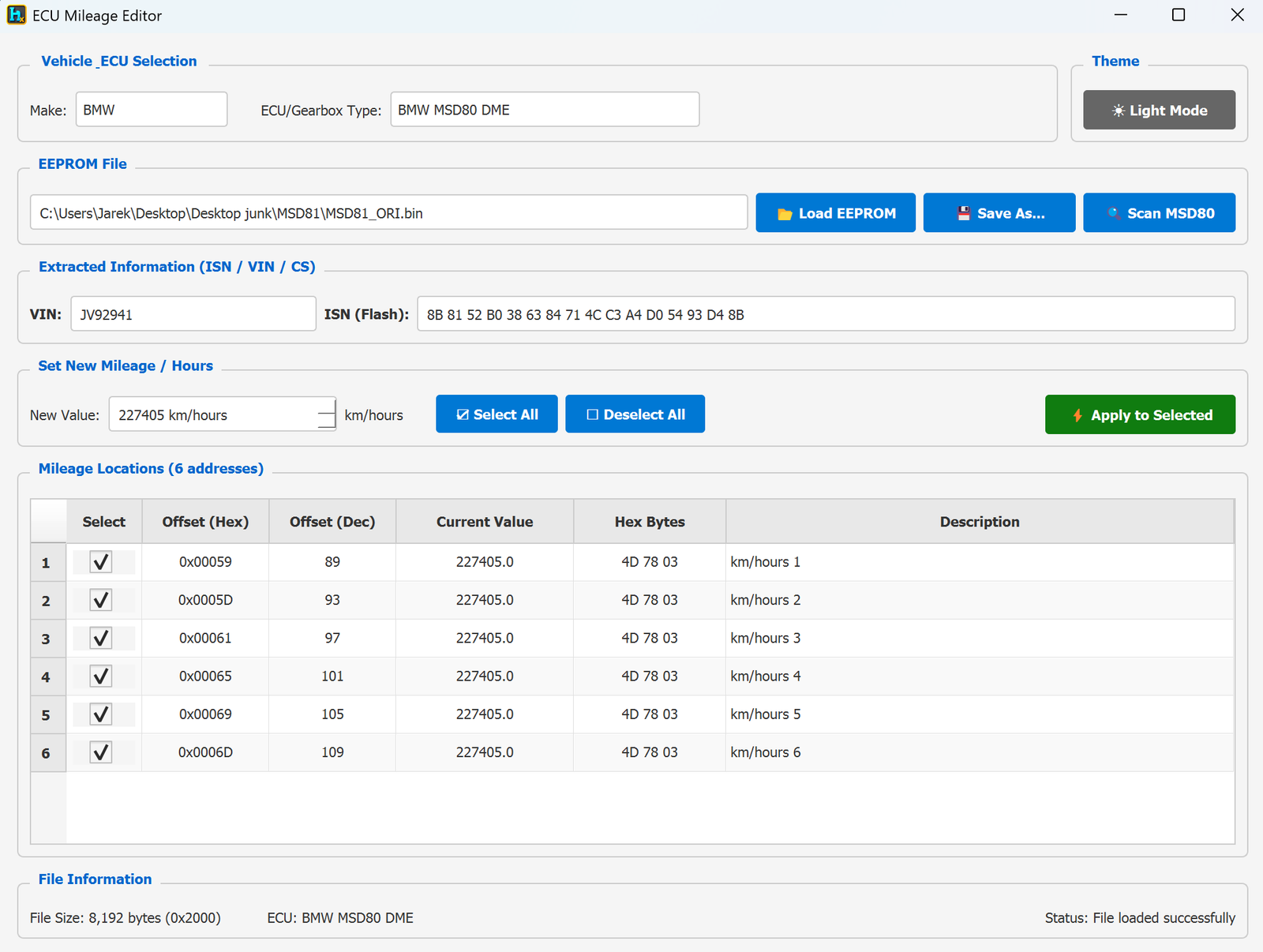
- EEPROM size: 8,192 bytes (0x2000).
- VIN is decoded and shown directly.
- ISN is NOT in the EEPROM — it's stored in a separate 2 MB flash file. On load, HexTool asks: "The ISN for BMW MSD80 DME is stored in a separate flash file (2MB). Would you like to load a flash file to decode the ISN? (ISN at offset 0x01100, 16 bytes)". Click Yes and pick the flash dump to have the ISN decoded and shown alongside the VIN.
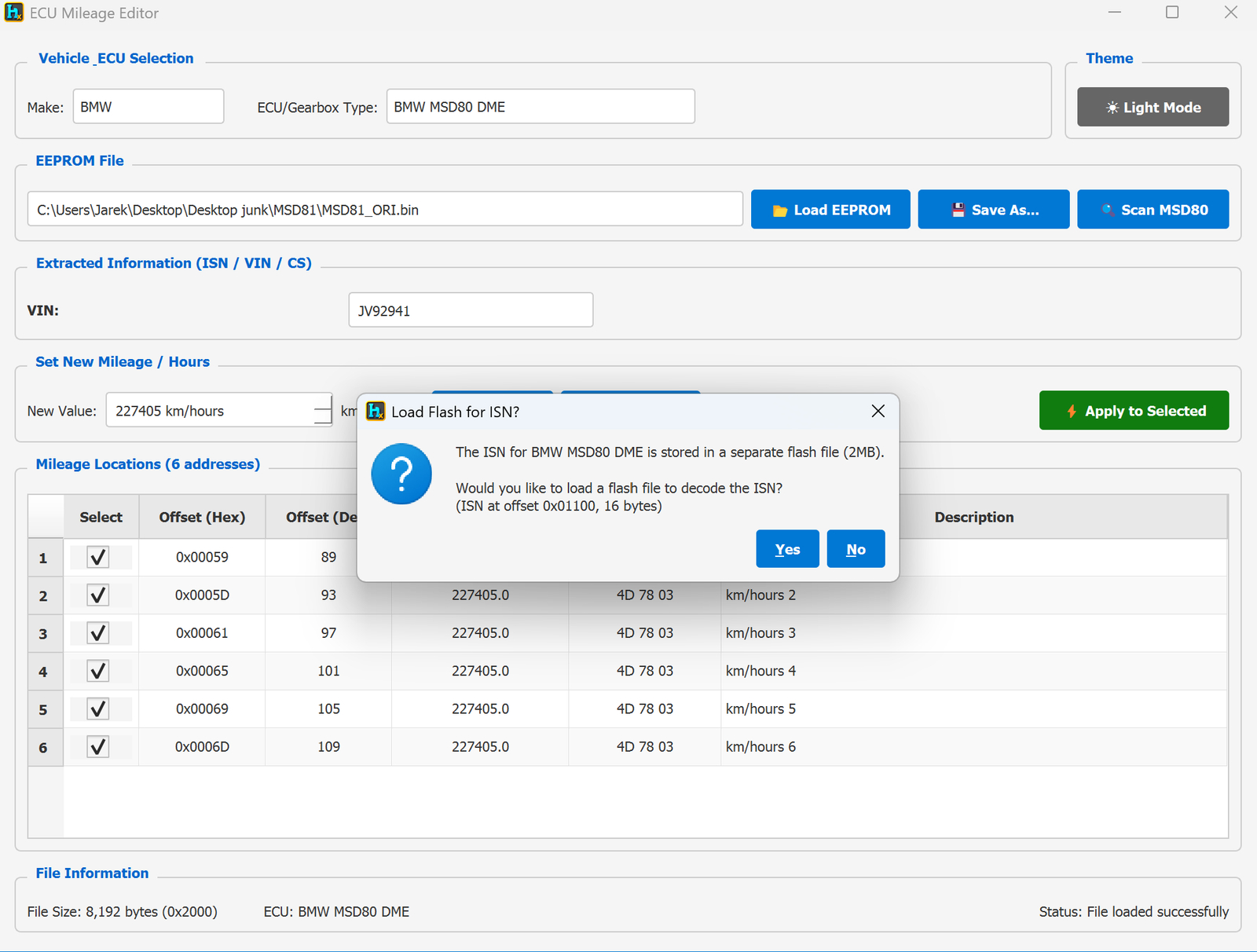
- Mileage Locations: 6 addresses — MSD80 stores the mileage/hours value redundantly at 6 different offsets in the EEPROM. All 6 are shown with their current value, hex bytes, and description, and are ticked by default so a single Apply to Selected updates every copy consistently.
Typical workflow
- Load the MSD80 EEPROM dump (left pane or Load EEPROM).
- If you need the ISN, click Yes on the flash prompt and pick the 2 MB flash file — or click Scan MSD80 to have HexTool locate/verify it.
- Type the New Value (km/hours).
- Leave all 6 mileage locations selected (or adjust with Select All / Deselect All).
- Click Apply to Selected, then Save As… or send to the right pane.
Requirements
- An MSD80 EEPROM dump (8 KB).
- Optionally, the matching 2 MB flash dump if you need to read/verify the ISN.
ECU Immo & Mileage / BMW MSD81 DME
ECU Mileage Editor — BMW MSD81 DME
Available in ProFullUltimate
What is this?
The ECU Mileage Editor is a single tool covering several BMW DME/gearbox profiles (MSD80/81/85, MSV70, MS42/43/45, EMS2, MD1/MG1, MEVD17…). Pick the profile matching your ECU and it decodes VIN, ISN (where applicable) and mileage from the EEPROM dump, and lets you write a new mileage value.
How to open it
From the main HexTool window: Tools → ECU Tools → ECU IMMO Mileage. It reads whatever is loaded in the left pane, and outputs the edited result to the right pane.
MSD81 specifics
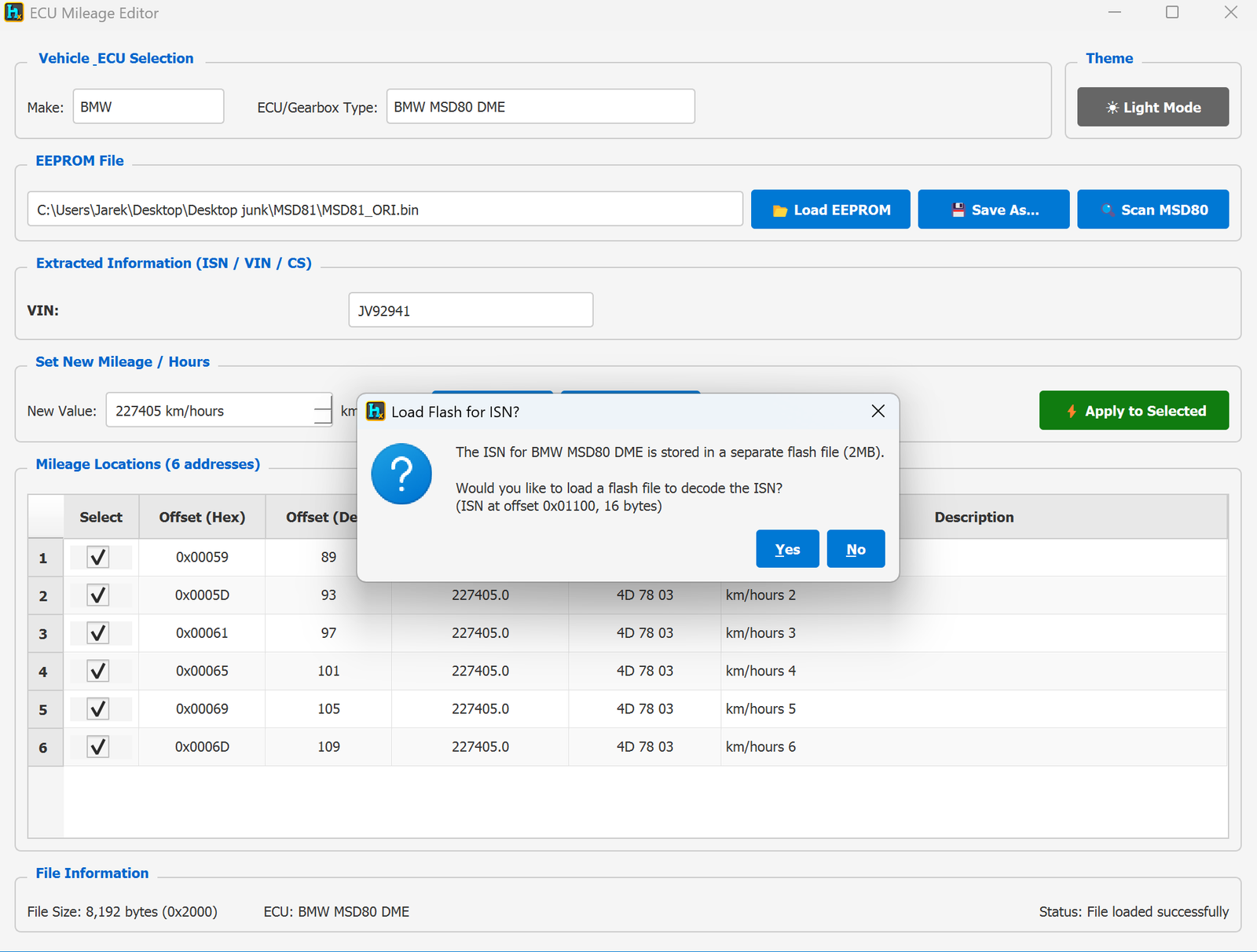
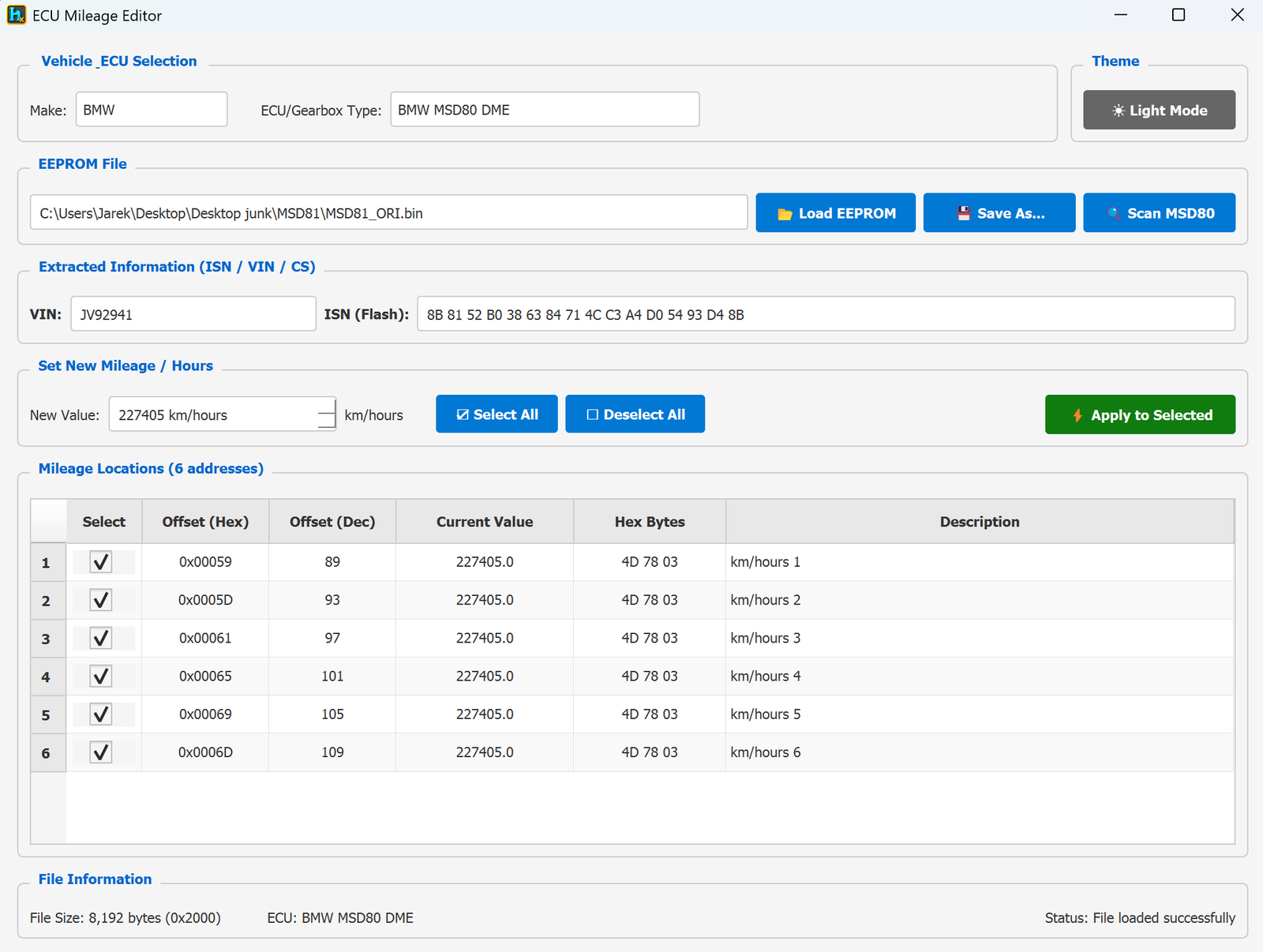
MSD81 uses the same layout as MSD80 — same 8,192-byte (8 KB) EEPROM size, same 6 redundant mileage locations, and the same behavior for the ISN:
- ISN is NOT in the EEPROM — it's stored in a separate 2 MB flash file. On load, HexTool asks whether you want to load that flash file to decode the ISN (found at offset
0x01100, 16 bytes).
- Mileage Locations: 6 addresses, all ticked by default so Apply to Selected updates every redundant copy in one click.
Typical workflow
- Load the MSD81 EEPROM dump (left pane or Load EEPROM).
- If you need the ISN, click Yes on the flash prompt and pick the 2 MB flash file — or click Scan MSD80 (shared scanner) to locate/verify it.
- Type the New Value (km/hours).
- Leave all 6 mileage locations selected (or adjust with Select All / Deselect All).
- Click Apply to Selected, then Save As… or send to the right pane.
Requirements
- An MSD81 EEPROM dump (8 KB).
- Optionally, the matching 2 MB flash dump if you need to read/verify the ISN.
ECU Immo & Mileage / BMW MSD85 DME
ECU Mileage Editor — BMW MSD85 DME
Available in ProFullUltimate
What is this?
The ECU Mileage Editor is a single tool covering several BMW DME/gearbox profiles (MSD80/81/85, MSV70, MS42/43/45, EMS2, MD1/MG1, MEVD17…). Pick the profile matching your ECU and it decodes VIN, ISN (where applicable) and mileage from the EEPROM dump, and lets you write a new mileage value.
How to open it
From the main HexTool window: Tools → ECU Tools → ECU IMMO Mileage. It reads whatever is loaded in the left pane, and outputs the edited result to the right pane.
MSD85 specifics
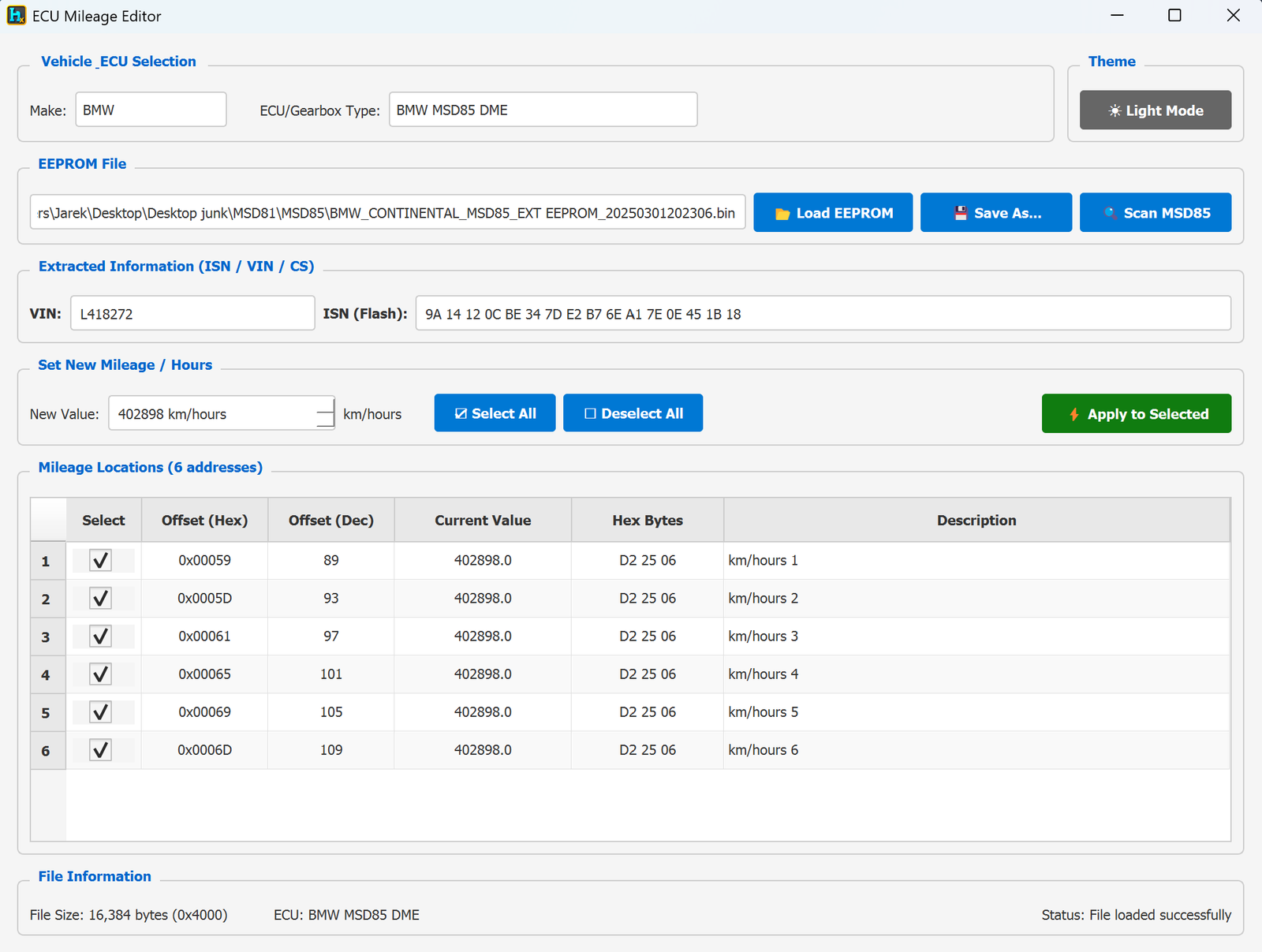
- EEPROM size: 16,384 bytes (16 KB) — larger than MSD80/81's 8 KB.
- ISN is NOT in the EEPROM — same as MSD80/81, it's stored in a separate 2 MB flash file. On load, HexTool asks whether to load that flash file to decode the ISN (found at offset
0x01100, 16 bytes).
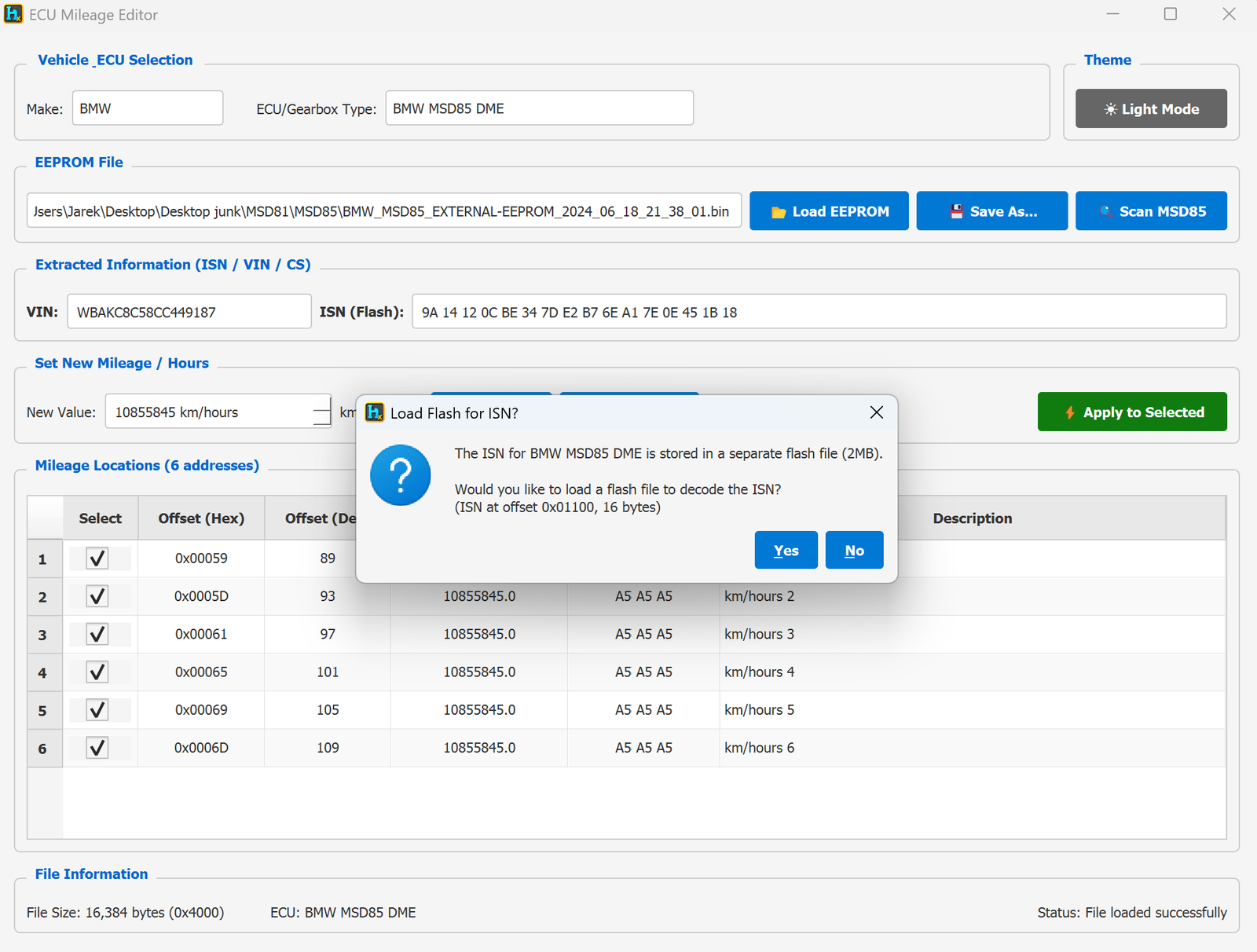
- Mileage Locations: 6 addresses, all ticked by default so Apply to Selected updates every redundant copy in one click.
Typical workflow
- Load the MSD85 EEPROM dump (left pane or Load EEPROM).
- If you need the ISN, click Yes on the flash prompt and pick the 2 MB flash file — or click Scan MSD85 to locate/verify it.
- Type the New Value (km/hours).
- Leave all 6 mileage locations selected (or adjust with Select All / Deselect All).
- Click Apply to Selected, then Save As… or send to the right pane.
Requirements
- An MSD85 EEPROM dump (16 KB).
- Optionally, the matching 2 MB flash dump if you need to read/verify the ISN.
ECU Immo & Mileage / BMW Mini EMS2
ECU Mileage Editor — BMW Mini EMS2 (Siemens EMS2)
Available in ProFullUltimate
What is this?
The ECU Mileage Editor is a single tool covering several BMW DME/gearbox profiles (MSD80/81/85, MSV70, MS42/43/45, EMS2, MD1/MG1, MEVD17…). Pick the profile matching your ECU and it decodes VIN, ISN (where applicable) and mileage from the EEPROM dump, and lets you write a new mileage value.
How to open it
From the main HexTool window: Tools → ECU Tools → ECU IMMO Mileage. It reads whatever is loaded in the left pane, and outputs the edited result to the right pane.
EMS2 specifics
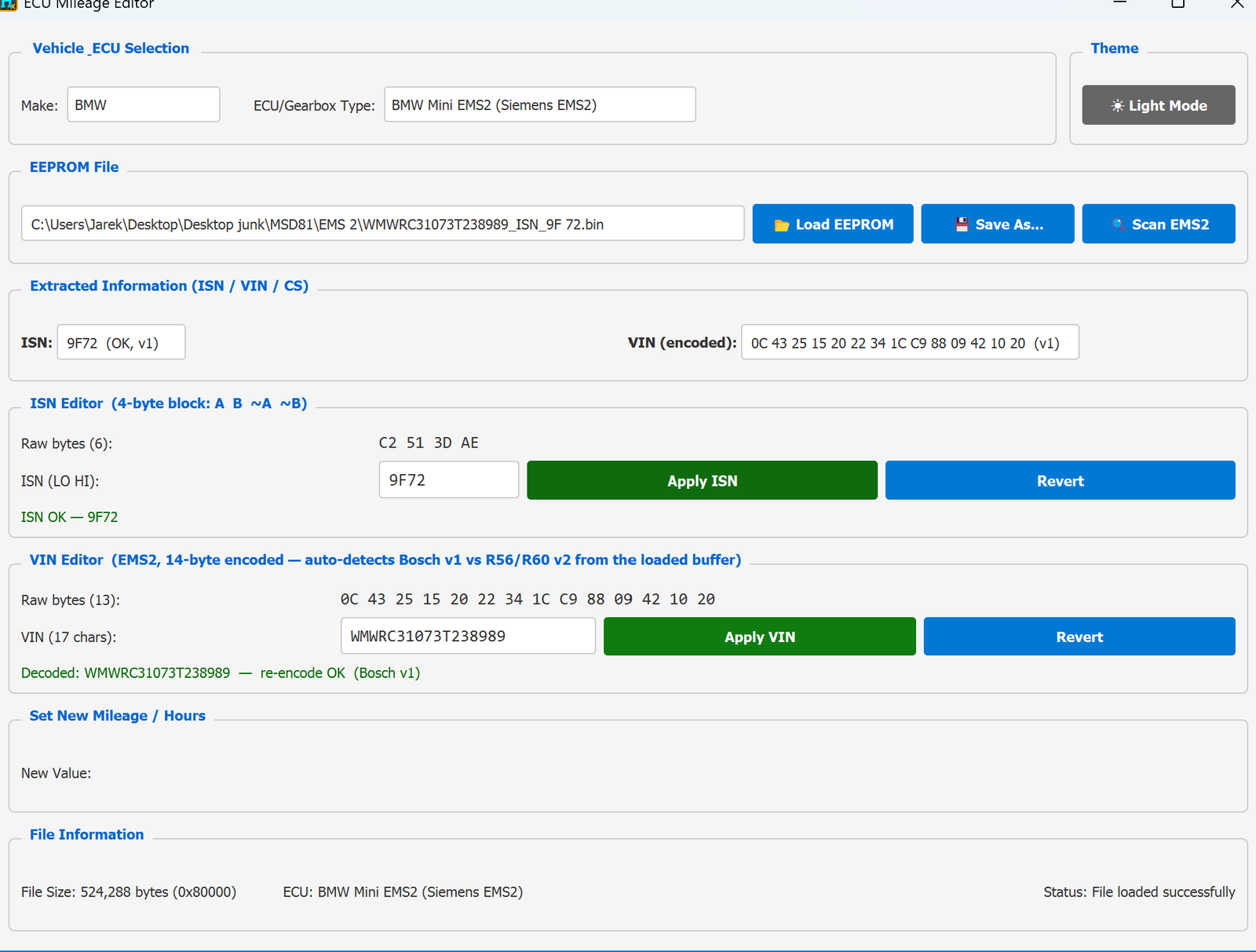
- File size: 524,288 bytes (512 KB) for both versions.
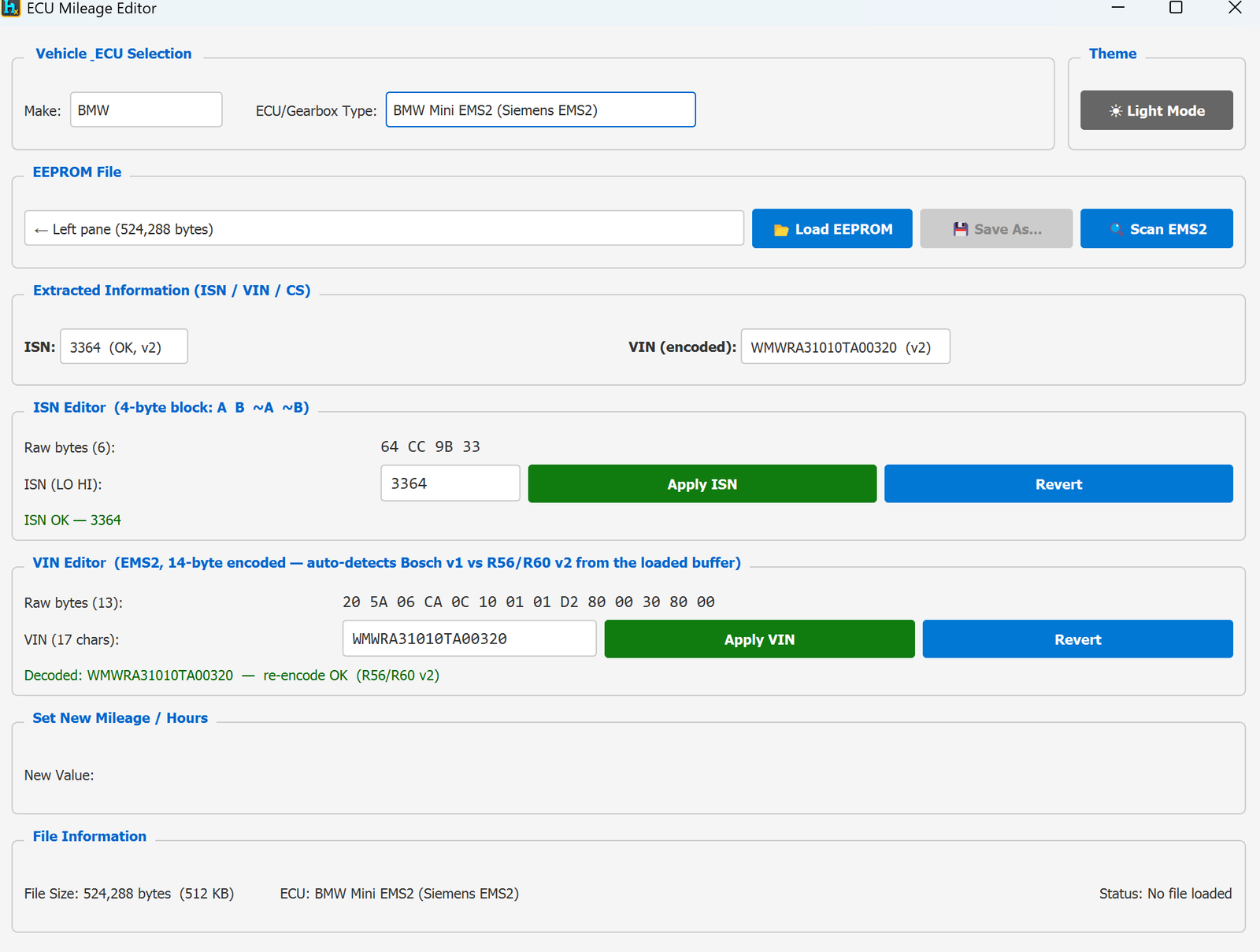
- Two auto-detected sub-versions, shown right next to the decoded values — you don't pick this manually, HexTool works out which one you have from the loaded buffer:
- v1 — Bosch layout.
- v2 — R56/R60 layout.
- ISN Editor — a 4-byte redundant block (
A B ~A ~B). Decoded to a plain ISN value and flagged ISN OK when the redundant bytes check out. Type a new value and click Apply ISN, or Revert to discard.
- VIN Editor — the VIN is stored 14-byte encoded; HexTool decodes it to the full 17-character VIN, and reports re-encode OK along with which layout it matched (Bosch v1 or R56/R60 v2). Type a new VIN and click Apply VIN, or Revert.
- No Mileage Locations table on this profile — the New Value/mileage section is present but empty for EMS2 in the samples seen; treat this profile as primarily an ISN/VIN tool.
v1 (Bosch) example: loaded via the left pane; ISN decoded as AF82 (OK, v1), VIN decoded as WMWRA31090TA09296 with a re-encode check confirming the Bosch v1 layout.
v2 (R56/R60) example: loaded from an EMS2_Full.bin file; ISN decoded as 3364 (OK, v2), VIN decoded as WMWRA31010TA00320 with a re-encode check confirming the R56/R60 v2 layout.
Typical workflow
- Load the EMS2 EEPROM/dump (left pane or Load EEPROM) — HexTool auto-detects v1 vs v2.
- Check ISN Editor — if needed, type a new ISN and click Apply ISN.
- Check VIN Editor — if needed, type a new VIN and click Apply VIN; HexTool confirms it re-encodes correctly for the detected layout.
- Save As… or send to the right pane.
Requirements
- An EMS2 dump (512 KB) — Bosch (v1) or R56/R60 (v2); no need to specify which, HexTool detects it automatically.
ECU Immo & Mileage / Bosch ME9 DME
ECU Mileage Editor — Bosch ME9 DME (BMW)
Available in ProFullUltimate
What is this?
The ECU Mileage Editor is a single tool covering several BMW DME/gearbox profiles (MSD80/81/85, MSV70, MS42/43/45, EMS2, MD1/MG1, MEVD17, Bosch ME9…). Pick the profile matching your ECU and it decodes VIN, ISN (where applicable) and mileage from the EEPROM/flash dump, and lets you write a new mileage value.
How to open it
From the main HexTool window: Tools → ECU Tools → ECU IMMO Mileage. It reads whatever is loaded in the left pane, and outputs the edited result to the right pane.
Bosch ME9 specifics
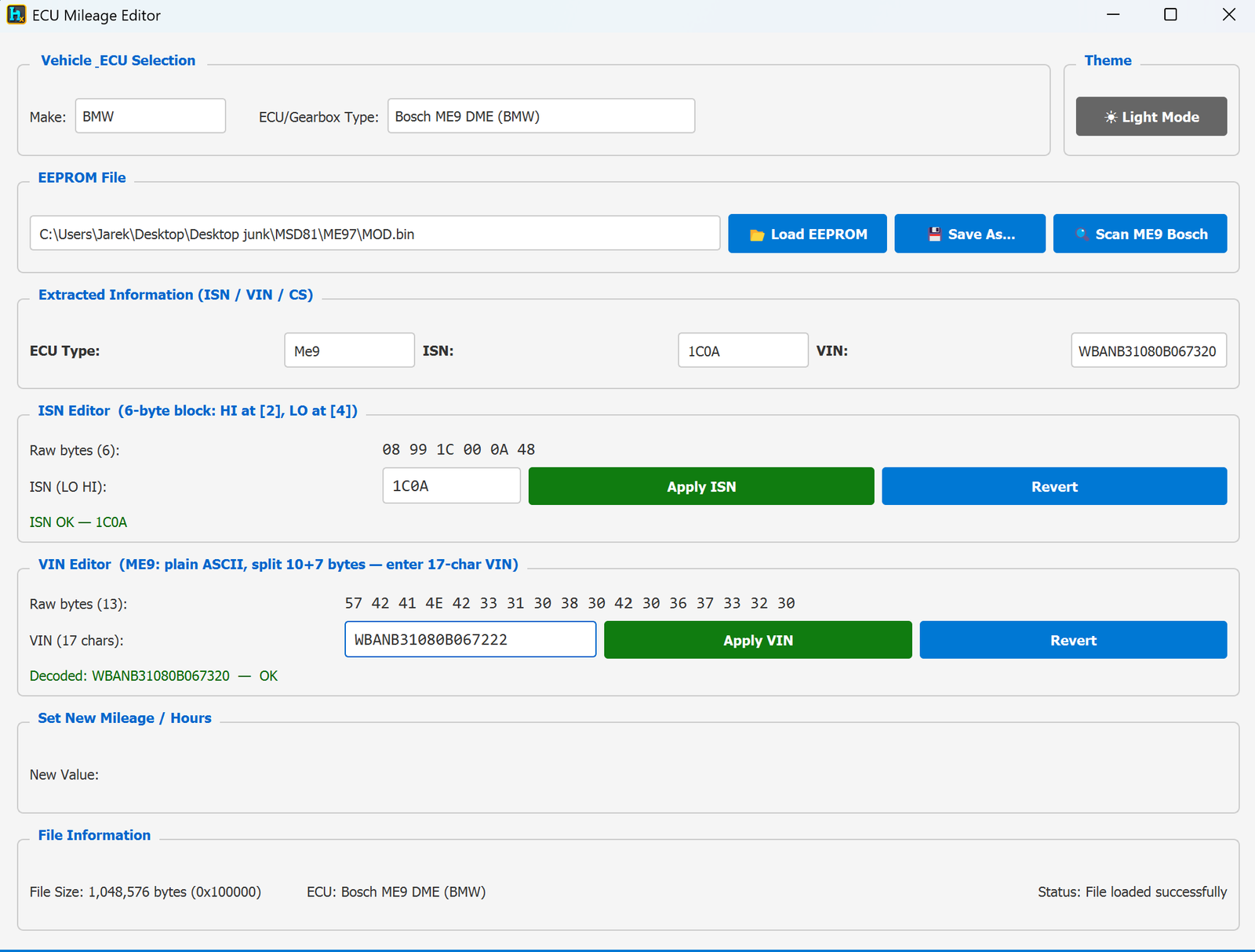
- File size: 1,048,576 bytes (1 MB) — a full flash dump, not a small EEPROM.
- ISN Editor — a 6-byte block (HI at position [2], LO at position [4]). Decoded to a plain ISN (LO HI) value and flagged ISN OK when it checks out. Type a new value and click Apply ISN, or Revert to discard.
- VIN Editor — plain ASCII, split across 10+7 bytes; HexTool decodes it directly and reports the result (e.g. "Decoded: WBANB31080B067320 — OK"). Type a 17-character VIN and click Apply VIN, or Revert.
- No Mileage Locations table on this profile — like EMS2, the New Value/mileage section is present but empty for ME9 in the samples seen; treat this profile as primarily an ISN/VIN tool.
- Scan ME9 Bosch — a dedicated scan button to locate/verify the ISN and VIN blocks within the 1 MB dump.
Typical workflow
- Load the ME9 flash dump (left pane or Load EEPROM).
- Check ISN Editor — if needed, type a new ISN and click Apply ISN.
- Check VIN Editor — if needed, type a new VIN and click Apply VIN.
- Save As… or send to the right pane.
Requirements
- A Bosch ME9 flash dump (1 MB).
ECU Immo & Mileage / Bosch MEVD17.2.x (N13/N20/N55/S63)
ECU Mileage Editor — BOSCH MEVD17.2.x (N13, N20, N55, S63)
Available in ProFullUltimate
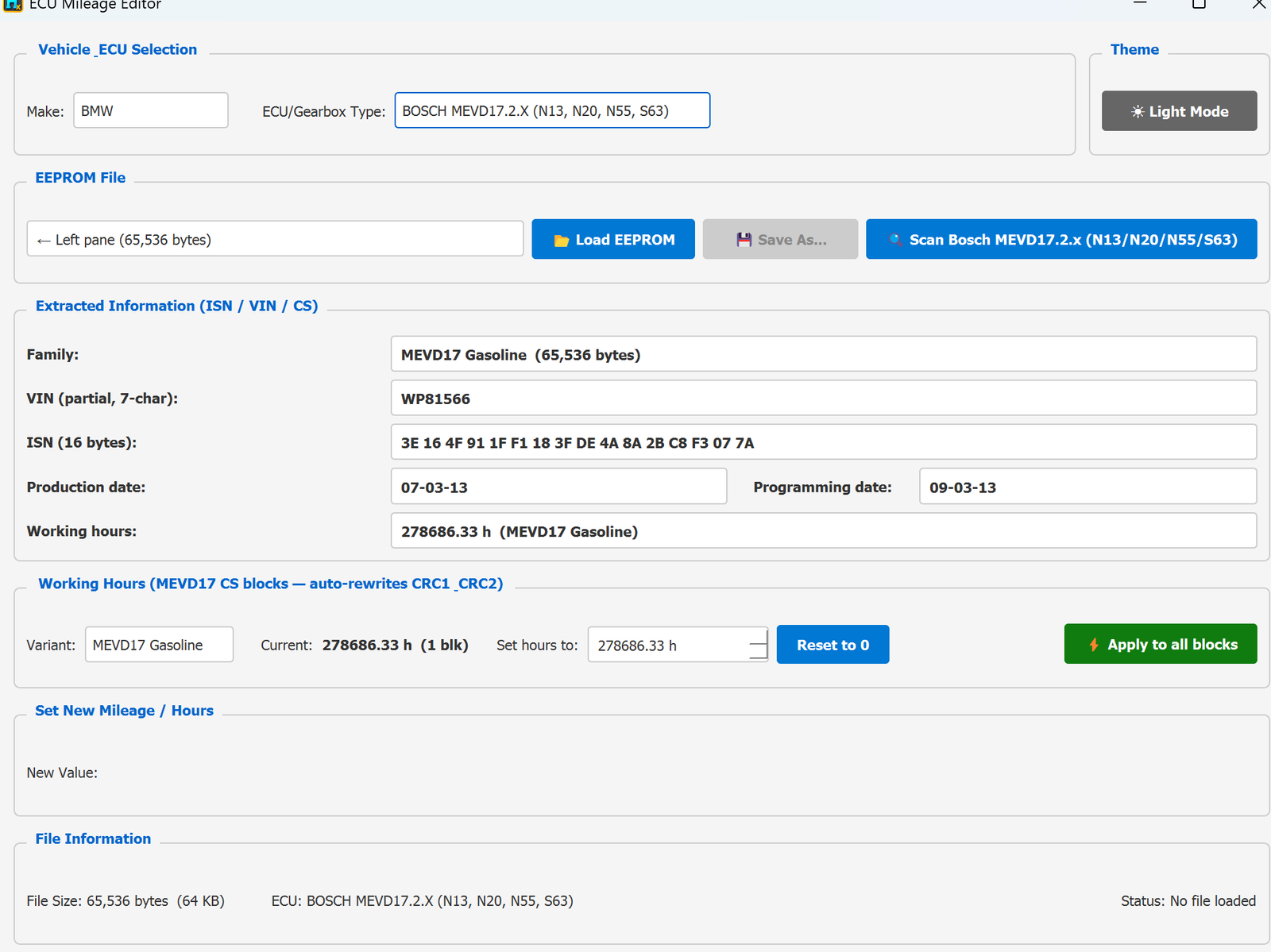
What is this?
The ECU Mileage Editor is a single tool covering several BMW DME/gearbox profiles (MSD80/81/85, MSV70, MS42/43/45, EMS2, MD1/MG1, MEVD17, Bosch ME9…). This profile targets the general BOSCH MEVD17.2.X family used across the N13, N20, N55 and S63 engines.
Why you'd use this
When a used engine computer (DME/ECU) is installed in a BMW, the car often rejects it — because the "working hours" stored in the used unit don't match the car's actual mileage, causing a persistent "2FA4" invalid data error. This tool lets you align the stored working hours to the car so the error clears.
How to open it
From the main HexTool window: Tools → ECU Tools → ECU IMMO Mileage, selecting the BOSCH MEVD17.2.X (N13, N20, N55, S63) profile.
What you can do with it
- Scan Bosch MEVD17.2.x (N13/N20/N55/S63) — auto-detects the ECU Family (e.g. "MEVD17 Gasoline") and dump size (64 KB in the sample seen).
- Decoded info: Family, partial VIN (7-char), ISN (16 bytes), Production date, Programming date, and current Working hours.
- Working Hours editor (MEVD17 CS blocks — auto-rewrites CRC1/CRC2):
- Shows the Variant and Current working hours, including how many blocks were found (e.g. "1 blk").
- Set hours to: type a specific value to match the car.
- Reset to 0 — one click to zero the working hours.
- Apply to all blocks — writes the new value to every block and automatically rewrites the CRC1/CRC2 checksums so the module accepts it.
Typical use case
- Installing a used/donor MEVD17.2.x DME on an N13/N20/N55/S63-engined car and clearing the "2FA4" invalid data error by setting its working hours to match the car (or resetting to 0 for a genuinely fresh unit).
Requirements
- A Bosch MEVD17.2.x dump (64 KB in the example — size depends on variant).
ECU Immo & Mileage / Simos 12.1 IMMO
ECU Mileage Editor — Simos 12.1 IMMO (VIN / CS / MAC / status)
Available in ProFullUltimate
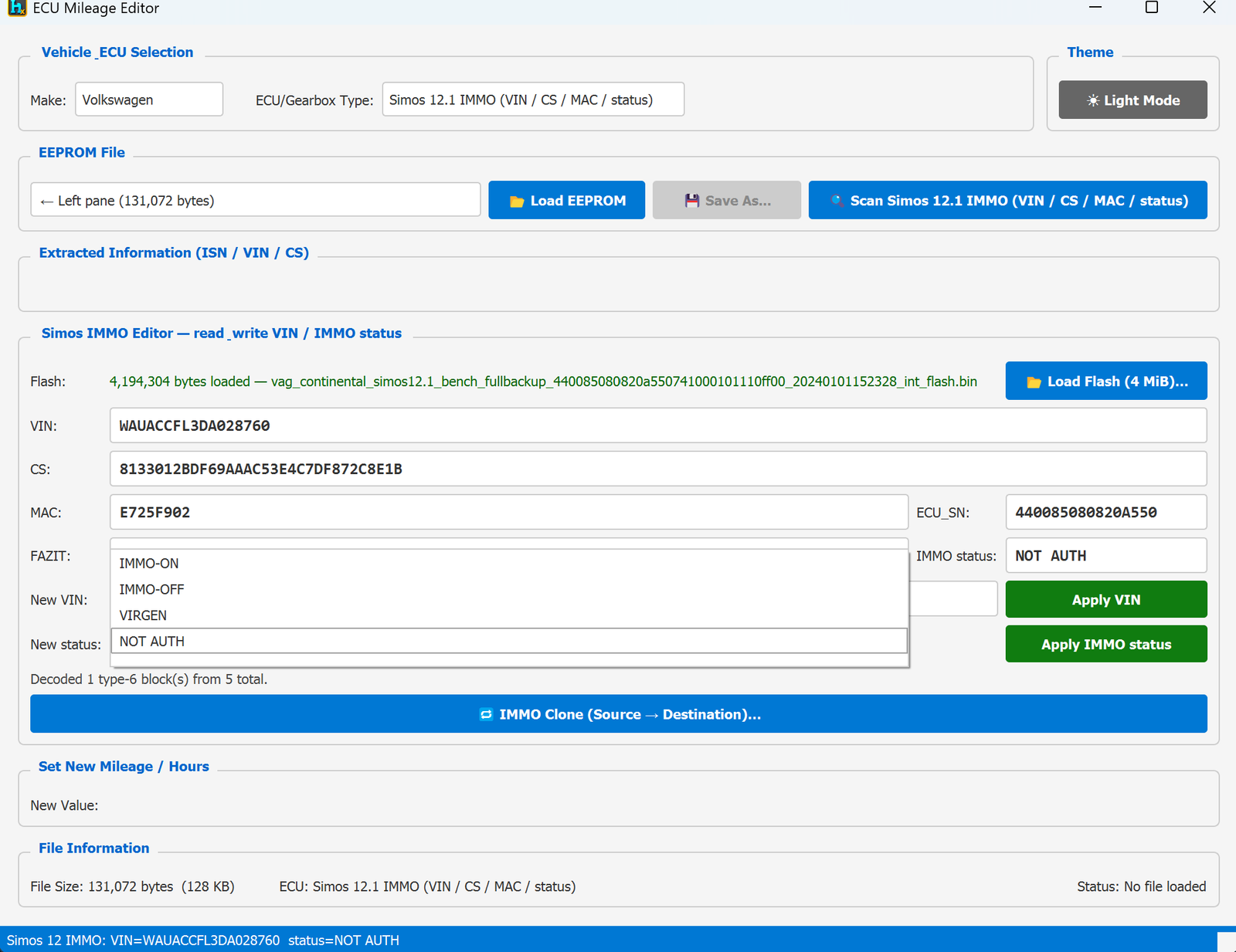
What is this?
Unlike the plain mileage scanners, this profile is a full Simos 12.1 IMMO Editor — it reads and writes the VIN, security checksum, MAC, ECU serial, and immobilizer status directly, and can even clone a car's immobilizer identity onto a donor ECU. Same tool and layout as the Simos 18.1 IMMO profile, just for Simos 12.1 hardware.
How to open it
From the main HexTool window: Tools → ECU Tools → ECU IMMO Mileage, selecting the Simos 12.1 IMMO (VIN / CS / MAC / status) profile.
Loading
- EEPROM: 131,072 bytes (128 KB) — smaller than Simos 18.1's 256 KB — loaded from the left pane or Load EEPROM.
- Load Flash (4 MiB)… — this profile also needs the ECU's full internal flash (4,194,304 bytes) to fully decode the IMMO blocks.
- Scan Simos 12.1 IMMO — decodes everything once both files are loaded (e.g. "Decoded 1 type-6 block(s) from 5 total").
Decoded / editable fields
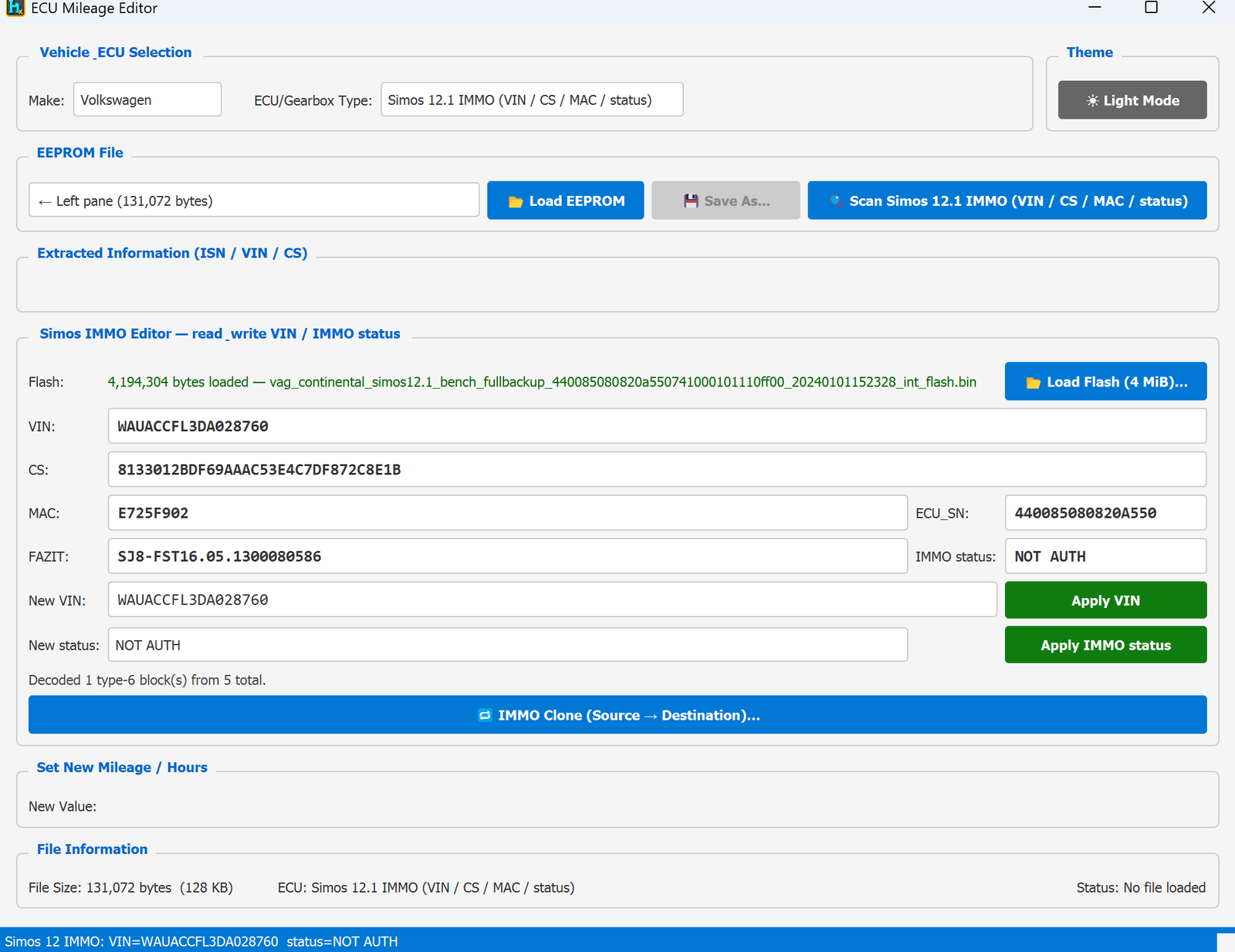
- VIN, CS (security checksum), MAC, ECU_SN (ECU serial), FAZIT (software/config string), and IMMO status.
- New VIN + Apply VIN — write a new VIN into the module.
- New status + Apply IMMO status — change the immobilizer state. Available values: IMMO-ON, IMMO-OFF, VIRGEN, NOT AUTH.
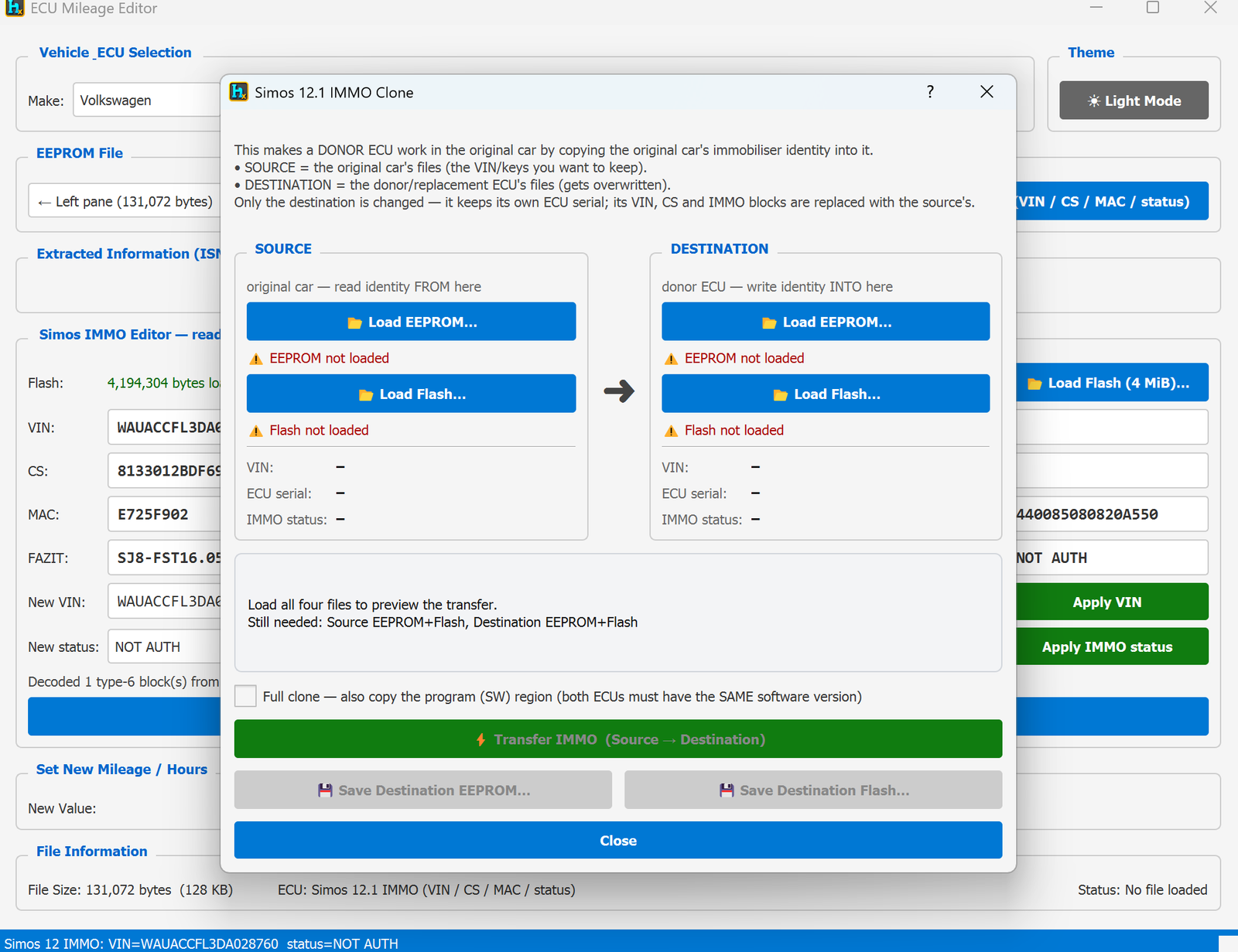
IMMO Clone (Source → Destination)
A guided dialog for making a donor ECU work in the original car by copying the original car's immobiliser identity into it:
- SOURCE = the original car's files (the VIN/keys you want to keep) — load its EEPROM and Flash.
- DESTINATION = the donor/replacement ECU's files (gets overwritten) — load its EEPROM and Flash too.
- Only the destination is changed — it keeps its own ECU serial; its VIN, CS and IMMO blocks are replaced with the source's.
- Full clone checkbox — optionally also copies the program (SW) region + EEPROM header, but only when both ECUs have the same software version.
- Transfer IMMO (Source → Destination) — performs the clone once all four files (Source EEPROM+Flash, Destination EEPROM+Flash) are loaded.
- Save Destination EEPROM… / Save Destination Flash… — save the resulting donor files, ready to write back to that ECU.
Typical use cases
- Reading a car's VIN/IMMO status directly from a Simos 12.1 ECU.
- Changing the IMMO status (e.g. VIRGEN for a blank/service unit).
- Making a used/donor Simos 12.1 ECU work in a different car by cloning the original car's immobiliser identity onto it.
Requirements
- A Simos 12.1 EEPROM dump (128 KB) and its matching 4 MiB flash dump.
- For IMMO Clone: EEPROM + Flash from both the original car (source) and the donor ECU (destination).
ECU Immo & Mileage / Simos 12.x Mileage
ECU Mileage Editor — Simos 12.x Mileage
Available in ProFullUltimate
What is this?
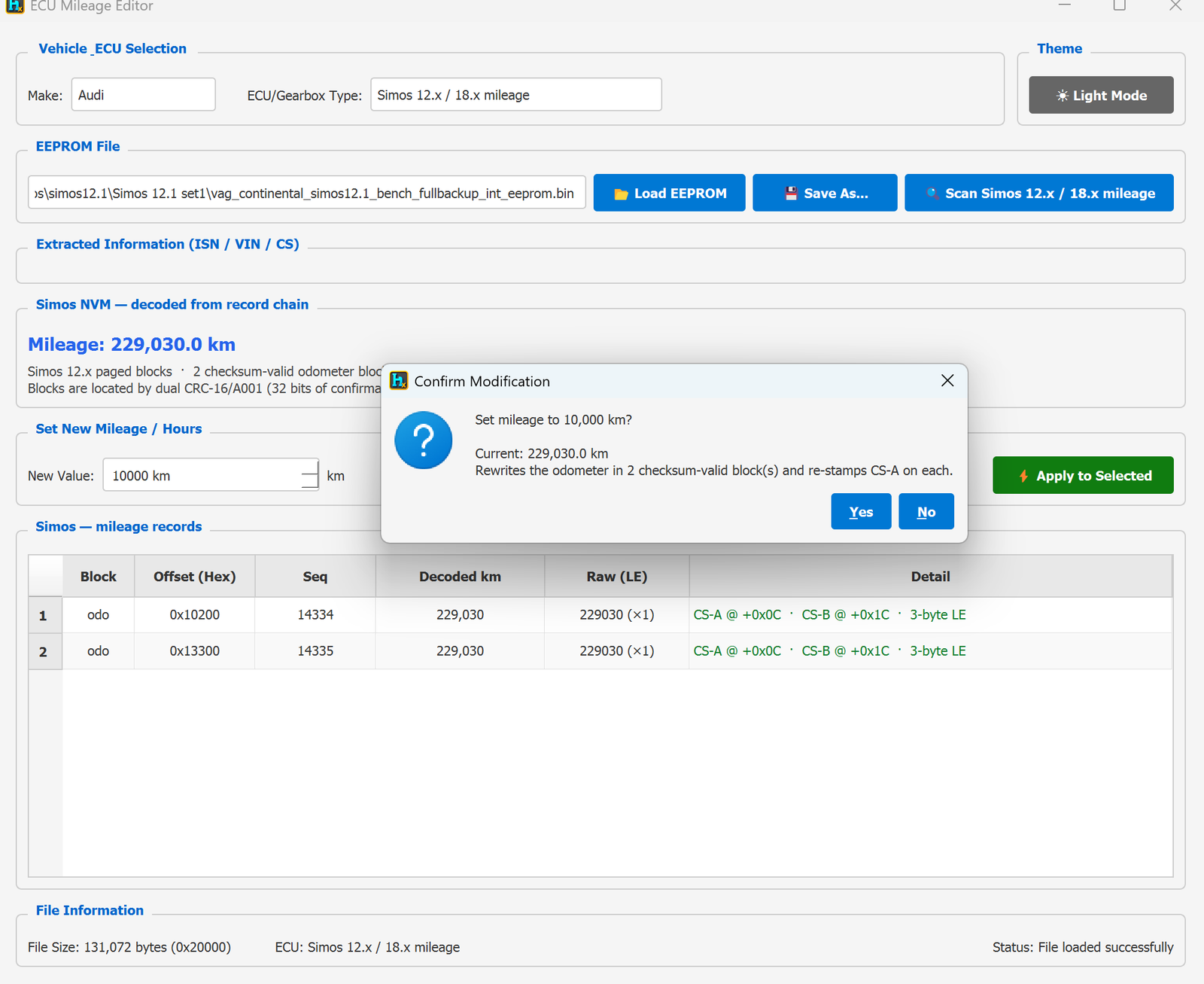
A single Simos 12.x / 18.x mileage profile that decodes the odometer straight from the record chain the moment you load the file — no known value to type in, and it works on any dump size. This replaces the old size-specific scanners (64 KB / 128 KB / 192 KB / 256 KB) that needed you to seed a known mileage. For Simos 12.x hardware it reads the paged NVM blocks.
How to open it
From the main HexTool window: Tools → ECU Tools → ECU IMMO Mileage, selecting the Simos 12.x / 18.x mileage profile.
How it works (Simos 12.x)
- Decoded on load — the current mileage is shown immediately under Simos NVM — decoded from record chain (e.g. 229,030.0 km); no scan seed required.
- Paged blocks — HexTool locates the checksum-valid odometer blocks (2 in the example) by a dual CRC-16/A001 pair — 32 bits of confirmation — so it only ever writes real blocks.
- Each block is a 3-byte little-endian value with two checksums — CS-A @ +0x0C and CS-B @ +0x1C — listed per row in the Simos — mileage records table (offset, seq, decoded km, raw).
- Any size — 64 KB / 128 KB Simos 12.x dumps are all handled by the same profile.
Setting a new mileage
- Load the Simos 12.x EEPROM dump (left pane or Load EEPROM) — the mileage decodes automatically.
- Type the New Value (km).
- Click Apply to Selected — it rewrites the odometer in every checksum-valid block and re-stamps CS-A on each, then Save As… or send to the right pane.
Requirements
- A Simos 12.x EEPROM dump (any size, e.g. 64 KB or 128 KB). No known mileage needed.
ECU Immo & Mileage / Simos 18.1 IMMO
ECU Mileage Editor — Simos 18.1 IMMO (VIN / CS / MAC / status)
Available in ProFullUltimate
What is this?
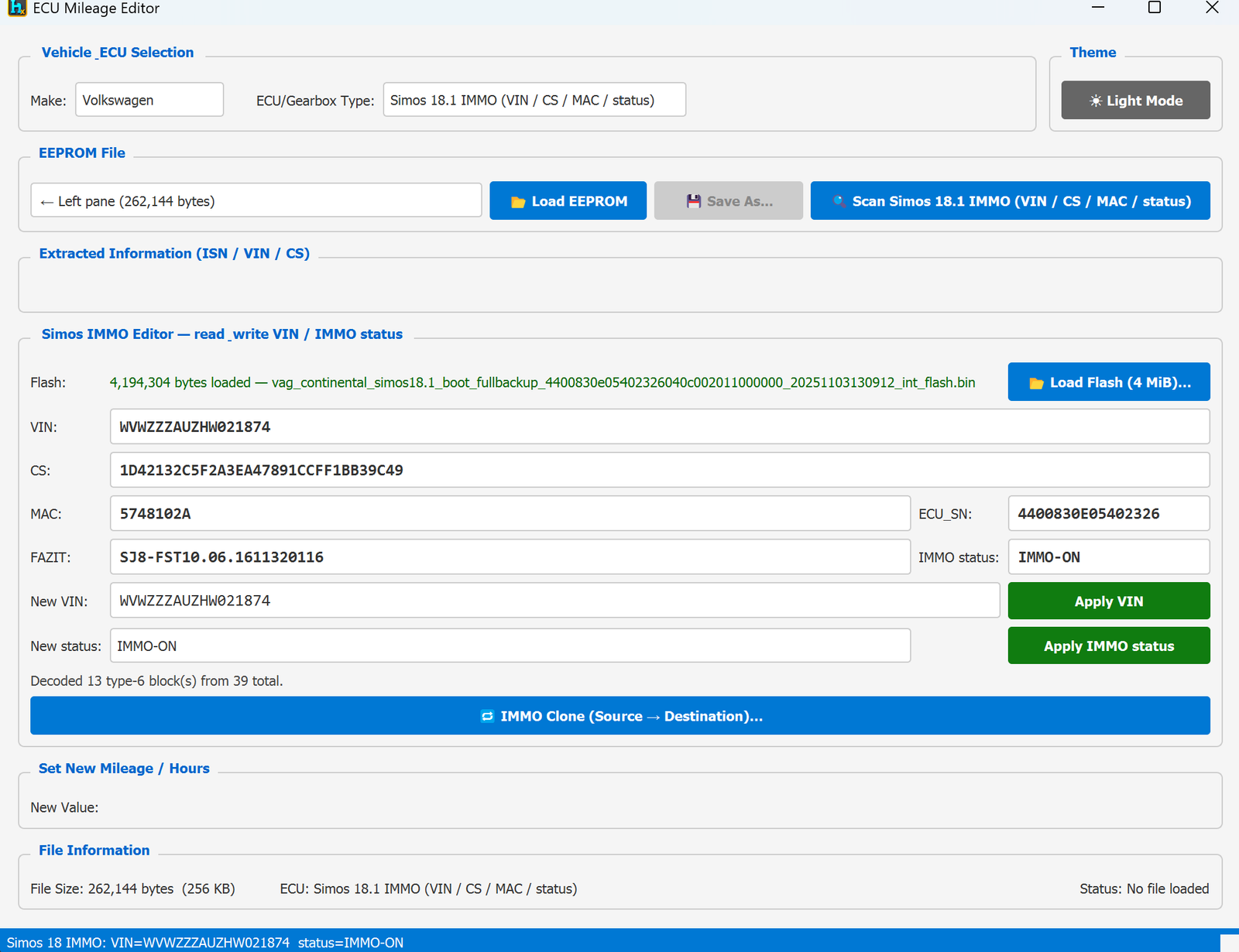
Unlike the plain mileage scanners, this profile is a full Simos 18.1 IMMO Editor: it reads and writes the VIN, security checksum, MAC, ECU serial, and immobilizer status directly, and can even clone a car's immobilizer identity onto a donor ECU.
How to open it
From the main HexTool window: Tools → ECU Tools → ECU IMMO Mileage, selecting the Simos 18.1 IMMO (VIN / CS / MAC / status) profile.
Loading
- EEPROM: 262,144 bytes (256 KB), loaded from the left pane or Load EEPROM.
- Load Flash (4 MiB)… — this profile also needs the ECU's full internal flash (4,194,304 bytes) to fully decode the IMMO blocks.
- Scan Simos 18.1 IMMO — decodes everything once both files are loaded (e.g. "Decoded 13 type-6 block(s) from 39 total").
Decoded / editable fields
- VIN, CS (security checksum), MAC, ECU_SN (ECU serial), FAZIT (software/config string), and IMMO status.
- New VIN + Apply VIN — write a new VIN into the module.
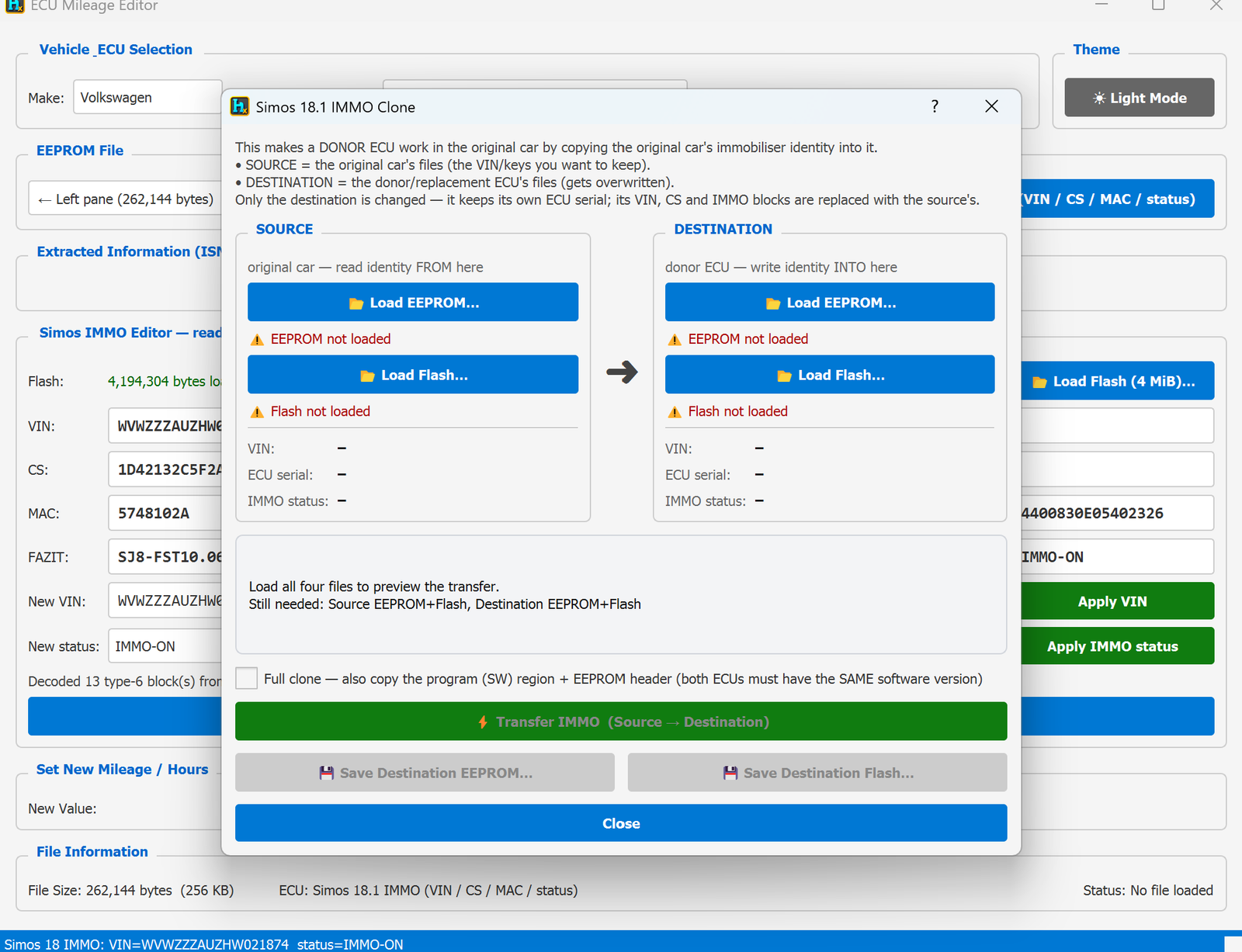
- New status + Apply IMMO status — change the immobilizer state. Available values: IMMO-ON, IMMO-OFF, VIRGEN, NOT AUTH.
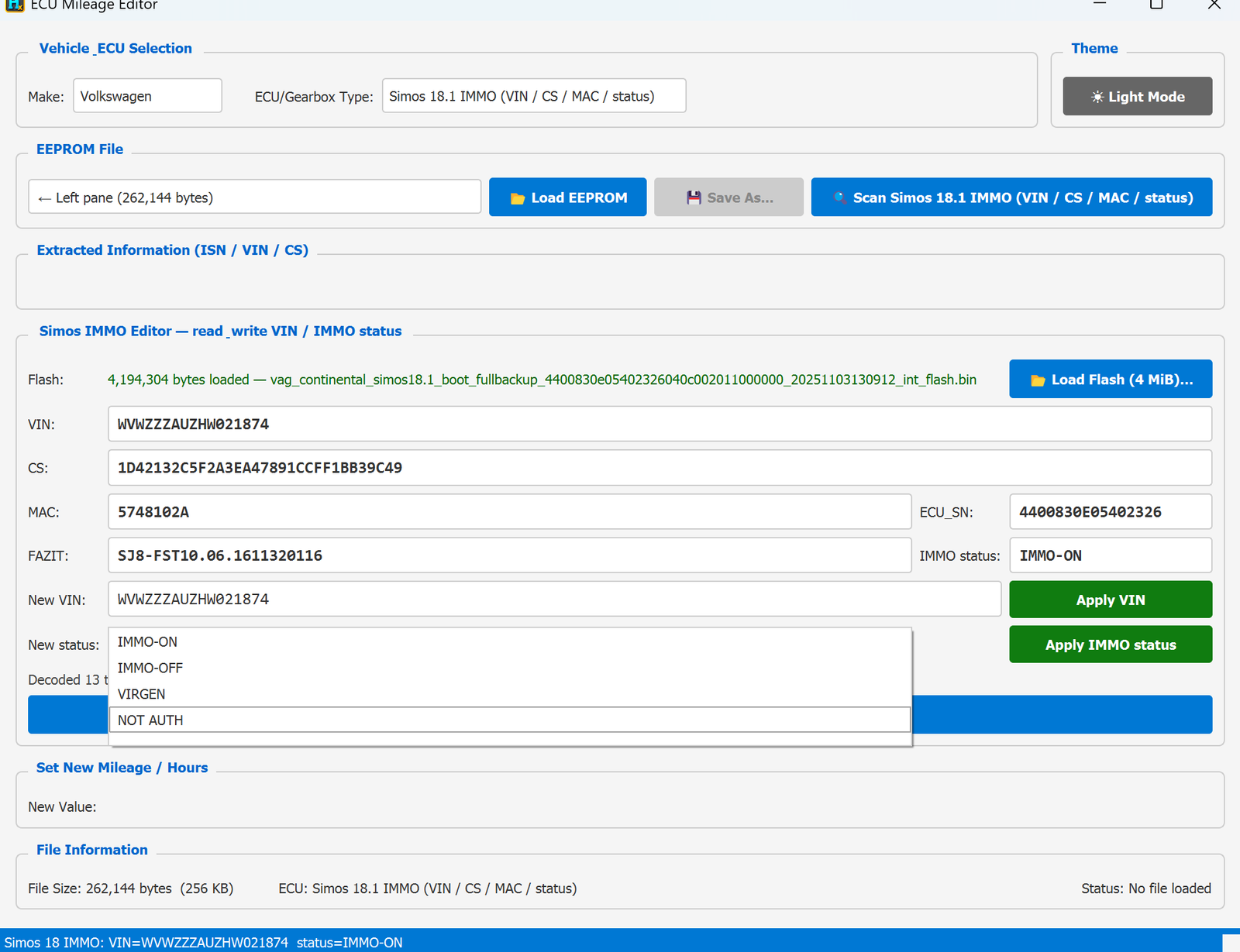
IMMO Clone (Source → Destination)
A guided dialog for making a donor ECU work in the original car by copying the original car's immobiliser identity into it:
- SOURCE = the original car's files (the VIN/keys you want to keep) — load its EEPROM and Flash.
- DESTINATION = the donor/replacement ECU's files (gets overwritten) — load its EEPROM and Flash too.
- Only the destination is changed — it keeps its own ECU serial; its VIN, CS and IMMO blocks are replaced with the source's.
- Full clone checkbox — optionally also copies the program (SW) region + EEPROM header, but only when both ECUs have the same software version.
- Transfer IMMO (Source → Destination) — performs the clone once all four files (Source EEPROM+Flash, Destination EEPROM+Flash) are loaded.
- Save Destination EEPROM… / Save Destination Flash… — save the resulting donor files, ready to write back to that ECU.
Typical use cases
- Reading a car's VIN/IMMO status directly from a Simos 18.1 ECU.
- Changing the IMMO status (e.g. VIRGEN for a blank/service unit).
- Making a used/donor Simos 18.1 ECU work in a different car by cloning the original car's immobiliser identity onto it.
Requirements
- A Simos 18.1 EEPROM dump (256 KB) and its matching 4 MiB flash dump.
- For IMMO Clone: EEPROM + Flash from both the original car (source) and the donor ECU (destination).
ECU Immo & Mileage / Simos 18.x Mileage
ECU Mileage Editor — Simos 18.x Mileage
Available in ProFullUltimate
What is this?
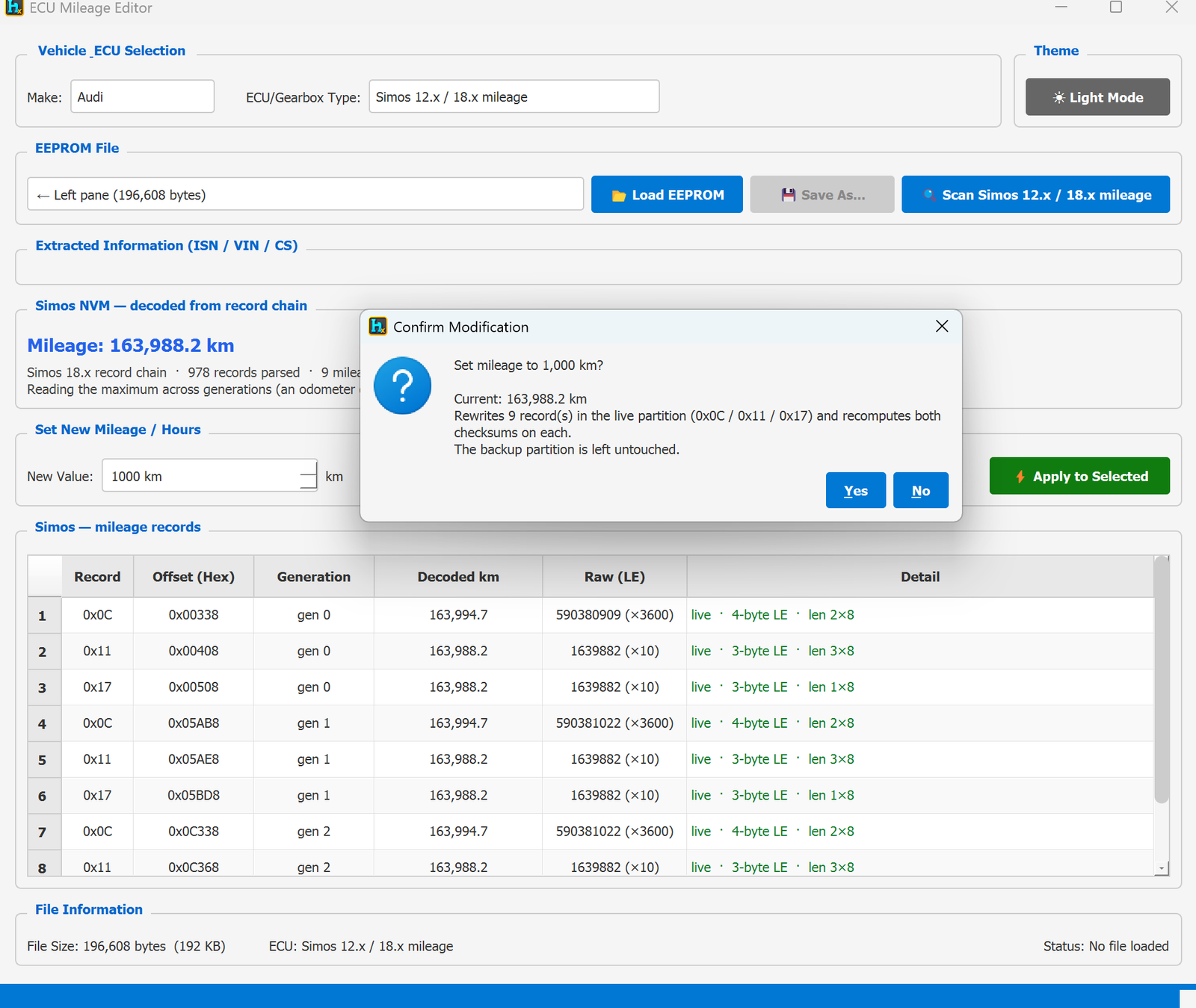
The same Simos 12.x / 18.x mileage profile, on Simos 18.x hardware. It decodes on load with no known value and handles any dump size (192 KB / 256 KB) — replacing the old per-size scanners. For 18.x it walks the module's record chain rather than fixed offsets.
How to open it
From the main HexTool window: Tools → ECU Tools → ECU IMMO Mileage, selecting the Simos 12.x / 18.x mileage profile.
How it works (Simos 18.x)
- Record chain — HexTool parses every record in the NVM (e.g. 978 records parsed) and isolates the mileage records (e.g. 9).
- Max across generations — the odometer only ever counts up, so the current value is read as the maximum across all generations (e.g. 163,988.2 km), which is immune to stale copies.
- Live vs backup partition — records live in a live partition at offsets 0x0C / 0x11 / 0x17 across generations, with mixed encodings shown per row (4-byte LE ×3600, 3-byte LE ×10, etc.) in the Simos — mileage records table.
Setting a new mileage
- Load the Simos 18.x EEPROM dump (left pane or Load EEPROM) — the mileage decodes automatically.
- Type the New Value (km).
- Click Apply to Selected — it rewrites the live-partition records and recomputes both checksums on each; the backup partition is left untouched. Then Save As… or send to the right pane.
Requirements
- A Simos 18.x EEPROM dump (any size, e.g. 192 KB or 256 KB). No known mileage needed.
ECU Immo & Mileage / DQ250 MQB Gearbox
ECU Mileage Editor — DQ250 MQB Gearbox
Available in ProFullUltimate
What is this?
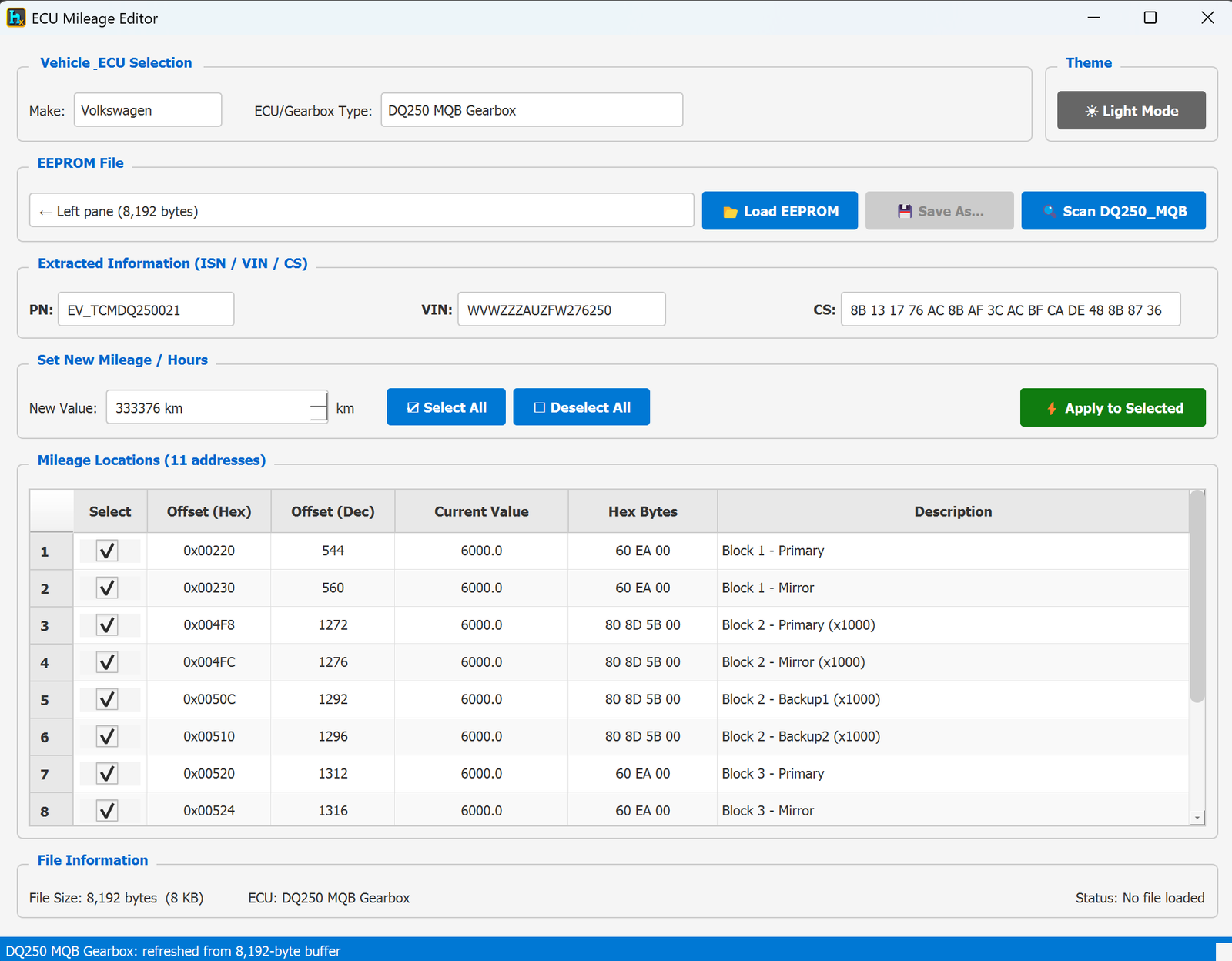
The ECU Mileage Editor covers several VAG Simos DME profiles alongside the BMW ones. This profile targets the DQ250 MQB gearbox (DSG/TCM) module — it decodes the part number, VIN and security checksum, and lets you correct the mileage stored across all of the module's redundant blocks.
How to open it
From the main HexTool window: Tools → ECU Tools → ECU IMMO Mileage, selecting the DQ250 MQB Gearbox profile.
What you can do with it
- File size: 8,192 bytes (8 KB).
- Scan DQ250_MQB decodes:
- PN — part number (e.g.
EV_TCMDQ250021)
- VIN
- CS — security checksum
- Mileage Locations: 11 addresses — the DQ250 stores mileage redundantly across three blocks, each with primary/mirror copies (and Block 2 also has two extra backup copies):
- Block 1 — Primary, Mirror
- Block 2 — Primary, Mirror, Backup1, Backup2 (all stored ×1000)
- Block 3 — Primary, Mirror
- (plus further entries beyond the visible rows, for 11 total)
- All locations are ticked by default so Apply to Selected updates every copy consistently in one click, regardless of which blocks store a raw value vs. a ×1000-scaled one — HexTool handles the scaling per row.
Typical workflow
- Load the DQ250 EEPROM dump (left pane or Load EEPROM).
- Click Scan DQ250_MQB to decode PN/VIN/CS and populate all 11 mileage locations.
- Type the New Value (km).
- Leave all locations selected (or adjust with Select All / Deselect All).
- Click Apply to Selected, then Save As… or send to the right pane.
Requirements
- A DQ250 MQB gearbox EEPROM dump (8 KB).
ECU Immo & Mileage / DQ200 MQB Gearbox
ECU Mileage Editor — DQ200 MQB Gearbox
Available in ProFullUltimate
What is this?
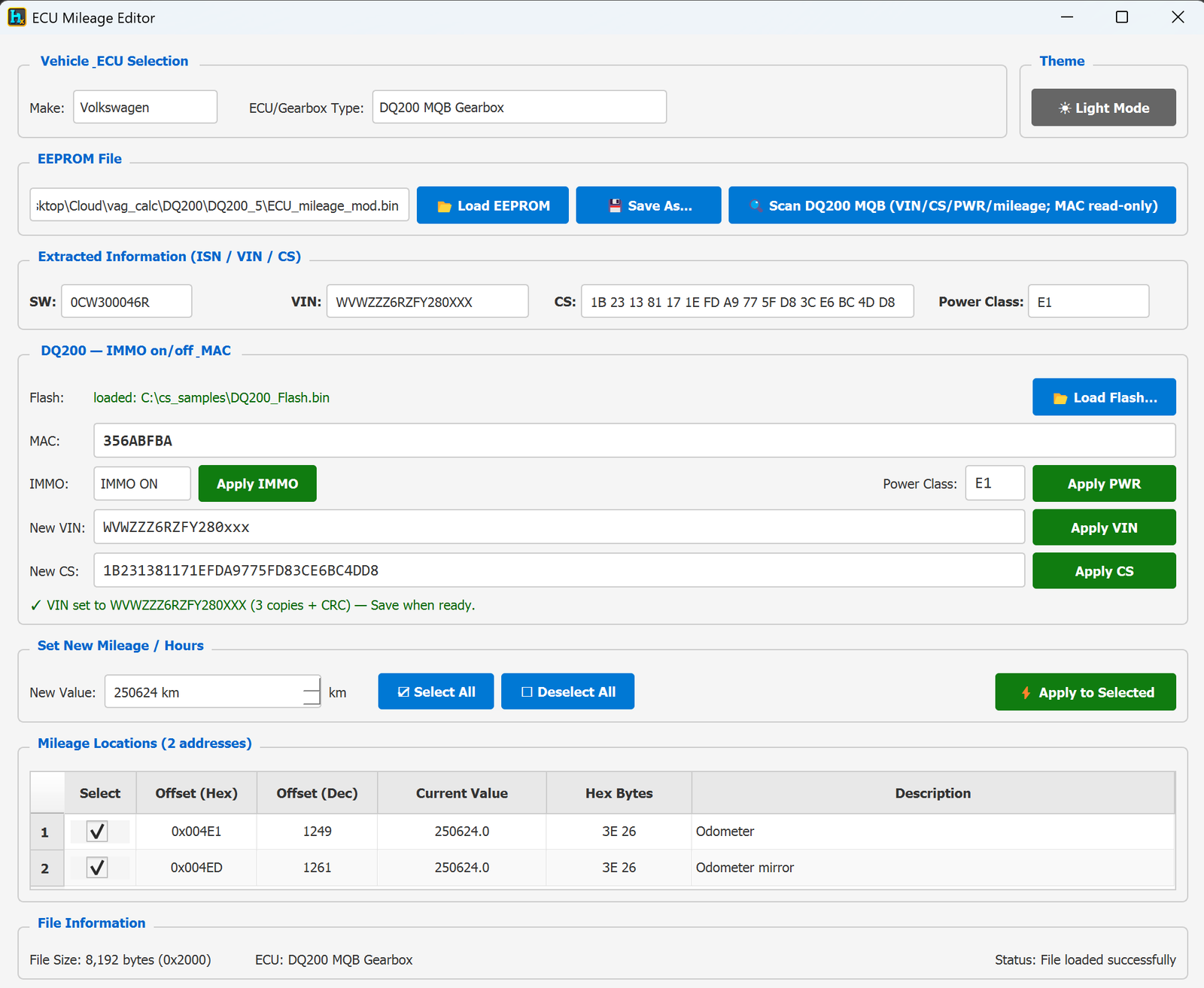
This profile of the ECU Mileage Editor targets the VW DQ200 MQB gearbox (DSG/TCM) module. From the 8 KB EEPROM it decodes the software/part number, VIN, security checksum (CS) and power class, corrects the mileage across both odometer copies, and — with the flash loaded — switches the gearbox IMMO on/off and rewrites VIN, CS and power class.
How to open it
From the main HexTool window: Tools → ECU Tools → ECU IMMO Mileage, selecting the DQ200 MQB Gearbox profile.
What you can do with it
- File size: 8,192 bytes (8 KB) EEPROM. The gearbox flash dump is loaded separately (Load Flash…) only when you want the IMMO on/off and MAC features.
- Scan DQ200 MQB (VIN / CS / PWR / mileage; MAC read-only) decodes:
- SW — software / part number (e.g.
0CW300046R)
- VIN
- CS — 16-byte security checksum
- Power Class (e.g.
E1)
- IMMO on/off & MAC — once the flash is loaded, HexTool reads the MAC (read-only) and lets you flip IMMO ON / OFF with Apply IMMO.
- Write-back — edit the value and apply it independently:
- New VIN → Apply VIN (writes all 3 copies + CRC)
- New CS → Apply CS
- Power Class → Apply PWR
- Mileage Locations: 2 addresses — Odometer at
0x004E1 (dec 1249) and Odometer mirror at 0x004ED (dec 1261). Both are ticked by default, so Apply to Selected updates the value and its mirror together in one click.
Typical workflow
- Load the DQ200 EEPROM dump (left pane or Load EEPROM). For IMMO on/off, also Load Flash….
- Click Scan DQ200 MQB to decode SW / VIN / CS / power class and populate the two mileage locations.
- Do the edit(s) you need — type the New Value (km) and Apply to Selected for mileage, and/or Apply VIN / Apply CS / Apply PWR / Apply IMMO.
- Click Save As… or send to the right pane. Save the flash separately if you changed IMMO.
Requirements
- A DQ200 MQB gearbox EEPROM dump (8 KB).
- The matching flash dump as well, if you want to use IMMO on/off (the MAC is read from the flash and is read-only).
🛠️
Coming soon
This guide is being written and will be published here soon. Check back shortly — documentation is added regularly.
Need help with this module now? Contact us.