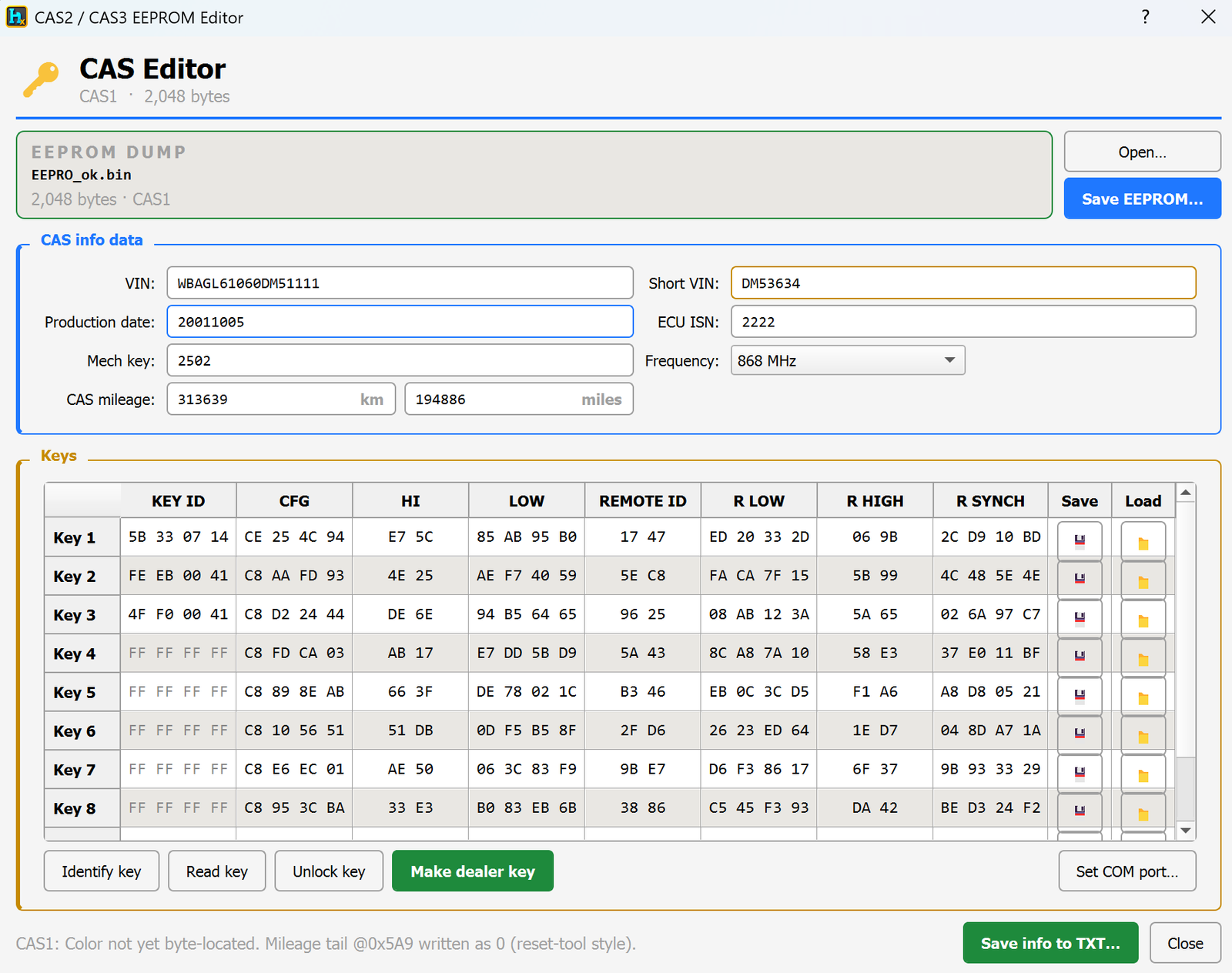
CAS1 is the early BMW car access system module (used before CAS2/CAS3). It stores the car's VIN, mileage, remote key data and immobilizer info in a small EEPROM memory chip. HexTool reads that chip dump and shows everything in one screen so you can view, fix or reprogram it.
What you can do with it
Open a CAS1 EEPROM dump (read from the chip with your programmer) and see the car's info decoded automatically — no manual searching through hex.
Read and edit the VIN stored in the module — correct it directly in the field, e.g. after a module swap or when the VIN doesn't match the car.
View and change the mileage recorded inside the CAS module.
View the Mech key and RF frequency of the car (needed for key matching / ordering the correct remote).
Manage up to 10 remote keys:
See which key slots are used and which are empty (FF FF FF FF = empty slot).
Identify key — check which slot a physical key belongs to.
Read key — pull the data from a key placed on the reader.
Unlock key — remove the immobilizer lock from a key so it can be reused or re-learned.
Make dealer key — create/program a new working key for the car.
Save a full text report of all decoded info with one click.
Save the edited EEPROM back to a file, ready to write back to the chip.
Typical use cases
Adding a new remote key to a car that already has some keys used up.
Recovering a car when all keys are lost (using an empty/unlocked slot).
Fixing a VIN mismatch after replacing a CAS module with one from another car.
Correcting mileage after a module replacement or repair.
Requirements
A CAS1 EEPROM dump (2 KB file) read out with a compatible programmer.
The HexTool Programmer (connected via COM port) is required to program/write keys — set it with Set COM port… before using Identify / Read / Unlock / Make dealer key.
Note: color coding for the CAS1 unit isn't identified yet, so it won't show in this version — everything else works normally.
BMW Tools / CAS2 Editor
CAS2 Editor
Available in ProFullUltimate
What is CAS2?
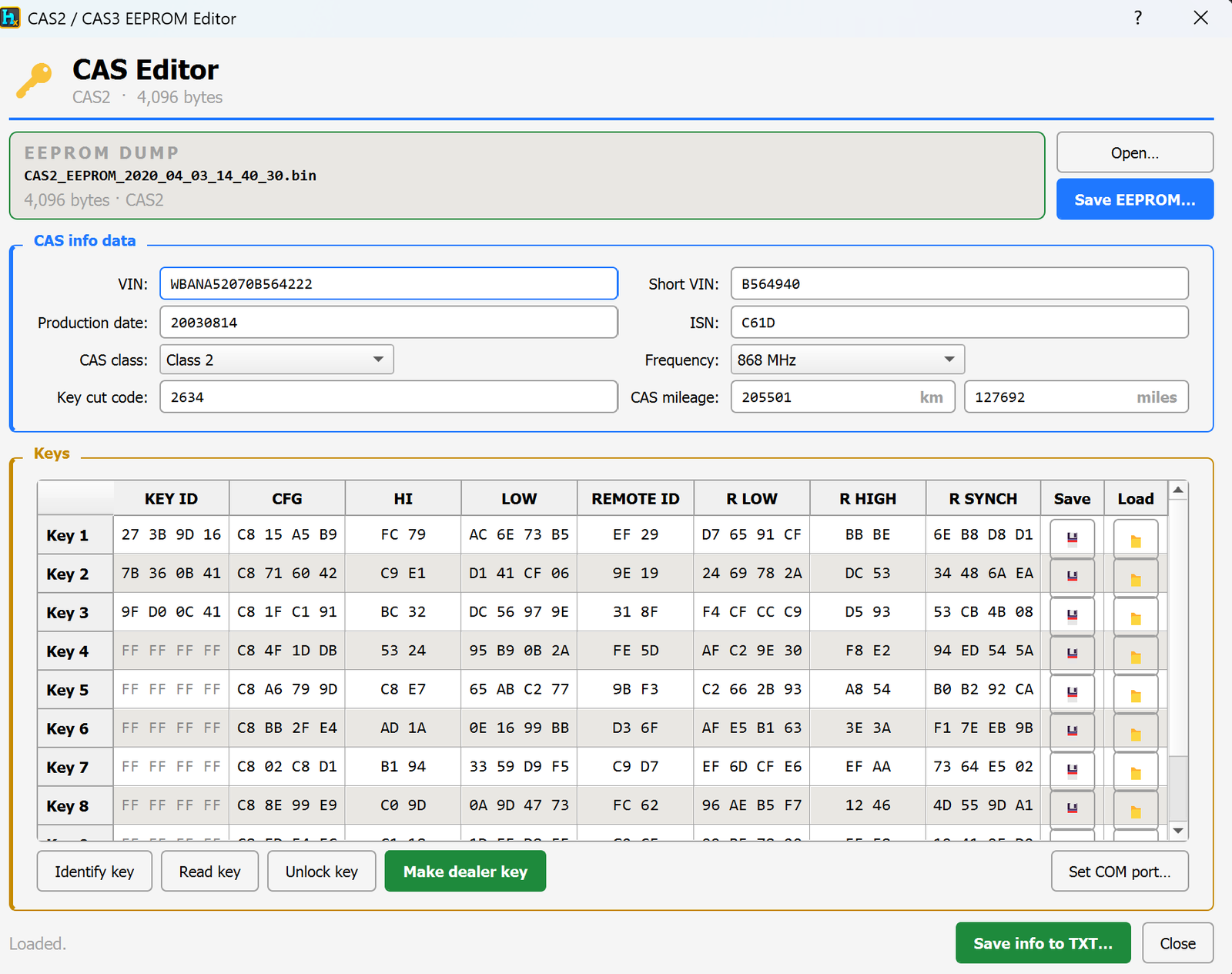
CAS2 is a BMW car access system module. It stores the car's VIN, mileage, remote key data and immobilizer info in a small EEPROM memory chip. HexTool reads that chip dump and shows everything in one screen so you can view, fix or reprogram it.
What you can do with it
Open a CAS2 EEPROM dump (read from the chip with your programmer) and see the car's info decoded automatically — no manual searching through hex.
Read and edit the VIN stored in the module — correct it directly in the field, e.g. after a module swap or when the VIN doesn't match the car.
View and change the mileage recorded inside the CAS module.
View the Mech key and RF frequency of the car (needed for key matching / ordering the correct remote).
Manage up to 10 remote keys:
See which key slots are used and which are empty (FF FF FF FF = empty slot).
Identify key — check which slot a physical key belongs to.
Read key — pull the data from a key placed on the reader.
Unlock key — remove the immobilizer lock from a key so it can be reused or re-learned.
Make dealer key — create/program a new working key for the car.
Save a full text report of all decoded info with one click.
Save the edited EEPROM back to a file, ready to write back to the chip.
Typical use cases
Adding a new remote key to a car that already has some keys used up.
Recovering a car when all keys are lost (using an empty/unlocked slot).
Fixing a VIN mismatch after replacing a CAS module with one from another car.
Correcting mileage after a module replacement or repair.
Requirements
A CAS2 EEPROM dump read out with a compatible programmer.
The HexTool Programmer (connected via COM port) is required to program/write keys — set it with Set COM port… before using Identify / Read / Unlock / Make dealer key.
BMW Tools / CAS3 Editor (0L10Y)
CAS3 Editor (0L10Y)
Available in ProFullUltimate
What is CAS3?
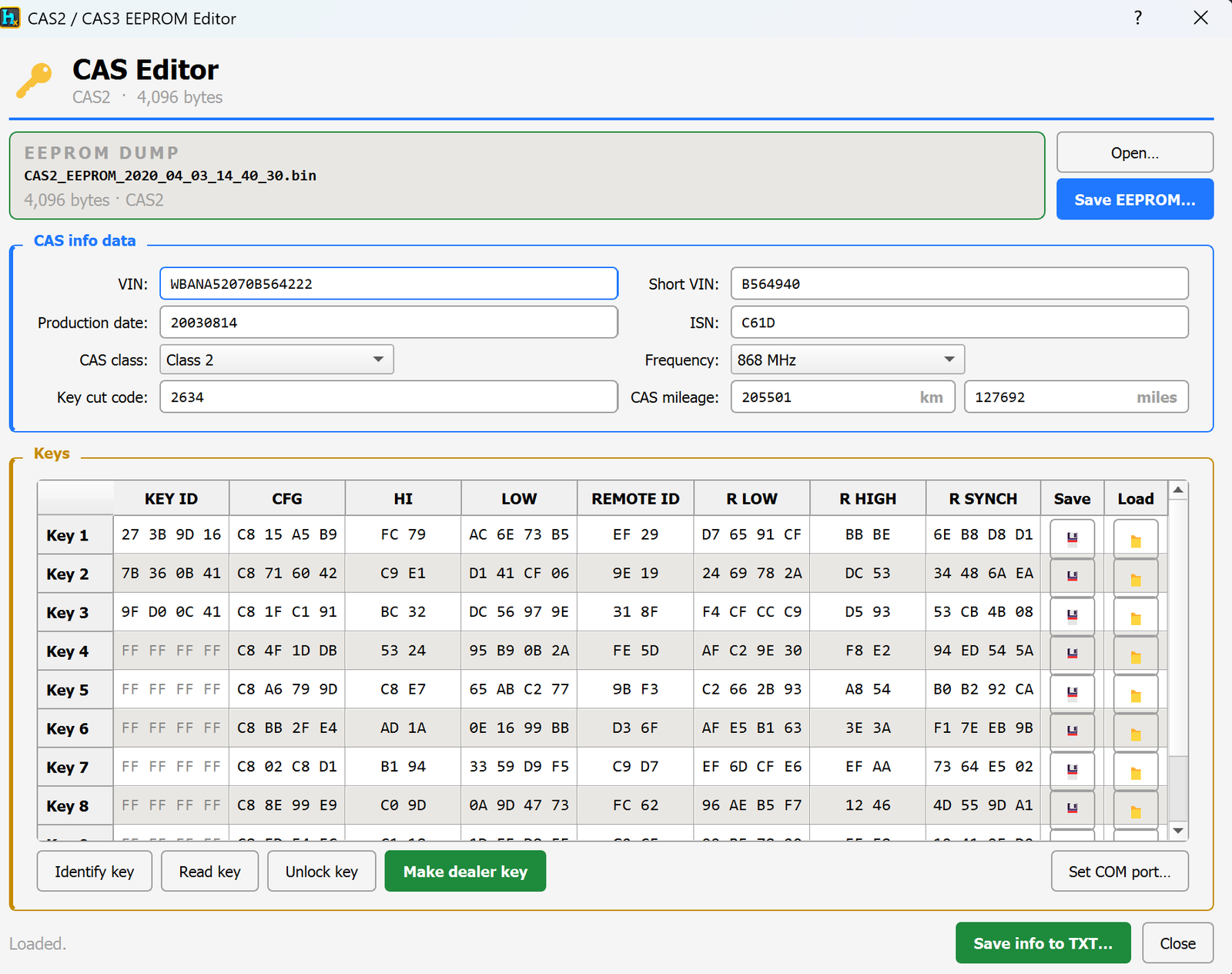
CAS3 is a BMW car access system module. It stores the car's VIN, mileage, remote key data and immobilizer info in a small EEPROM memory chip. HexTool reads that chip dump and shows everything in one screen so you can view, fix or reprogram it.
What you can do with it
Open a CAS3 EEPROM dump (read from the chip with your programmer) and see the car's info decoded automatically — no manual searching through hex.
Read and edit the VIN stored in the module — correct it directly in the field, e.g. after a module swap or when the VIN doesn't match the car.
View and change the mileage recorded inside the CAS module.
View the Mech key and RF frequency of the car (needed for key matching / ordering the correct remote).
Manage up to 10 remote keys:
See which key slots are used and which are empty (FF FF FF FF = empty slot).
Identify key — check which slot a physical key belongs to.
Read key — pull the data from a key placed on the reader.
Unlock key — remove the immobilizer lock from a key so it can be reused or re-learned.
Make dealer key — create/program a new working key for the car.
Save a full text report of all decoded info with one click.
Save the edited EEPROM back to a file, ready to write back to the chip.
Typical use cases
Adding a new remote key to a car that already has some keys used up.
Recovering a car when all keys are lost (using an empty/unlocked slot).
Fixing a VIN mismatch after replacing a CAS module with one from another car.
Correcting mileage after a module replacement or repair.
Requirements
A CAS3 EEPROM dump read out with a compatible programmer.
The HexTool Programmer (connected via COM port) is required to program/write keys — set it with Set COM port… before using Identify / Read / Unlock / Make dealer key.
BMW Tools / CAS3 Editor (0L15Y)
CAS3 Editor (0L15Y)
Available in ProFullUltimate
Video walkthrough
What is CAS3?
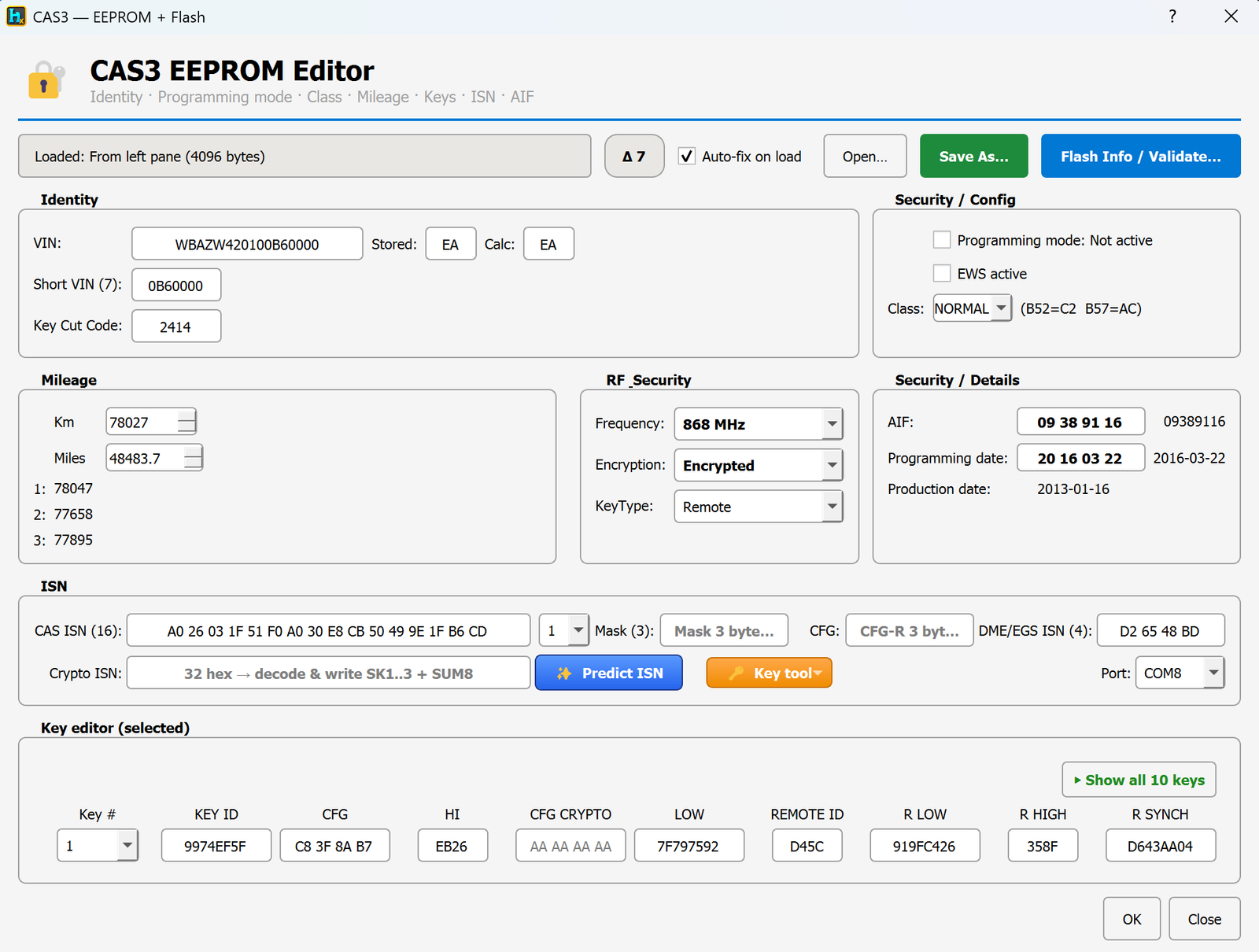
CAS3 is the BMW car access system used on E-series models (E90, E60, E70…). It's the module that holds the car's VIN, immobilizer secret (ISN), mileage, remote keys and programming state. HexTool reads a 4 KB EEPROM dump from the module and gives you one screen to check and fix everything on it.
How to open it
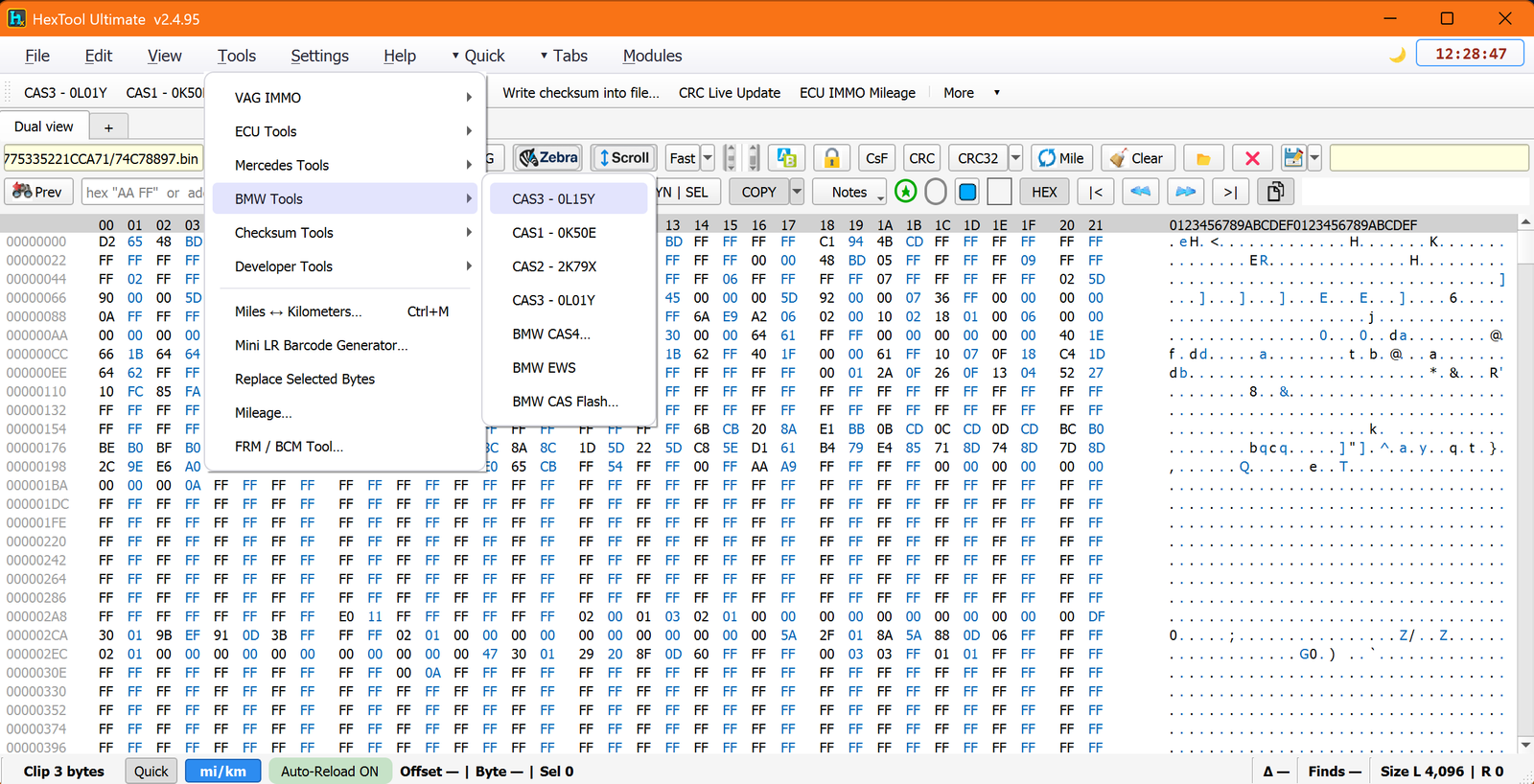
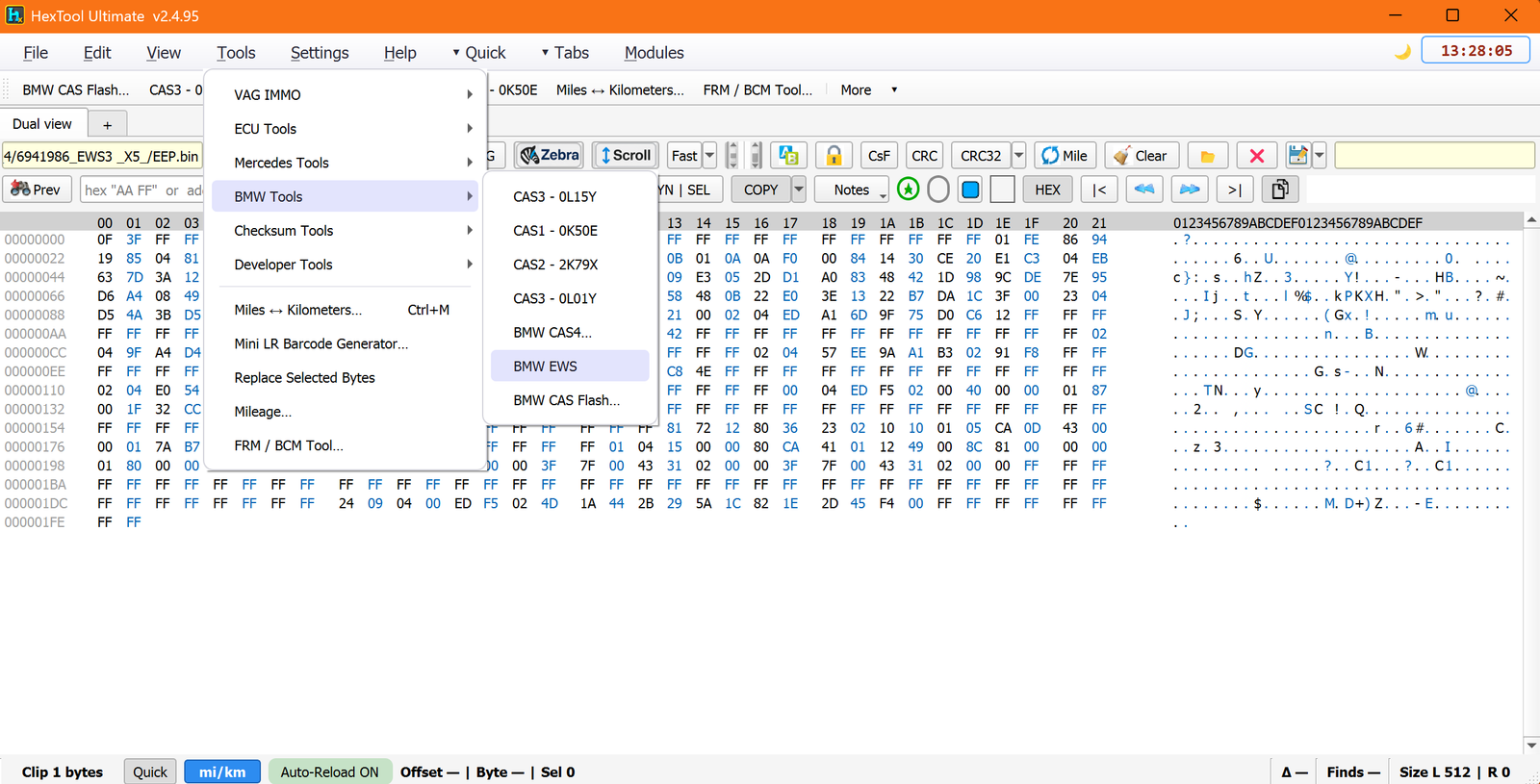
You can load a CAS3 dump straight from the main HexTool window: go to Tools → BMW Tools → CAS3 - 0L15Y and the editor opens using the file already loaded in the pane. No need to leave the main hex view first.
What you can do with it
Identity
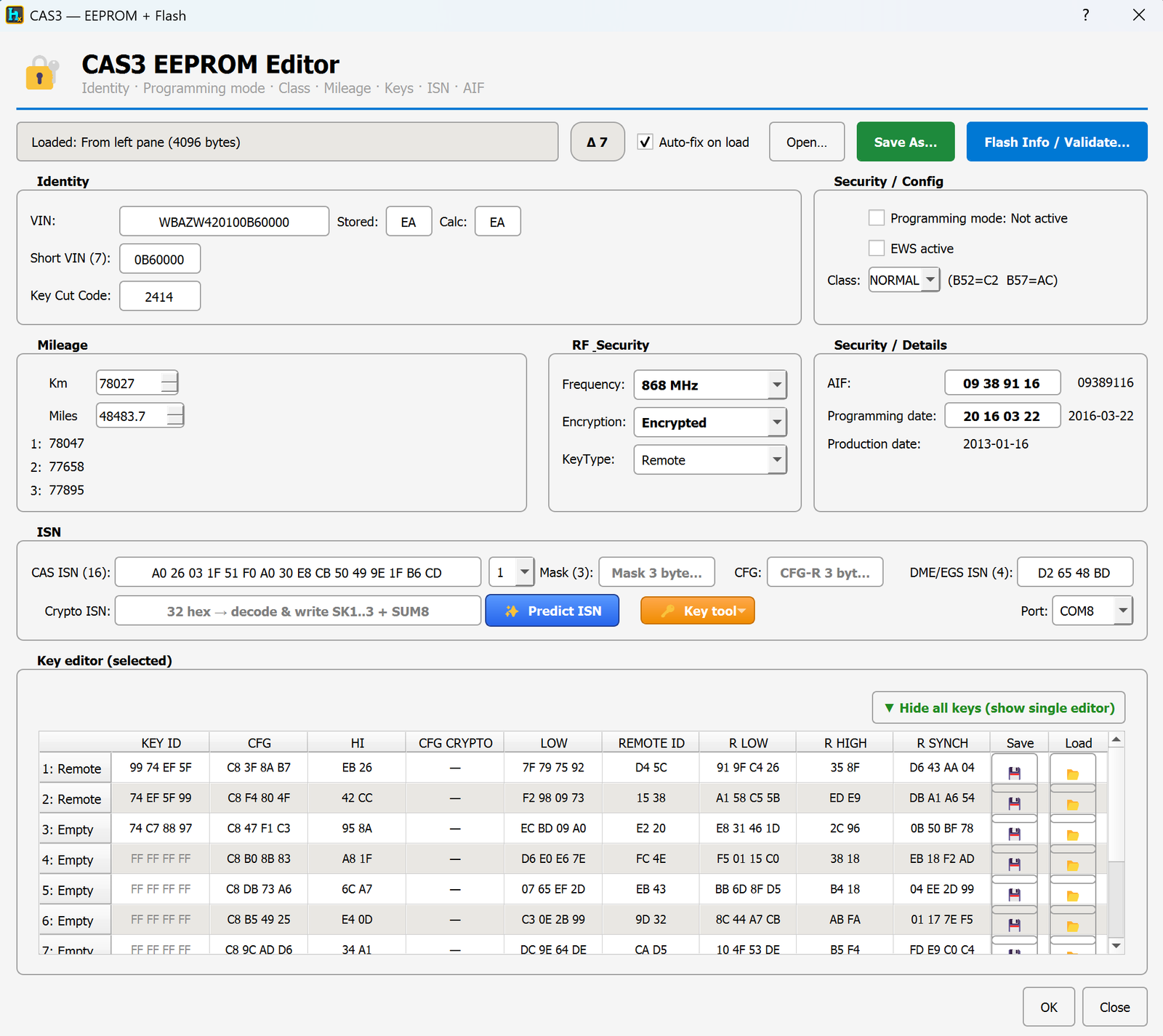
View and fix the VIN — the module stores both the VIN and a checksum byte; if they don't match (module swap, corruption) the editor shows Stored vs Calculated and lets you recalculate/repair it in one click.
Short VIN and Key Cut Code are shown alongside for reference when ordering/cutting a new key.
Programming mode & security state
Auto-fix wizard — when the editor detects the module is stuck in programming mode on load, it offers a one-click wizard that repairs the EEPROM and validates the flash for corruption automatically.
Fix "Programming mode" — clear the flag so the car isn't stuck in service/programming mode.
Toggle EWS active state.
Change the security Class (NORMAL / C2 / AC) if the car needs a different class to match its DME/EWS.
Mileage
Reset mileage in all 4 stored locations at once (the CAS3 keeps the current km plus 3 backup copies) — useful after a repair when the values get out of sync.
RF / key settings
Change remote frequency (868 MHz, 434 MHz, etc.)
Change encryption mode (Encrypted / Plain) and Key Type (Remote / Fixed code, etc.) to match the actual keys used on the car.
ISN (immobilizer secret)
Replace the ISN, encrypted or plain, and push it into the DME/EGS ISN field so the ECU and CAS agree again.
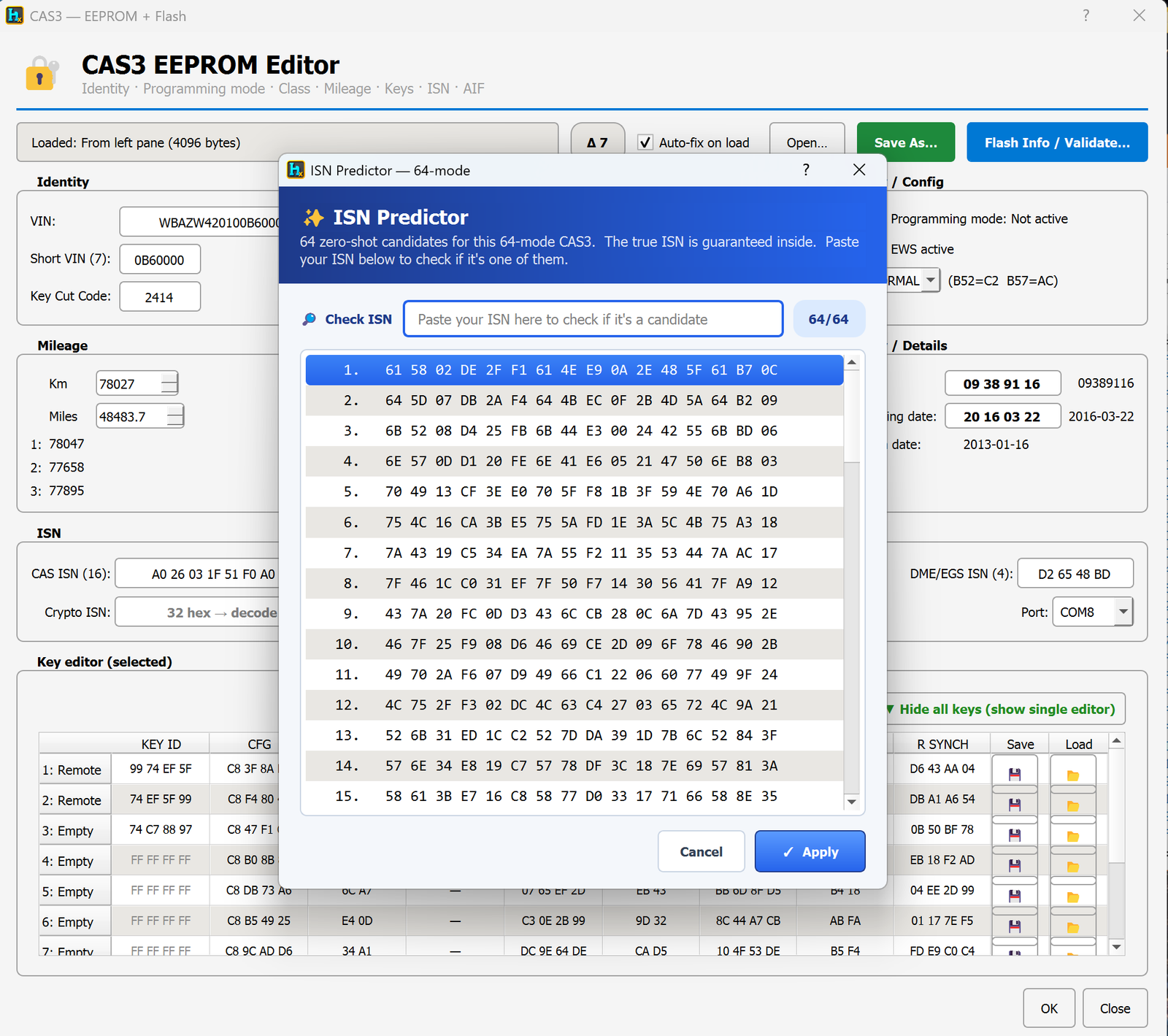
Predict ISN — for encrypted (64-mode) CAS3 units, generates the full set of candidate ISNs for the module; the correct one is guaranteed to be in the list, so you paste a known-good ISN to confirm which candidate matches, then apply it.
Decode the real ISN from a working key — if you still have one working key, its data can be used to recover the true ISN for the car (requires the key reader hardware connected).
Decode ISN by pasting key config or mask — advanced recovery path for when you have partial key data instead of a full working key (also requires the reader hardware).
AIF (needed for ELV-free flashing)
Edit the AIF value — this is what lets the module be flashed using free/ELV-independent flashing software instead of requiring the original ELV unit to be present.
Keys
Edit each key's data directly in the key table (Key ID, CFG, HI, LOW, Remote ID, R LOW/HIGH, R SYNCH…).
Expandable key list — by default you see a single selected key editor; click Show all 10 keys to expand the full table and edit/save/load any slot individually.
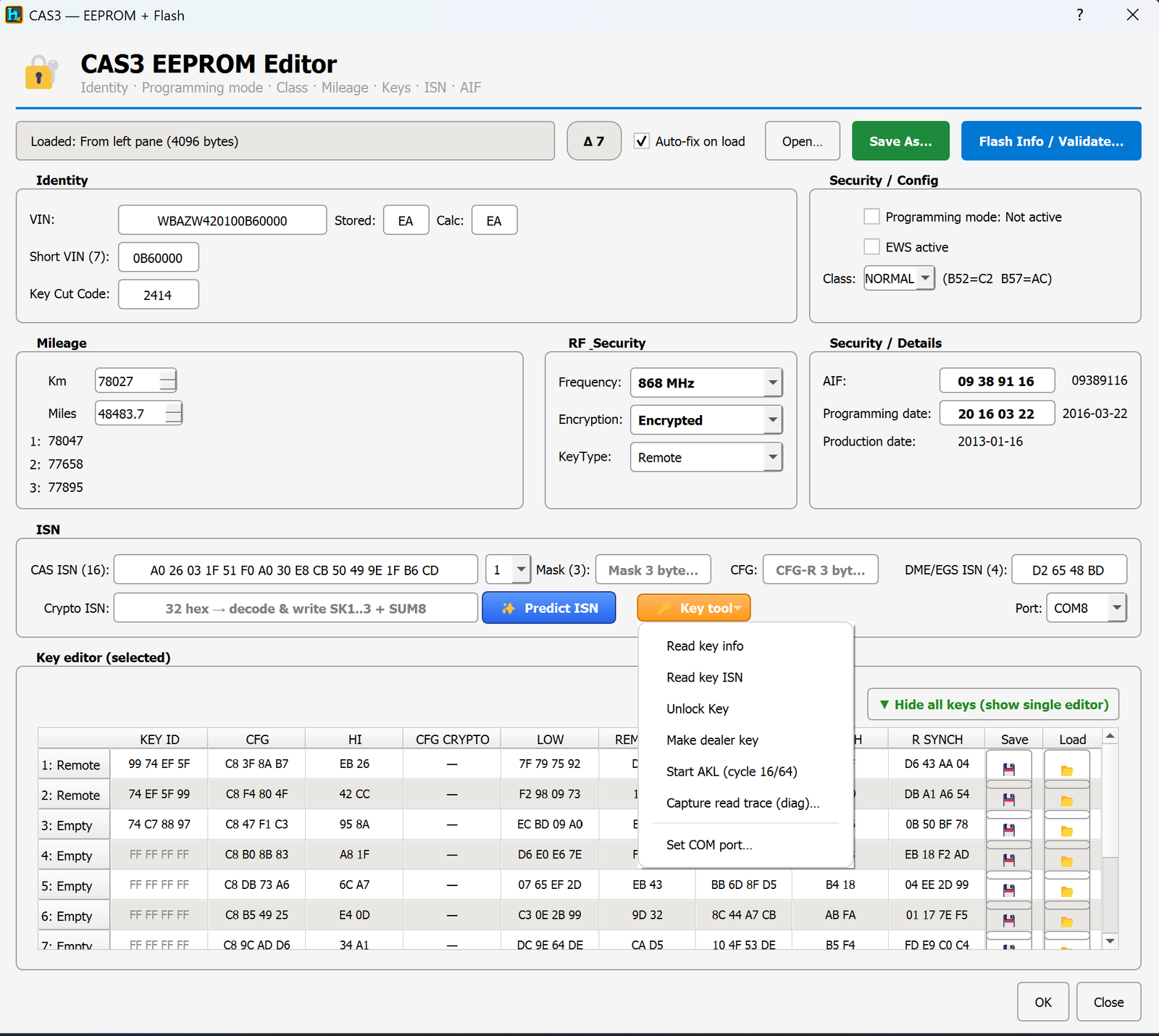
Key tool menu (hardware required) — right next to Predict ISN:
Read key info / Read key ISN — pull data straight off a key on the reader.
Unlock Key — remove the immobilizer lock so a key can be reused.
Make dealer key — program a fresh working key for the car.
Capture read trace (diag) — capture a diagnostic trace for advanced troubleshooting.
Typical use cases
All keys lost — predict the ISN, then AKL/program a new dealer key.
Adding a spare key to a car that already has keys in use.
Fixing a VIN mismatch or stuck programming mode after a module swap.
Preparing a module for flashing with free/ELV-independent flash tools by correcting the AIF.
Resetting mileage consistently across all 4 stored copies after a repair.
Requirements
A CAS3 EEPROM dump (4 KB file), loaded from disk or straight from the HexTool hex pane.
The HexTool Programmer connected via COM port for any key-reading, unlocking, or dealer-key-programming actions.
BMW Tools / CAS4 / CAS4+ Editor
CAS4 / CAS4+ Editor
Available in ProFullUltimate
What is CAS4?
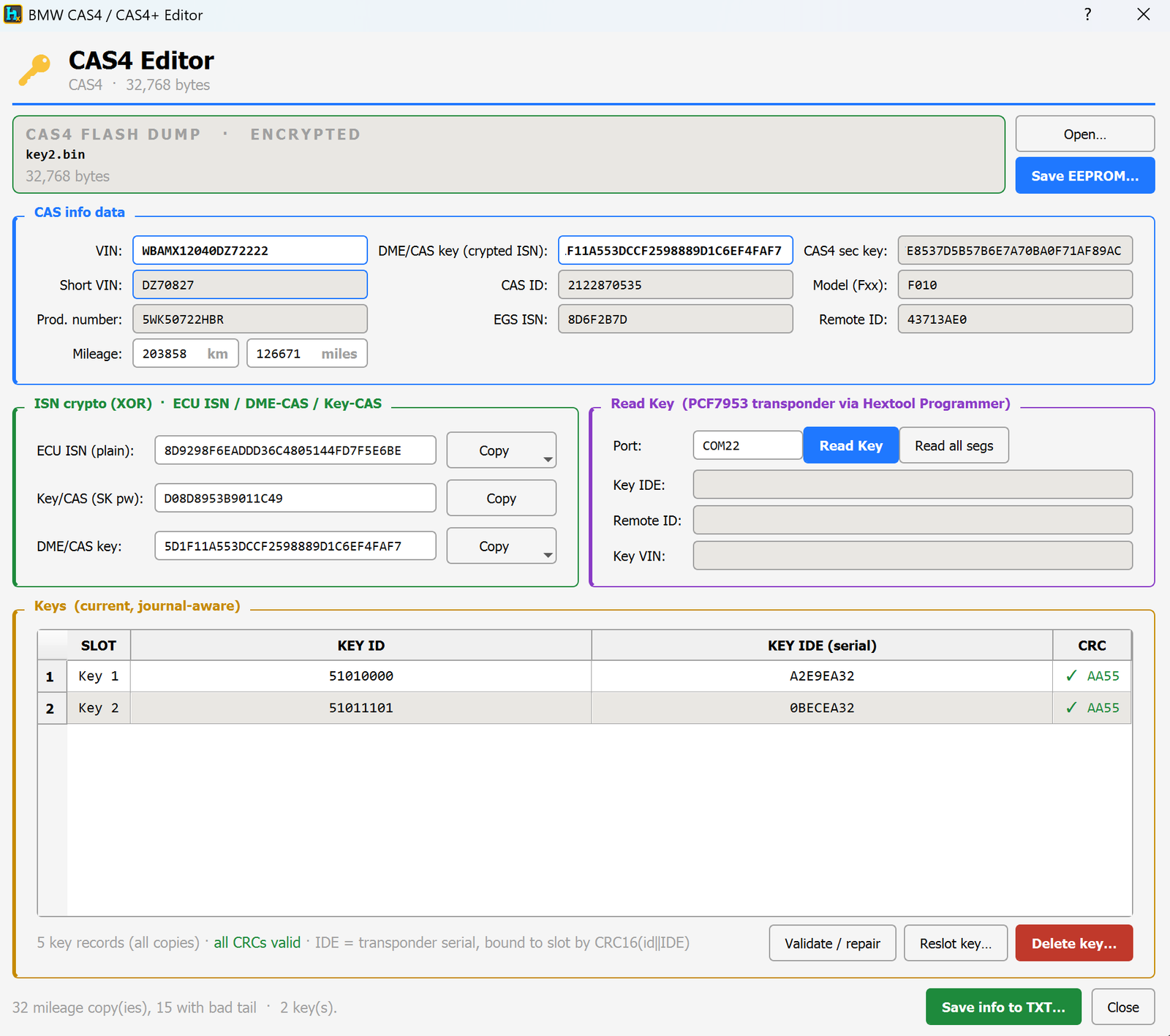
CAS4 (and CAS4+) is BMW's car access system used on newer F-series models. It stores the VIN, the immobilizer secret (ISN), the CAS security key, mileage, and the car's remote keys in a 32 KB flash dump. HexTool decodes all of it in one screen and lets you repair or reprogram it.
Supported masks:5M48H and 1N35H — 32 KB D-Flash dumps.
How to open it
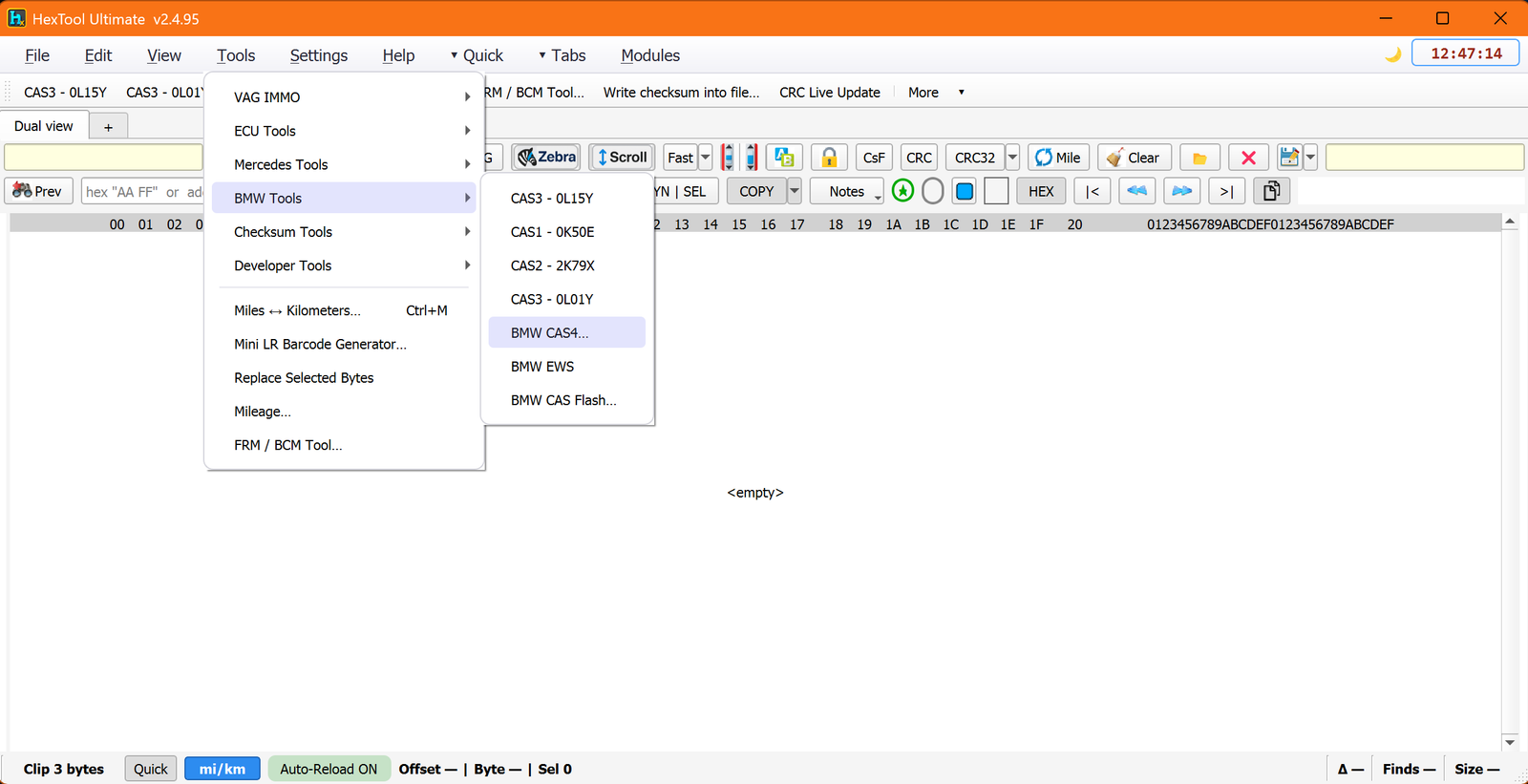
From the main HexTool window: Tools → BMW Tools → BMW CAS4… — it loads straight from the file/pane you have open, so there's no separate "open file" step needed first.
What you can do with it
Identity
View and replace the VIN, Short VIN, production number, CAS ID, EGS ISN, model (Fxx) and Remote ID at a glance.
View and reset the mileage in km/miles.
ISN & keys decryption
Decrypt the ISN two ways:
From the Key/CAS password (SK pw)
From the DME/CAS key (crypted ISN)
Either path reveals the plain ECU ISN so it can be checked or reused.
Replace the ISN, encrypted or plain — write a new working ISN back into the CAS4 so it matches the DME/EGS again.
Keys table
View all key slots (Key 1, Key 2…) with their Key ID, Key IDE (the transponder serial), and a CRC validity check per row.
Fix a key slot's checksum — if a slot's CRC shows invalid, the editor recalculates and repairs it.
Reslot keys — move a key's data to a different slot number without losing its data (handy when slots get out of order or a key needs to move to slot 1).
Calculate ISN checksum and calculate keys checksum — regenerate the checksums that validate the ISN and key data after any manual edit, so the module accepts the change.
Delete key — remove an unused/lost key slot.
Validate / repair — one-click check across all key records and mileage copies, flags anything invalid.
Read a physical key (hardware required)
With the HexTool Programmer connected, you can scan a key directly: it reads the Key IDE, Remote ID, and decodes the VIN and ISN stored on the key itself — useful to confirm a spare key actually belongs to this car before adding it.
Mileage
Smart mileage scan — automatically finds all the mileage copies stored across the flash (CAS4 keeps many backup copies) instead of you having to locate them by hand.
Fix a broken mileage checksum — the status bar flags copies with a bad tail/checksum (e.g. "32 mileage copies, 15 with bad tail") and the editor repairs them so the displayed mileage is trusted by the car again.
Typical use cases
Recovering the true ISN when the DME and CAS4 have gone out of sync.
Adding, moving, or removing a remote key without breaking the other slots.
Confirming a spare/donor key really matches the car before programming it.
Cleaning up mileage after a repair where some backup copies were left with bad checksums.
Requirements
A CAS4 flash dump (32 KB file), encrypted or plain — supported masks 5M48H and 1N35H (32 KB D-Flash).
The HexTool Programmer for reading data directly off a physical key.
BMW Tools / BMW CAS Flash Recovery
BMW CAS Flash Recovery
Available in ProFullUltimate
What is this?
This is the CAS3 flash-side companion to the CAS3 EEPROM editor. Where the CAS3 Editor works on the small EEPROM (VIN, keys, ISN…), this tool works on the much bigger 512 KB flash chip that holds the module's firmware — checking it's the correct, uncorrupted flash for the car, and fixing it if not.
How to open it
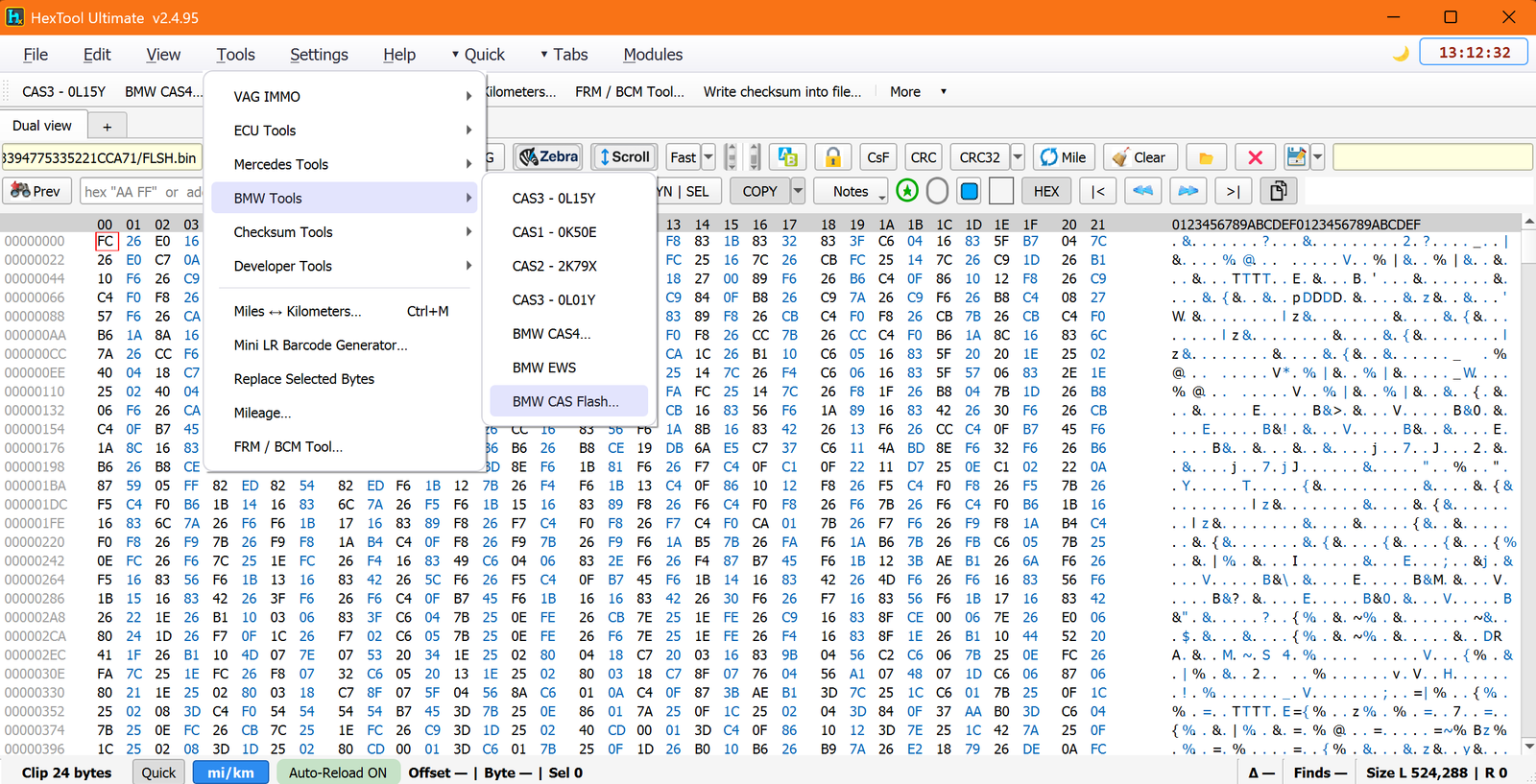
From the main HexTool window: Tools → BMW Tools → BMW CAS Flash…
What you can do with it
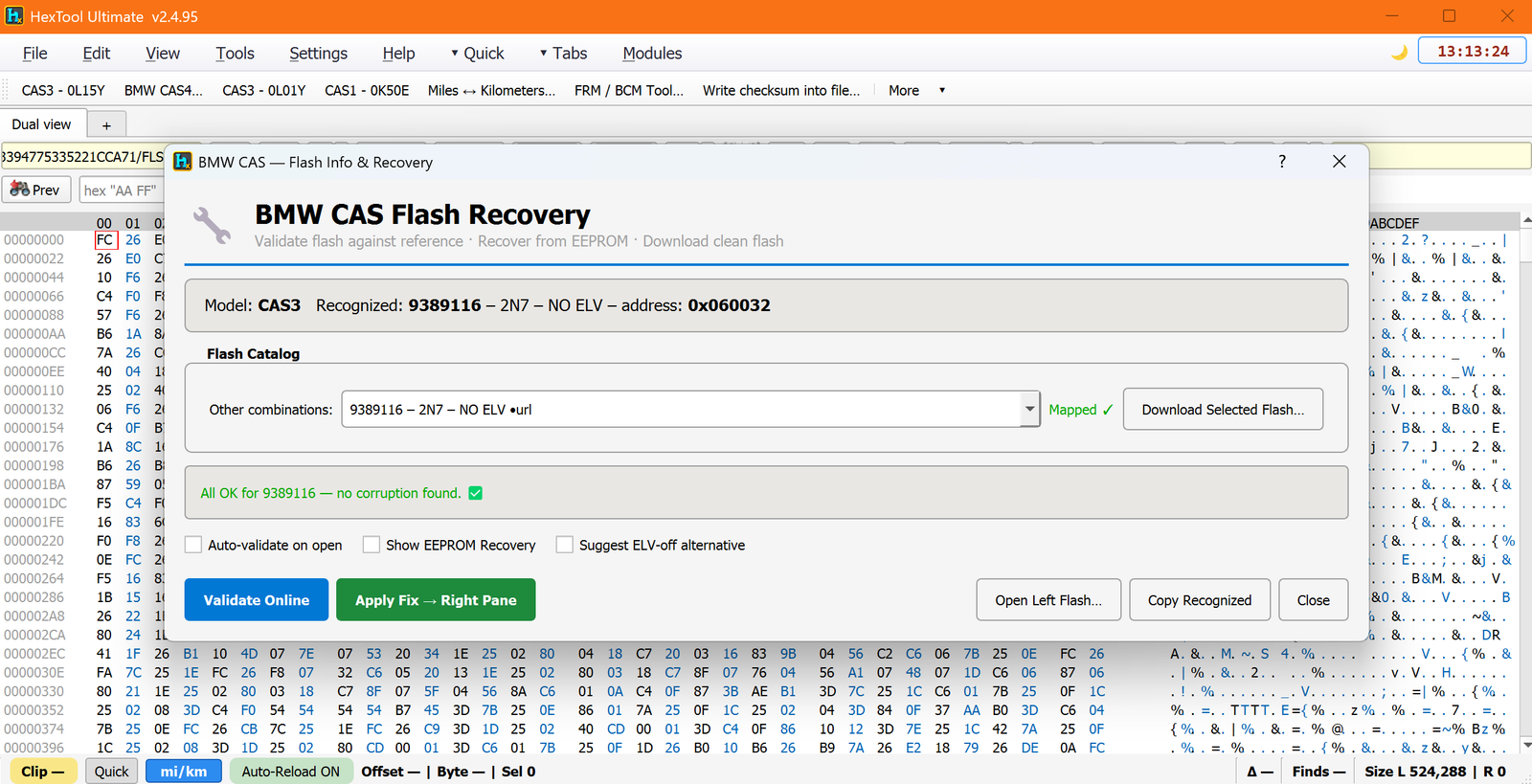
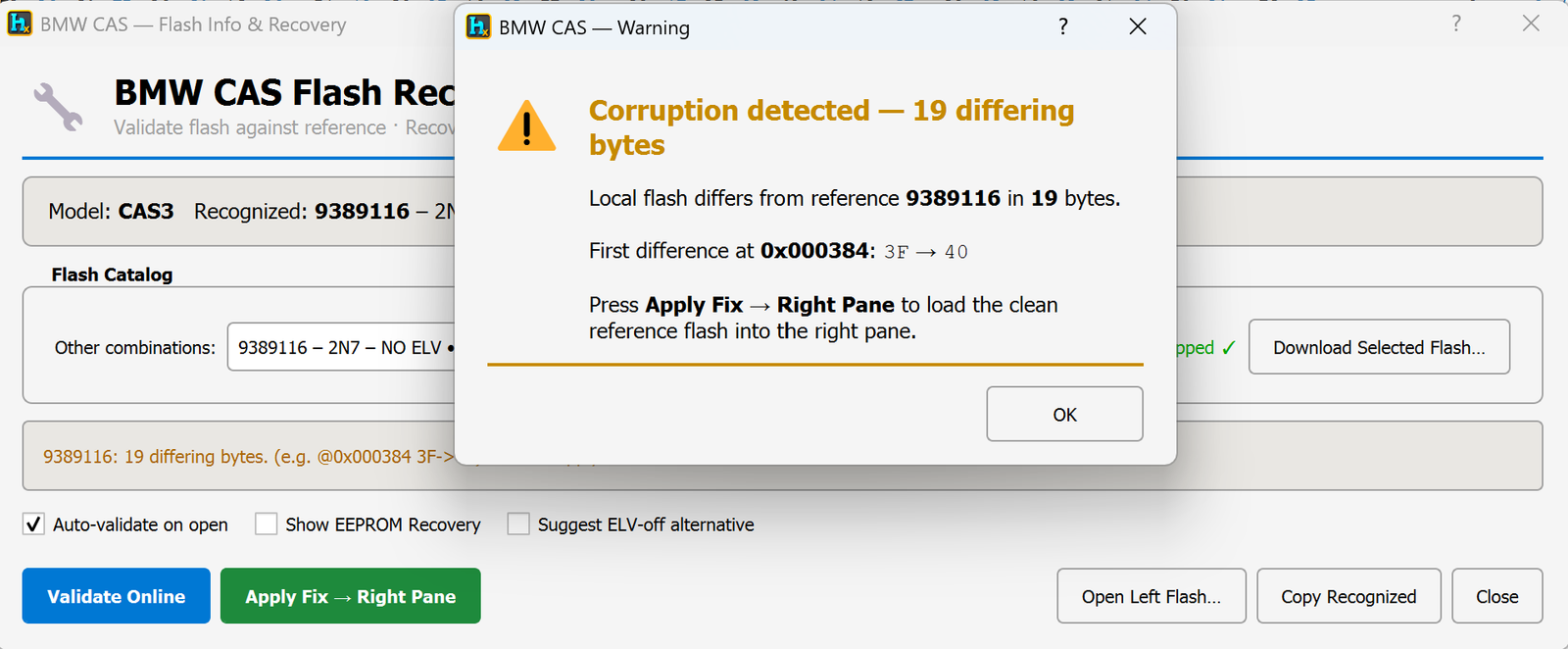
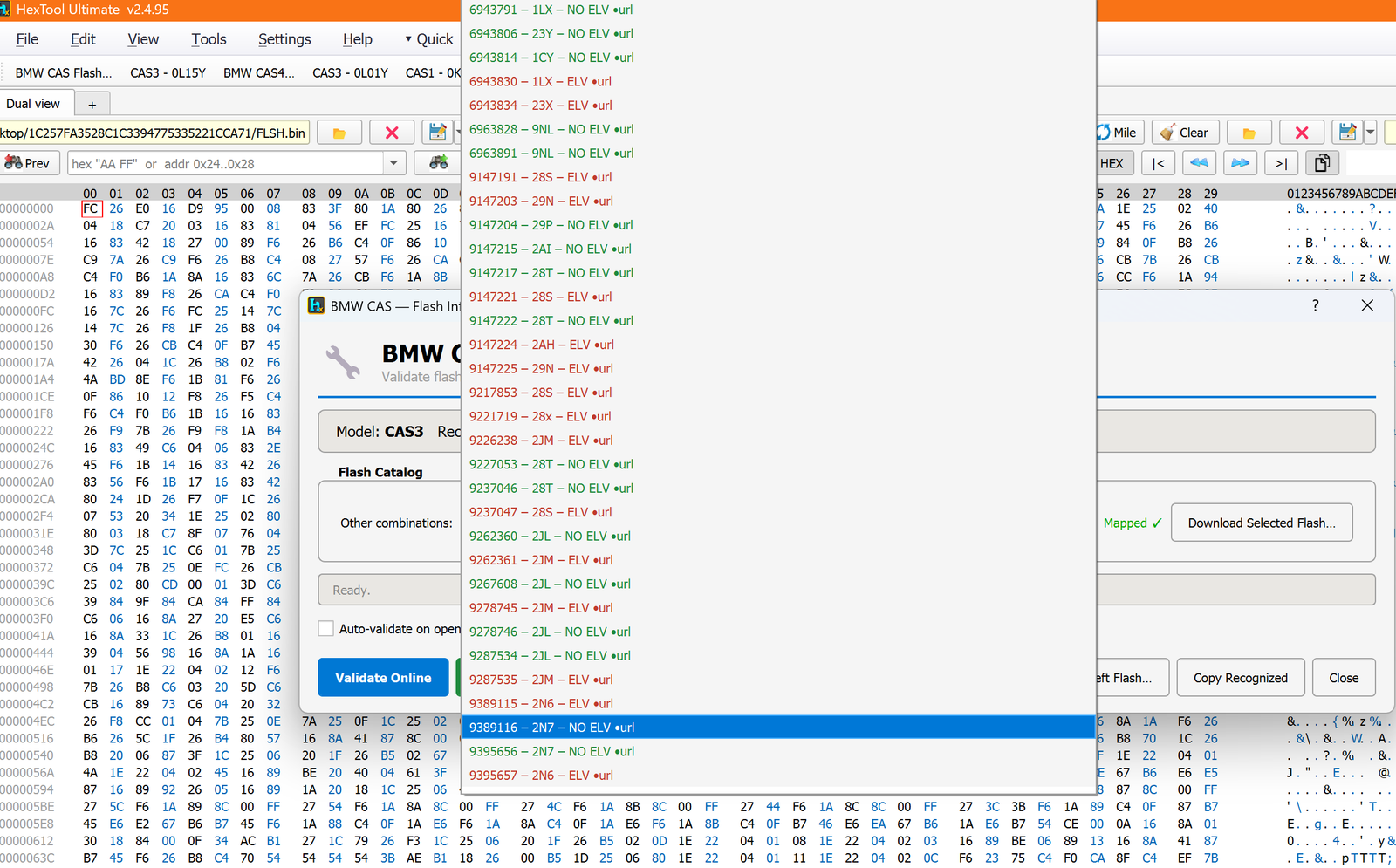
Load a CAS3 flash dump (512 KB) — the tool auto-recognises the model, the flash number, its variant, and whether it's an ELV or NO-ELV flash (e.g. "CAS3 · 9389116 – 2N7 – NO ELV").
Quick online validation — compares your loaded flash byte-for-byte against the correct reference flash for that number and tells you exactly how many bytes differ and where the first difference is (e.g. "19 differing bytes, first difference at 0x000384"). (Requires an internet connection.)
Auto-fix on corruption — if corruption is found, one click (Apply Fix → Right Pane) loads the clean reference flash into the right pane, ready to save and write back to the car.
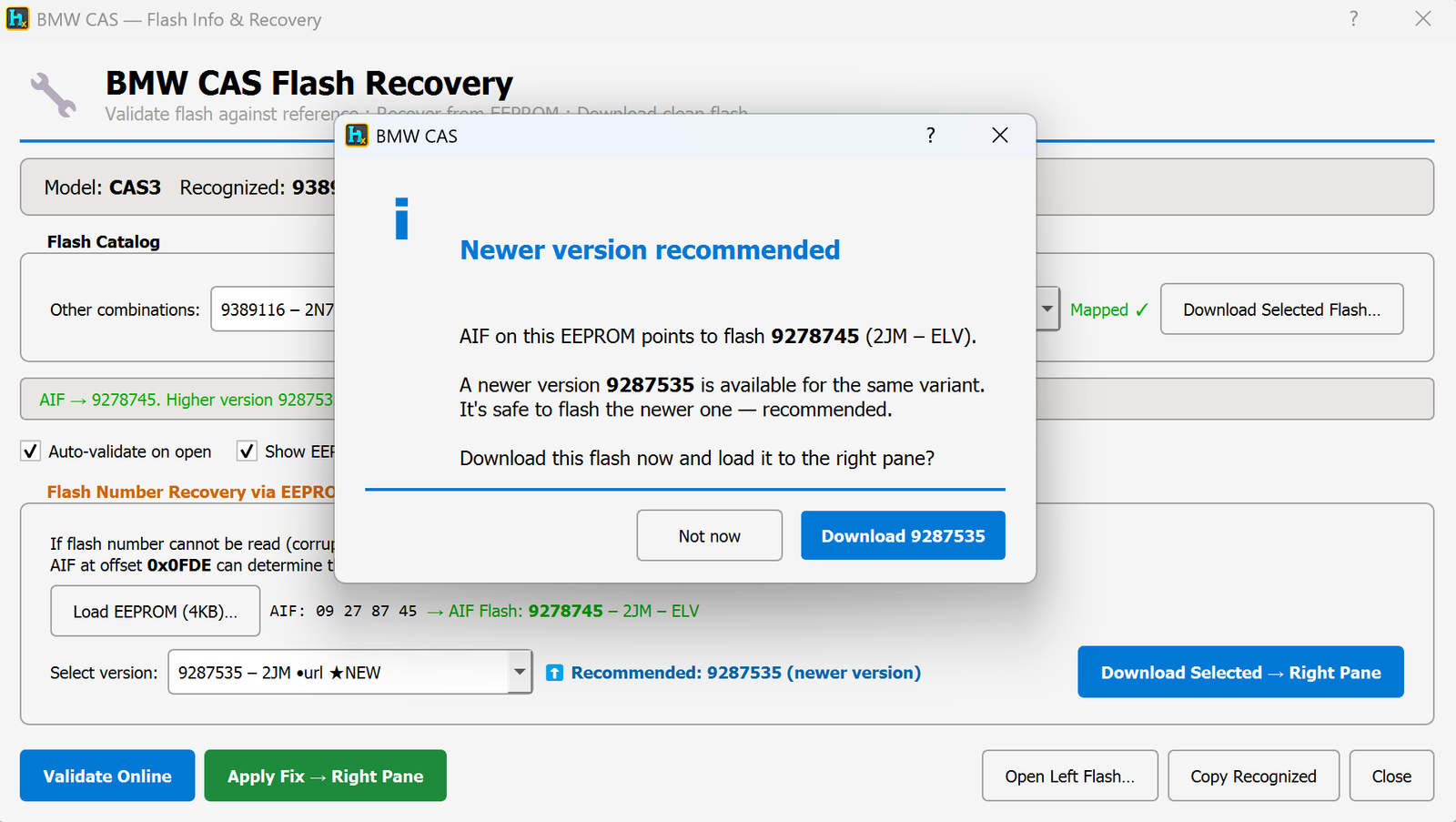
Recognises when a newer flash version is available — if your flash number maps to an older revision, the tool tells you a newer version exists for the same variant and that it's safe to use instead.
Auto-download suggestion — offers to download the recommended (or any selected) flash straight into the right pane, no need to search for it yourself.
Recover the flash number from the EEPROM when it's completely missing — if the flash's own number can't be read (badly corrupted), load the car's 4 KB EEPROM dump instead: the AIF value stored in it is used to work out which exact flash the car needs.
Suggest a NO-ELV alternative — optionally suggests swapping to a NO-ELV flash variant, letting the module be flashed/used without needing the original ELV unit present.
Full flash catalog browser — a dropdown of essentially every known CAS3 flash combination (model, variant letter, ELV/NO-ELV, with a direct download link for each), so you can pick a specific one manually instead of relying on auto-detection.
Typical use cases
Checking a freshly read-out CAS3 flash is genuine and undamaged before doing any other work on the car.
Fixing a corrupted flash automatically instead of hunting for the correct reference file yourself.
Recovering a car where the flash chip is too damaged to identify itself, using only the EEPROM dump.
Switching a car to a NO-ELV flash so it no longer depends on a working ELV unit.
Requirements
A CAS3 flash dump (512 KB), or a CAS3 EEPROM dump (4 KB) for flash-number recovery.
Internet connection — required for online validation and any download/auto-fix action.
BMW Tools / BMW EWS Editor
BMW EWS Editor
Available in ProFullUltimate
What is EWS?
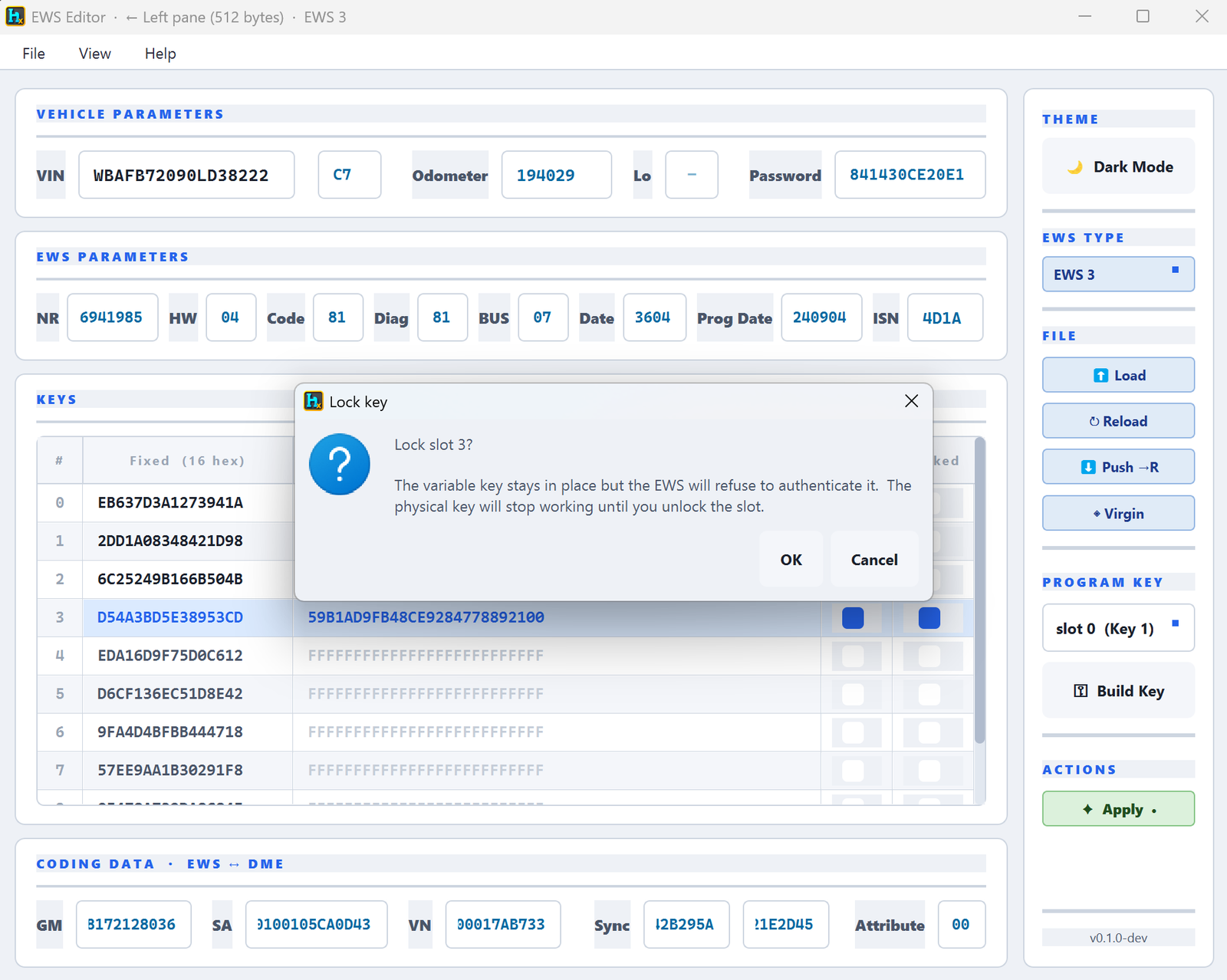
EWS is BMW's older immobilizer module, fitted before CAS came along (E30, E36, E39, E46, E60, E90 and others depending on version). It stores the car's VIN, mileage, a password, and up to 10 key slots. HexTool reads the module dump and gives you one screen to view, fix, and reprogram it.
Supported EWS versions
EWS 3, EWS 4, EWS 4.1, EWS 4.3, and EWS 4.4 — selectable from the EWS TYPE dropdown, since each version stores its data at different offsets.
How to open it
From the main HexTool window: Tools → BMW Tools → BMW EWS
What you can do with it
Vehicle & module parameters
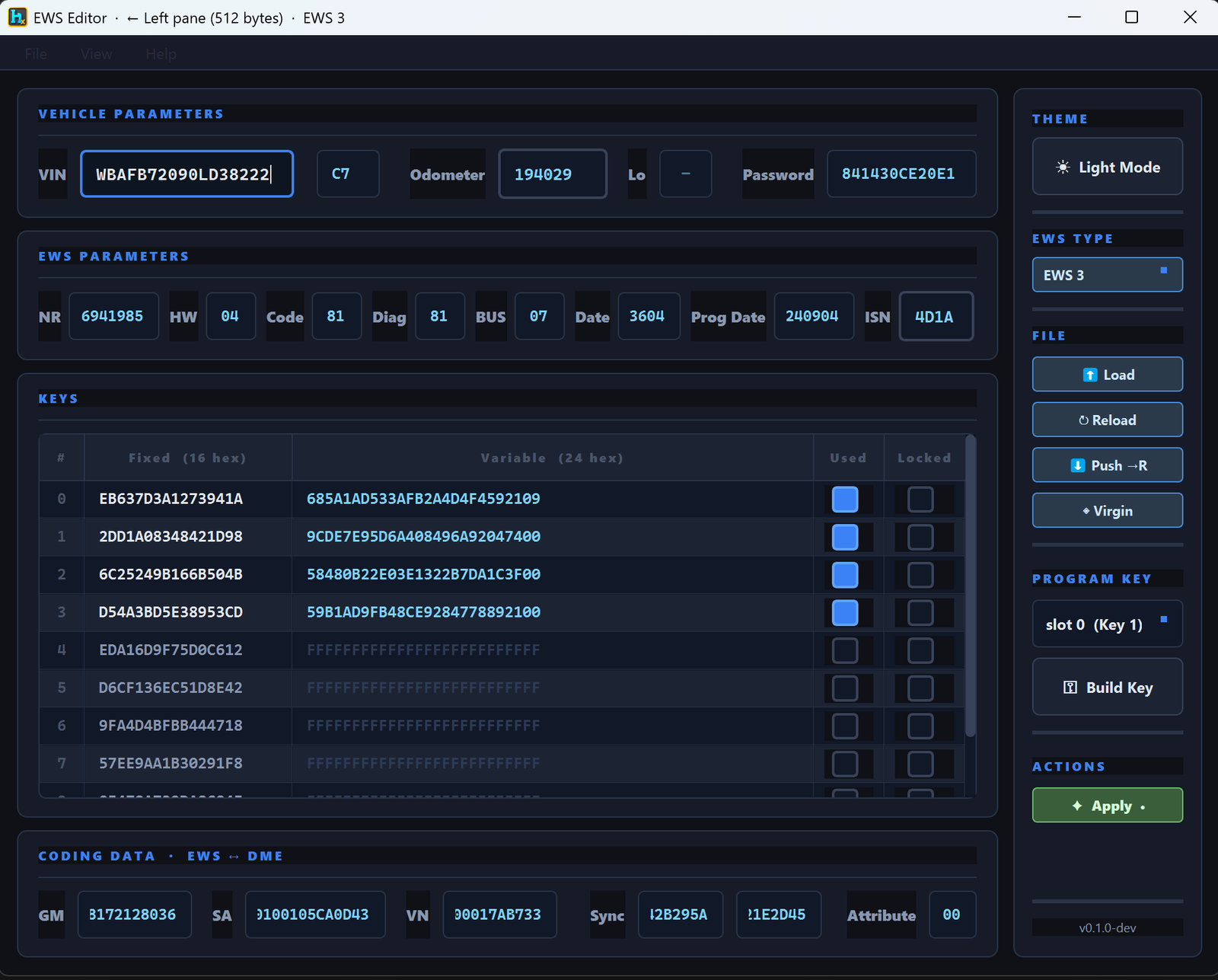
View and edit the VIN, odometer/mileage, and the module's write password.
View EWS parameters — module number, hardware version, code, diag index, bus, production date, programming date, and the ISN.
View coding data (EWS ↔ DME) — GM, SA, VN, Sync and Attribute fields that link the EWS to the engine ECU (DME); needed when the two must be kept in sync (e.g. after replacing one of them).
Keys (up to 10 slots)
View every key slot — Fixed (16 hex) and Variable (24 hex) parts, plus whether the slot is Used and/or Locked.
Lock / unlock a key slot — locking leaves the key's data in place but tells the EWS to refuse authenticating it, so the physical key stops working until you unlock the slot again (no need to erase the slot to disable a key).
Program a new dealer key (EWS3) — Build Key takes an existing key slot's Fixed data straight from the loaded module and produces the plain PCF7935/PCF7931 transponder image needed to make a working dealer key; no calculation or hardware crypto involved, the car adopts the key itself on first crank.
Reset / transfer actions
Virgin — reset an EWS3 module back to a blank/virgin state (e.g. when preparing a used module for a different car).
Push → R — push the current (edited) data into the right-hand pane so it can be saved or written back to the module.
Load / Save BIN — load a module dump from file or save your edits back to a .bin file.
Light/Dark Mode — cosmetic theme toggle for the editor window.
Typical use cases
Fixing mileage or VIN after an EWS module swap.
Temporarily disabling a lost/stolen key without wiping its slot, by locking it instead.
Producing a working spare dealer key for EWS3 cars directly from module data, without extra hardware.
Resetting a used EWS3 module to virgin state before fitting it to a different car.
Requirements
An EWS module dump (.bin) — 512 bytes for EWS3, larger for EWS4 variants.
No special reader hardware is required for the operations above — key building for EWS3 only needs the module's own data.
🛠️
Coming soon
This guide is being written and will be published here soon. Check back shortly — documentation is added regularly.